

Weekly Spend
Andrew Ovens Finance iPhoneiPadiPod touch
Weekly Spend is a free Finance app for iPhone and iPad by Andrew Ovens. Requires iOS 17.0. Updated October 13, 2026.
- Price
- Free
- on the App Store
- Size
- 2 MB
- Age 4+
- Updated
- Oct 13
- 2026 · v1.3
Screenshots


About Weekly Spend
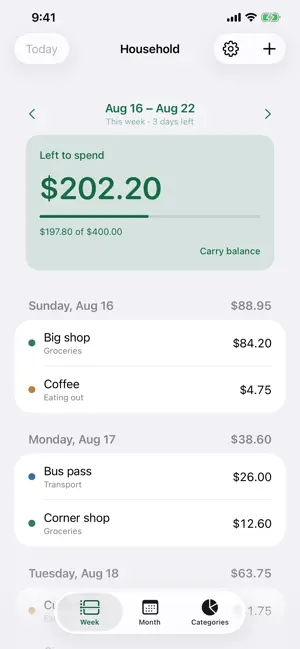
Weekly Spend answers one question: how much is left to spend this week? Work out what you have after the bills that never change — rent, insurance, subscriptions — split it across the weeks in the month, and that is your weekly target. Add expenses as you go and watch the number come down. That is the whole idea. Not sure what that target should be? The app works it out with you: answer as many of the prompts as you know — pay, rent, insurance, groceries — and it does the arithmetic. WHAT IT DELIBERATELY DOES NOT DO There is nowhere to enter your salary, your rent, or any other recurring amount. Those numbers are already decided, and putting them in an app does not change them. Leaving them out is what keeps this on the one figure that actually moves day to day. If money arrives mid-week — a refund, a gift, cash back — add it as an expense with a minus sign. No budgets to rebalance every month. No charts to interpret. No lectures. SHARED, PROPERLY One budget can live on as many devices as you like. Copy the budget ID, enter it on your partner's phone, and you both see the same running total within seconds — add a coffee on the way home and it is there before you are. The same budget opens on other phones and at budget.andrewovens.com, so a household running a mix of phones is not a problem, and neither is checking it from a laptop. WORKS WITHOUT A SIGNAL Everything lives on the device and syncs when it can. Add an expense in a basement car park and it is saved; it reaches the other devices when you surface. Nothing is lost waiting for a connection. WHAT YOU GET • One clear number: what is left this week • Expenses grouped by day, with a running total for each • Categories, and a breakdown by week or month • A month view showing every week against your target • Carry an unspent balance forward into next week • Copy a repeating expense to next week in one tap NO ACCOUNTS, NO ADVERTISING, NO TRACKING There is nothing to sign up for and no password to forget. No advertising, no analytics SDKs, no third-party services of any kind. There is no name, email address or phone number collected, because there is nowhere to enter one — a budget is identified by a random ID that only you and the people you share it with have. Built and run by one person, not a company with an exit strategy.
What’s new
Version 1.3 · Updated October 13, 2026
Added a setting to allow automatically carrying balances forward
App privacy
The developer, Andrew Ovens, reported these privacy practices to Apple.
Data Not Linked to You
The following data, which may be collected but is not linked to your identity, may be used for the following purposes:
- Usage Data: Product Interaction, Other Usage Data
- Diagnostics: Crash Data, Performance Data, Other Diagnostic Data
Used for: Analytics, App Functionality
Alternatives to Weekly Spend
Looking for apps like Weekly Spend? Here are 6 similar apps on the App Store. The highest rated is Spendable Today: Daily Budget (5.0/5), and all 6 are free to download.
-
 Envelope Budget by DOTNULL
-
 CüzdanKontrol: Harcama Takibi
-
 Finance Manager: Budgetology
-
 MSI Fibra - Coité
-
 Expense tracker, Money tracker
-
 Spendable Today: Daily Budget
5.0
Spendable Today: Daily Budget
5.0
| App | Rating | Price | Last updated | Compare |
|---|---|---|---|---|
| Weekly Spend | – | Free | October 13, 2026 | |
| Envelope Budget by DOTNULL | – | Free | Oct 8, 2026 | Compare |
| CüzdanKontrol: Harcama Takibi | – | Free | May 29, 2026 | Compare |
| Finance Manager: Budgetology | – | Free | Jul 24, 2025 | Compare |
| MSI Fibra - Coité | – | Free | Aug 6, 2025 | Compare |
| Expense tracker, Money tracker | – | Free | Feb 13, 2024 | Compare |
| Spendable Today: Daily Budget | 5.0 / 5 (1) | Free | Oct 7, 2026 | Compare |
Compare Weekly Spend with the top alternatives: ratings, updates, ASO score and keyword gaps →