

VanDraw
VanDraw Education iPhoneiPadiPod touch
VanDraw is a free Education app for iPhone and iPad by VanDraw. Rated 4.8/5 from 179 ratings. Requires iOS 16.4. Updated October 5, 2026.
- Rating
- 4.8
- 179 ratings
- Price
- Free
- on the App Store
- Size
- 110 MB
- Age 12+
- Updated
- Oct 5
- 2026 · v1.0.5
Screenshots


About VanDraw
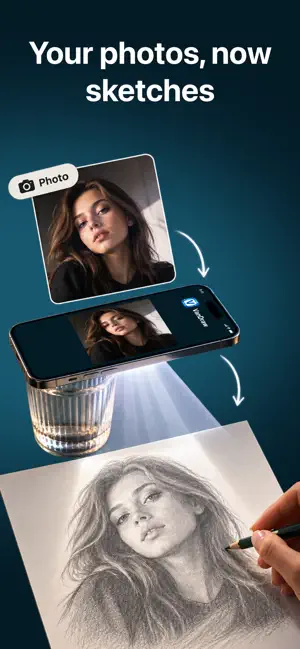
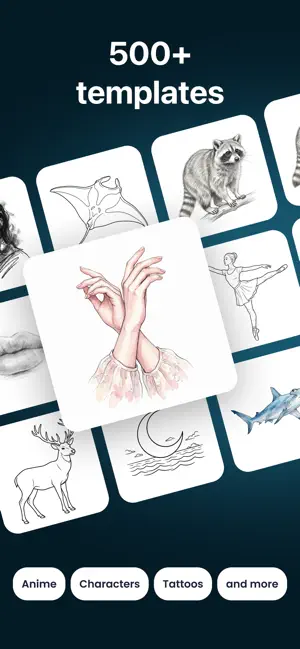
Ever wished you could draw like your favorite artists? With VanDraw, you can — no talent required. Pick a picture, point your phone at a sheet of paper, and the outline appears right on the page. Follow the lines with your pencil. A few minutes later you're holding a real drawing, made by your own hand. HOW IT WORKS 1. Choose a picture from the library — or use your own photo. 2. Point your camera at a blank sheet of paper. 3. VanDraw shows the picture on top of your sheet as a clean outline. Trace what you see, at your own pace. WHAT'S INSIDE • Guided lessons. The next stroke lights up on your sheet and a voice explains it. Steps go in order, and your progress is saved along the way. • A library of hundreds of pictures, sorted by category: anime, animals, places and nature, minimalist line art, characters and cartoons. • Your own photos. Any photo becomes an outline you can project onto paper and trace. • Camera tools that keep the picture steady: image lock, zoom, flashlight, autofocus and opacity control. WHO IT'S FOR • Adults who say "I can't draw." You don't need talent to start — the app leads, you follow, and the result is one you'll want to show someone. • Anime and manga fans who want their favorite characters to come out looking like their favorite characters. The lines are right there on your sheet, so the proportions hold. • Kids and parents. Here the screen is a tool, not the entertainment. The child draws with their own hand, and what remains is a real drawing on real paper. WHY IT WORKS Tracing is how artists have learned for centuries. When your hand repeats a line, it remembers the movement, and each drawing makes the next one easier. Nothing here stays behind glass: every picture you finish lives in your sketchbook, not in a file. Put a sheet of paper on the table, open VanDraw and see what you can draw today. Terms of Use: https://vandraw.com/terms/ Privacy Policy: https://vandraw.com/privacy/
Ratings & reviews
4.8
179 ratings
What’s new
Version 1.0.5 · Updated October 5, 2026
A new Lessons tab takes you from simple shapes to detailed drawings — finish one lesson to unlock the next. Voice guidance, zoom into every detail, and a personal drawing plan built around your level and goal.
App privacy
The developer, VanDraw, reported these privacy practices to Apple.
Data Linked to You
The following data, which may be collected and linked to your identity, may be used for the following purposes:
- Purchases: Purchase History
- Identifiers: Device ID
Used for: Analytics, App Functionality
Data Not Linked to You
The following data, which may be collected but is not linked to your identity, may be used for the following purposes:
- Location: Coarse Location
- Usage Data: Product Interaction
Used for: Analytics, App Functionality
Alternatives to VanDraw
Looking for apps like VanDraw? Here are 6 similar apps on the App Store. The highest rated is Retrace: Learn How to Draw (5.0/5), and all 6 are free to download.
-
 How to Draw Anime: AR Draw
4.3
-
 AR Sketch Camera – Drawing
4.4
-
 Retrace: Learn How to Draw
5.0
-
 Skribly: How to Draw Together
4.6
-
 Verity Mods & Guide
3.6
-
 Gacha World Club - Mods, Skins
2.9
| App | Rating | Price | Last updated | Compare |
|---|---|---|---|---|
| VanDraw | 4.8 / 5 (179 ratings) | Free | October 5, 2026 | |
| How to Draw Anime: AR Draw | 4.3 / 5 (35) | Free | Jul 29, 2026 | Compare |
| AR Sketch Camera – Drawing | 4.4 / 5 (38) | Free | Sep 14, 2026 | Compare |
| Retrace: Learn How to Draw | 5.0 / 5 (1) | Free | Aug 18, 2026 | Compare |
| Skribly: How to Draw Together | 4.6 / 5 (513) | Free | Oct 7, 2026 | Compare |
| Verity Mods & Guide | 3.6 / 5 (244) | Free | Jul 15, 2026 | Compare |
| Gacha World Club - Mods, Skins | 2.9 / 5 (128) | Free | Dec 30, 2025 | Compare |
Compare VanDraw with the top alternatives: ratings, updates, ASO score and keyword gaps →