

AI Cleanup – Photo Cleaner
LUMI LOVE LLC Utilities iPhoneiPadiPod touch
AI Cleanup – Photo Cleaner is a free Utilities app for iPhone and iPad by LUMI LOVE LLC. Requires iOS 17.0. Updated October 20, 2026.
- Price
- Free
- on the App Store
- Size
- 14 MB
- Age 4+
- Updated
- Oct 20
- 2026 · v1.2
Screenshots


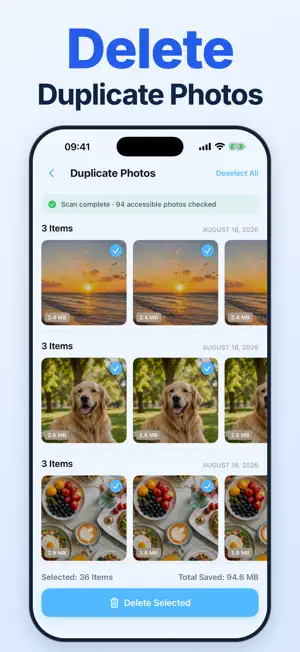

About AI Cleanup – Photo Cleaner
Make room for what matters with AI Cleanup. Find duplicate and similar photos, review blurry shots and screenshots, compress large videos, and organize contacts. REVIEW BEFORE YOU CLEAN Scan photos for free and choose exactly what to remove. The first-scan overview shows real category counts and estimated file sizes. Nothing is deleted automatically. Deleted photos go to Recently Deleted in Photos. SMALLER VIDEOS Choose low, balanced or high quality. Save a compressed copy and keep the original by default, or replace it after the new video is verified. Savings depend on the source video and selected quality. Your first video compression and save is free. ORGANIZED CONTACTS Find possible duplicates and incomplete contacts. Review which contact to keep before merging, or export a vCard backup. Contact deletion cannot be undone. ON-DEVICE ANALYSIS Photo, video and contact analysis happens on your device. AI Cleanup does not upload this content to our servers. The app includes optional rewarded ads and usage statistics; statistics can be turned off in Settings. See our Privacy Policy for details. CHOOSE HOW TO CLEAN Watch an optional ad for a cleanup action, or subscribe to Pro for unlimited, ad-free use. Photo ad rewards cover up to 500 MB per cleanup. A weekly auto-renewing plan is available. Prices, billing periods and any eligible trial are shown before purchase. If you start a free trial, you can choose an end-of-trial reminder; notification permission is optional. Payment is charged to your Apple Account when the purchase is confirmed. Subscriptions renew automatically unless canceled at least 24 hours before the current period or free trial ends. Manage or cancel your subscription in your Apple Account subscription settings. Privacy Policy: https://clean.appshots.app/privacy.html Terms of Use: https://clean.appshots.app/terms.html
What’s new
Version 1.2 · Updated October 20, 2026
• More languages throughout the app. • A weekly Pro plan with clearer purchase details. • Optional reminder before an eligible free trial ends. • A first-scan overview with real photo counts and estimated file sizes. • Layout and usability improvements.
App privacy
The developer, LUMI LOVE LLC, reported these privacy practices to Apple.
Data Linked to You
The following data, which may be collected and linked to your identity, may be used for the following purposes:
- Location: Coarse Location
- Identifiers: Device ID
- Usage Data: Product Interaction, Advertising Data
- Diagnostics: Performance Data
- Purchases: Purchase History
Used for: Third-Party Advertising, Analytics
Data Not Linked to You
The following data, which may be collected but is not linked to your identity, may be used for the following purposes:
- Diagnostics: Crash Data
Used for: Analytics
Alternatives to AI Cleanup – Photo Cleaner
Looking for apps like AI Cleanup – Photo Cleaner? Here are 6 similar apps on the App Store. The highest rated is Duplicate Cleaner: Photo Video (5.0/5), and all 6 are free to download.
-
 Duplicate Cleaner: Photo Video
5.0
Duplicate Cleaner: Photo Video
5.0
-
 Duplicate Photo & Video Finder
3.4
Duplicate Photo & Video Finder
3.4
-
 Declutter: Photo Cleaner
5.0
Declutter: Photo Cleaner
5.0
-
 SERecorder
5.0
SERecorder
5.0
-
 Ad Earnings for Adsense
2.3
Ad Earnings for Adsense
2.3
-
 PIN AI
5.0
PIN AI
5.0
| App | Rating | Price | Last updated | Compare |
|---|---|---|---|---|
| AI Cleanup – Photo Cleaner | – | Free | October 20, 2026 | |
| Duplicate Cleaner: Photo Video | 5.0 / 5 (1) | Free | Oct 16, 2026 | Compare |
| Duplicate Photo & Video Finder | 3.4 / 5 (5) | Free | Oct 2, 2026 | Compare |
| Declutter: Photo Cleaner | 5.0 / 5 (2) | Free | Jul 15, 2026 | Compare |
| SERecorder | 5.0 / 5 (2) | Free | Jan 19, 2026 | Compare |
| Ad Earnings for Adsense | 2.3 / 5 (3) | Free | Mar 27, 2025 | Compare |
| PIN AI | 5.0 / 5 (8) | Free | Mar 3, 2026 | Compare |