

Mai Drum Studio
Chungseok Kim Music iPhoneiPadiPod touch
Mai Drum Studio is a paid Music app for iPhone and iPad by Chungseok Kim. Requires iOS 16.6. Updated November 17, 2026.
- Price
- 11.99 USD
- on the App Store
- Size
- 13 MB
- Age 4+
- Updated
- Nov 17
- 2026 · v3.1
Screenshots
Save to Pinterest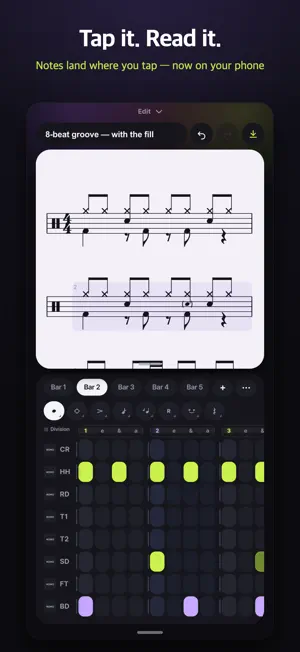


About Mai Drum Studio
Drum notation you write by tapping. Instead of placing notes on a staff one at a time, you tap cells on a grid. The note lands where you tapped, and beams and rests sort themselves out. When it looks right, press play and hear it. WRITING · Tap the grid and the score draws itself, in real time · 4/4 and also 3/4, 5/4, 6/8, 9/8, 12/8, 5/8, 7/8 — you pick the grouping · Eighths, sixteenths, thirty-seconds and triplets, set per beat · Ghost notes, accents, open hi-hat, flams, drags · R and L sticking, above or below the notes · Repeats, segno, coda, 1st/2nd endings — playback follows all of them · Lyrics and cues under any bar · Crash, hi-hat, ride, toms, snare, floor tom, kick — show only what you play LISTENING · Dynamics are audible: ghosts sit back, accents open up · The metronome can count out loud, or click · Double-tap a bar to hear just that bar PRACTICE · Loop — pick the bars that beat you and run them · Speed trainer — the tempo steps up every few passes, on its own · Today's numbers — practice time, note count and average BPM add up as you play · Practice log — how long, how many days running · Practice card — today's session as one image, ready to share APPLE PENCIL · Write straight onto the score. Mark what your teacher just said · Set it to pencil-only and your hand can rest on the screen EXPORT · PDF — A4, four bars a line. Print it or keep it in Files · PNG — one image of the score · Song files — kept on the device, reopened later WORKS WITH NO INTERNET Practice rooms and planes do not have Wi-Fi. This app sends nothing to a server and does everything on the device. There is no account to make. KOREAN AND ENGLISH The interface is in both. It follows your device on first launch and you can switch any time in Settings. Switching changes the interface text only — your scores, song titles and renamed instruments stay as they are. BUY ONCE There is nothing else to pay for. No subscription, no locked features, no ads. Everything above is open from the first launch. --- Made by Maistro maidrum.com
What’s new
Version 3.1 · Updated November 17, 2026
Now on phones - Mai Drum Studio now runs on iPhone too. The app you already bought opens on your iPhone as well - On a phone the Edit tab fits one line of score and all eight drum rows on one screen. The Score tab opens sideways and the Library upright - eDrum screen pads, Transcribe, the metronome and the practice planner all work on the phone. For a USB e-drum kit, turn the phone sideways Send scores - Send a score to a student by QR code, link or file. The student just opens the link or scans the code - Received scores always arrive as new songs, and ones you already have are skipped Setlists - Build setlists in the Library and attach a score, tempo and metronome settings to each song - In the performance view, tap a song to open its score and tempo together. The metronome sits large at the bottom, and a swipe turns to the next page and the next song - When one PDF holds several songs, set a tempo per page, or split the PDF into one file per song Metronome - Press start and the clicks are evenly spaced from the very first beat. On iPhone and iPad the default click plays straight from the device audio - Bar counting can use a high click instead of a voice - Load scores from your Library into a setlist, and rename setlists Reading and practice - The Practice tab shows the score one page at a time, like paper. Swipe or use a page turner, and pages turn on their own as playback moves on - Choose one or two pages in the score view, bookmark PDF pages and reopen where you left off Transcribe - Save YouTube links with your transcriptions and reopen them from the list of transcribed songs - Duplicate, copy and paste bars right in the Transcribe tab Notation - Dotted quarter notes - Noteheads a second apart now sit side by side, and tuplet numbers use the music font. Bar numbers show only at the start of each line by default - Time signatures no longer overlap a start repeat Languages - Traditional and Simplified Chinese Fixes - Screen mirroring from an iPad to a TV now shows the app as it is
App privacy
The developer, Chungseok Kim, reported these privacy practices to Apple.
Data Not Collected
The developer does not collect any data from this app.
Alternatives to Mai Drum Studio
Looking for apps like Mai Drum Studio? Here are 6 similar apps on the App Store. The highest rated is Band Session Note (5.0/5), and 1 of the 6 are free to download.
-
 Ahns Metronome
-
 Band Session Note
5.0
-
 Guitabs
-
 Continuo: Bassline Maker
5.0
-
 Setronome - Live Metronome
-
 Circle of Fifths & Patterns
| App | Rating | Price | Last updated | Compare |
|---|---|---|---|---|
| Mai Drum Studio | – | 11.99 USD | November 17, 2026 | |
| Ahns Metronome | – | Free | Sep 14, 2026 | Compare |
| Band Session Note | 5.0 / 5 (1) | 9.99 USD | Nov 24, 2026 | Compare |
| Guitabs | – | 1.99 USD | Aug 25, 2026 | Compare |
| Continuo: Bassline Maker | 5.0 / 5 (1) | 4.99 USD | Aug 6, 2026 | Compare |
| Setronome - Live Metronome | – | 17.99 USD | Nov 11, 2026 | Compare |
| Circle of Fifths & Patterns | – | 6.99 USD | Nov 26, 2026 | Compare |
Compare Mai Drum Studio with the top alternatives: ratings, updates, ASO score and keyword gaps →