

Scroll Timer: Doomscroll Log
YUSUF OCAL Productivity iPhoneiPadiPod touch
Scroll Timer: Doomscroll Log is a free Productivity app for iPhone and iPad by YUSUF OCAL. Requires iOS 17.0. Updated September 21, 2026.
- Price
- Free
- on the App Store
- Size
- 11 MB
- Age 4+
- Updated
- Sep 21
- 2026 · v1.2
Screenshots


About Scroll Timer: Doomscroll Log
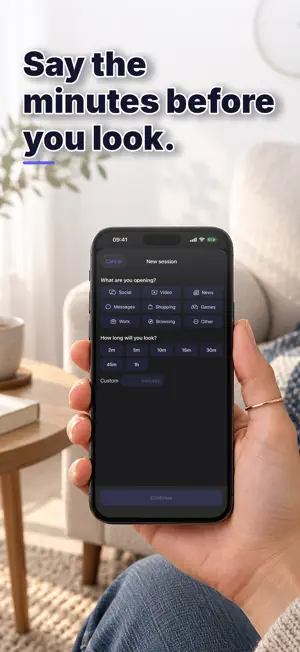
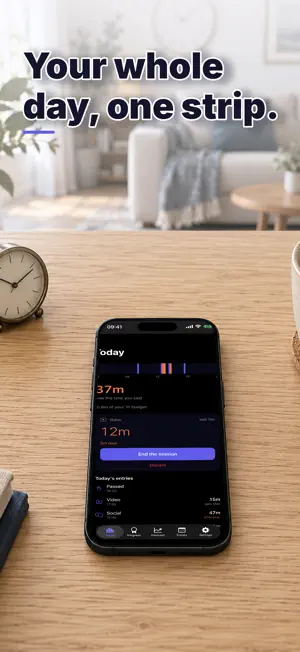
You did not decide to spend forty minutes there. That is the whole problem: the minutes were never said out loud, so nothing ever compared them to anything. Scroll Timer is a ledger for phone sessions. Before you open something, you say what it is and how many minutes you mean to spend. When you stop, it shows the one number it exists for: the gap between what you said and what happened. HOW IT WORKS • Pick a context — social, video, news, shopping, games, messages, work, reading, other. • Say the minutes. A short pause runs first — a few seconds you choose, or none at all. • Stop when you stop. The gap gets written down. • Decided not to open it after all? Log a pass. Not opening is an entry too. THE DAY AS ONE STRIP Your day is drawn as a single 24-hour strip: the minutes you planned in one colour, the part that ran over in another. One look tells you where the day actually went. WHAT IT DOES NOT DO • Blocks nothing. No app is hidden, locked or delayed against your will. • Asks for no permissions. Not Screen Time, not Family Controls, not location. • Reads no system data. It cannot see which apps you open or for how long — every minute in the ledger comes from a session you started yourself. That is the design, not a missing feature. A lock you can uninstall in a weak moment measures nothing. A written record does. WHAT ELSE IS IN IT • Rest of day: where today lands if it carries on like your last two weeks did, with your daily budget drawn as a line. • Trends: day streak, weekly average, monthly total and contexts used, plus a month calendar showing which days stayed inside your budget. • Challenges that refresh every day, week and month. • 80 achievements across bronze, silver and gold, with levels and XP. • A session you forget to stop is closed at the length you planned and marked as an estimate — never a silent six-hour entry. You can correct the end time afterwards. • CSV export of every entry. • Works offline. No account, no sign-up, no analytics; nothing leaves your phone. HONEST ABOUT WHAT IT IS This is a record of what you told it, not a measurement of your phone. It makes no health claims and promises no reduction. It shows the difference between what you said and what happened, in minutes, and leaves the decision to you. PRICING Recording sessions is part of Scroll Timer Pro: • A recurring subscription, with the first period at a reduced price • Or a one-time purchase that never renews Reading your ledger and exporting it stay free. Subscriptions renew automatically unless cancelled at least 24 hours before the period ends. Manage or cancel any time in your Apple Account settings. Terms of Use: https://doesonejob.com/scrollledger/terms/ Privacy Policy: https://doesonejob.com/scrollledger/privacy/ Questions or ideas: [email protected]
What’s new
Version 1.2 · Updated September 21, 2026
General improvements and small fixes.
App privacy
The developer, YUSUF OCAL, reported these privacy practices to Apple.
Data Not Linked to You
The following data, which may be collected but is not linked to your identity, may be used for the following purposes:
- Purchases: Purchase History
Used for: App Functionality
Alternatives to Scroll Timer: Doomscroll Log
Looking for apps like Scroll Timer: Doomscroll Log? Here are 6 similar apps on the App Store. The highest rated is allso (5.0/5), and all 6 are free to download.
-
 FocusFlow Screen Time Control
-
 allso
5.0
allso
5.0
-
 Yohaku: Stop Doomscrolling Now
5.0
Yohaku: Stop Doomscrolling Now
5.0
-
 Yutora: Screen Time Blocker
-
 Multi: Habit Tracker & To Do
-
 StarForge: Screen Time Control
5.0
StarForge: Screen Time Control
5.0
| App | Rating | Price | Last updated | Compare |
|---|---|---|---|---|
| Scroll Timer: Doomscroll Log | – | Free | September 21, 2026 | |
| FocusFlow Screen Time Control | – | Free | Mar 23, 2026 | Compare |
| allso | 5.0 / 5 (2) | Free | Sep 21, 2026 | Compare |
| Yohaku: Stop Doomscrolling Now | 5.0 / 5 (1) | Free | Aug 19, 2026 | Compare |
| Yutora: Screen Time Blocker | – | Free | Sep 20, 2026 | Compare |
| Multi: Habit Tracker & To Do | – | Free | Sep 16, 2026 | Compare |
| StarForge: Screen Time Control | 5.0 / 5 (6) | Free | Sep 14, 2026 | Compare |