

IDHaven: Passport Photo ID
Bravo Consulting Limited Utilities iPhoneiPadiPod touch
IDHaven: Passport Photo ID is a free Utilities app for iPhone and iPad by Bravo Consulting Limited. Requires iOS 17.0. Updated September 2, 2026.
- Price
- Free
- on the App Store
- Size
- 10 MB
- Age 4+
- Updated
- Sep 2
- 2026 · v1.0
Screenshots



About IDHaven: Passport Photo ID
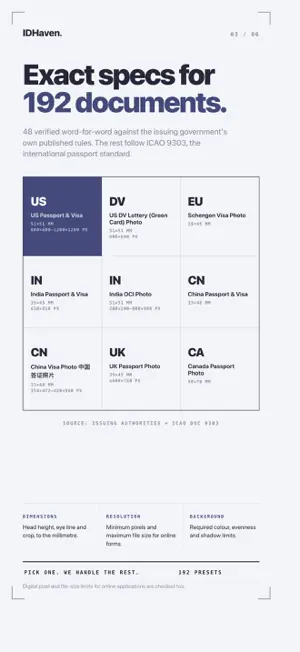
Your face never leaves your phone. IDHaven takes compliant passport, visa, and ID photos entirely on your iPhone. No upload. No account. No subscription. Ever. WHY IDHAVEN • 100% on-device — face detection and measurement run on your iPhone's chip. Airplane Mode works fine. There is no server. • Checked against official rules — head size, eye position, background color and evenness, lighting, expression. Every specification cites the government source. • Compliant by design — no beauty filters, no AI retouching. For documents that ban edited photos (like US passports from 2026), IDHaven keeps your original untouched and checks your real background instead. DOCUMENTS 192 countries and documents — US Passport & Visa (2×2 in) · US DV Lottery (600×600) · Schengen Visa · China Passport & Visa 中国 · UK · Canada · Japan · Australia · India Passport & OCI · Philippines · Mexico · Brazil · Korea · and more, with exact digital pixel and file-size limits for online applications. 48 of them were verified word-for-word against the issuing authority's own published document. The rest follow ICAO Doc 9303, the international passport standard — and the app tells you which of the two it is using, so you know when to double-check with the authority. HOW IT WORKS 1. Pick your document. 2. Take a photo with live guidance — distance, centering, and pose hints before you shoot. 3. Get a verdict in plain language: what passed, what to fix, and why. 4. Export a digital file sized to spec, or a 4×6 print sheet — up to six photos on one $0.35 pharmacy print, or AirPrint at home at exact size. FREE VS PRO Free: run every check, see your full result, export with a watermark after a short ad. Pro (one-time purchase): clean exports, 4×6 print sheets, no ads. No subscription. No account. Restore anytime. THE FINE PRINT Only the issuing authority can accept a photo — no app can guarantee acceptance. IDHaven measures against published official specifications so you submit with confidence. Questions? [email protected] — a human answers.
App privacy
The developer, Bravo Consulting Limited, reported these privacy practices to Apple.
Data Used to Track You
The following data may be used to track you across apps and websites owned by other companies:
- Identifiers: Device ID
Data Linked to You
The following data, which may be collected and linked to your identity, may be used for the following purposes:
- Location: Coarse Location
- Identifiers: Device ID
- Usage Data: Product Interaction, Advertising Data
Used for: Third-Party Advertising, Developer’s Advertising or Marketing, Analytics
Data Not Linked to You
The following data, which may be collected but is not linked to your identity, may be used for the following purposes:
- Diagnostics: Performance Data, Other Diagnostic Data, Crash Data
Used for: Third-Party Advertising, Developer’s Advertising or Marketing, Analytics
Alternatives to IDHaven: Passport Photo ID
Looking for apps like IDHaven: Passport Photo ID? Here are 6 similar apps on the App Store. The highest rated is Passport Photo King - ID Maker (5.0/5), and all 6 are free to download.
-
 Jewelry Identifier: Appraisal+
-
 AI Gallery Cleaner
-
 Touch Speed GPS
-
 Passport Photo King - ID Maker
5.0
-
 Tire Ai Scan 2025 Lite
-
 VCCPARK
5.0
| App | Rating | Price | Last updated | Compare |
|---|---|---|---|---|
| IDHaven: Passport Photo ID | – | Free | September 2, 2026 | |
| Jewelry Identifier: Appraisal+ | – | Free | Sep 25, 2026 | Compare |
| AI Gallery Cleaner | – | Free | Oct 29, 2025 | Compare |
| Touch Speed GPS | – | Free | Feb 9, 2024 | Compare |
| Passport Photo King - ID Maker | 5.0 / 5 (2) | Free | Mar 31, 2026 | Compare |
| Tire Ai Scan 2025 Lite | – | Free | Aug 14, 2025 | Compare |
| VCCPARK | 5.0 / 5 (1) | Free | Oct 25, 2026 | Compare |