

SnipStash: Snippet Manager
Hassan Nawaz Khan Productivity iPhoneiPadiPod touchMac
SnipStash: Snippet Manager is a free Productivity app for iPhone and iPad by Hassan Nawaz Khan. Requires iOS 17.0. Updated October 21, 2026.
- Price
- Free
- on the App Store
- Size
- 10 MB
- Age 4+
- Updated
- Oct 21
- 2026 · v1.2.1
Screenshots


About SnipStash: Snippet Manager
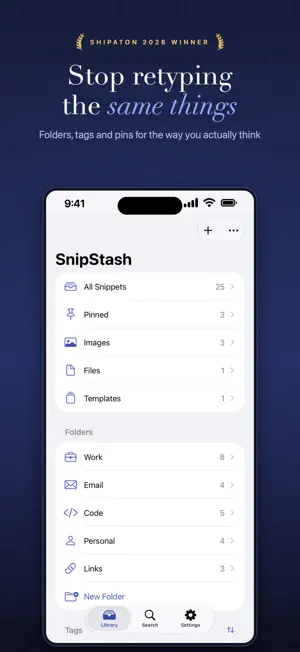
SnipStash is where your reusable text lives. Email replies you send constantly. Code you paste every day. Addresses, invoice details, meeting links, the numbers every form asks for, the tricky spelling of a client's name. Save it once, then put it anywhere in two taps. SAVE ANYTHING, FAST Text, links, images, documents and files. Add a snippet directly in the app, or share it in from any other app with the Share Extension — Safari, Mail, Notes, Files, anywhere the share sheet appears. FIND IT INSTANTLY Full-text search across titles and bodies. Tags and folders for the way you actually think. Colour labels for the things you reach for constantly. Sort by most recent, most used, or pinned — SnipStash quietly learns what you use and floats it to the top. TEMPLATES Text, images and files in one reusable block, in the order you want them. Put {Name} or any {Variable} in it and fill it in as you send. Copy the whole thing into Mail or Notes, or send it a step at a time in a chat app. YOUR AI PROMPTS, READY TO GO Keep the prompts you reuse in one place and paste them into any AI chat app in a tap. Turn a prompt into a template with {Topic} or {Tone} and fill it in as you send. THE KEYBOARD IS THE POINT The SnipStash keyboard puts your snippets inside every app on your phone. Tap the globe key, tap a snippet, and it's typed. No app switching, no copy-paste dance, no losing your place mid-sentence. ONE TAP TO COPY Every snippet copies with a single tap and a satisfying haptic tick. Images, files and links all copy in the right format for the app you paste into. WORKS WITH SHORTCUTS AND SIRI Ask Siri to copy any snippet by name: text, images or files. Or build SnipStash into Shortcuts to add snippets, copy them, or pass their files to the next step. SYNCS PRIVATELY Your library syncs across your iPhone, iPad and Mac through your own private iCloud account. No accounts to create, no servers of ours, nothing for us to read. Your snippets are yours. AND ON THE MAC SnipStash for Mac is a separate app, included. Press Option-Space in any app, type two letters, press Return, and the snippet is on your clipboard. BUILT TO RESPECT YOU No subscription. No ads. No analytics. No tracking. The keyboard has no networking code in it at all and never records what you type — it only reads the snippets you saved. FREE AND PRO Free includes 25 snippets, your first template, two image or file snippets, and the first 5 in the keyboard. SnipStash Pro is a single one-time purchase — not a subscription — and unlocks: • Unlimited snippets • The full snippet list in the keyboard • iCloud sync across your devices • Unlimited image, document and file snippets and templates Buy it once, keep it forever, on every device signed in to your Apple Account. Questions or ideas? Get in touch — this app is young and the roadmap is still being shaped by the people using it.
What’s new
Version 1.2.1 · Updated October 21, 2026
SnipStash won the Productivity award at RevenueCat Shipaton 2026. Thank you to everyone who uses it. This update includes small fixes and a fresh App Store look.
App privacy
The developer, Hassan Nawaz Khan, reported these privacy practices to Apple.
Data Not Linked to You
The following data, which may be collected but is not linked to your identity, may be used for the following purposes:
- Purchases: Purchase History
Used for: Analytics, App Functionality
Alternatives to SnipStash: Snippet Manager
Looking for apps like SnipStash: Snippet Manager? Here are 6 similar apps on the App Store.
-
 Ledge – Clipboard & Snippets
-
 Qiki - Your Essentials.
-
 URLuc PDF Reader
-
 SaveCross: Clipboard Library
-
 Backpocket: Pin and reuse info
-
 Found: Private Library
| App | Rating | Price | Last updated | Compare |
|---|---|---|---|---|
| SnipStash: Snippet Manager | – | Free | October 21, 2026 | |
| Ledge – Clipboard & Snippets | – | Free | Sep 30, 2026 | Compare |
| Qiki - Your Essentials. | – | Free | Oct 10, 2026 | Compare |
| URLuc PDF Reader | – | Free | Sep 16, 2026 | Compare |
| SaveCross: Clipboard Library | – | Free | Sep 21, 2026 | Compare |
| Backpocket: Pin and reuse info | – | Free | Oct 20, 2026 | Compare |
| Found: Private Library | – | Free | Sep 29, 2026 | Compare |