

Dipper: GPS Area Measure
Insight Spatial LLC Utilities iPhoneiPadiPod touch
Dipper: GPS Area Measure is a free Utilities app for iPhone and iPad by Insight Spatial LLC. Requires iOS 17.0. Updated October 6, 2026.
- Price
- Free
- on the App Store
- Size
- 27 MB
- Age 4+
- Updated
- Oct 6
- 2026 · v1.1
Screenshots



About Dipper: GPS Area Measure
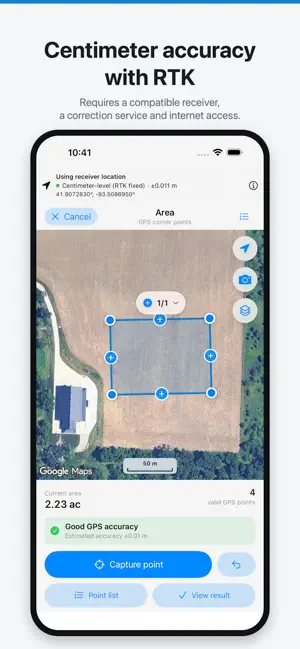
Measure land area, distance, and perimeter on iPhone and iPad — tap the corners on satellite imagery, walk the boundary with GPS, or connect an RTK GNSS receiver for centimeter-level accuracy. Built for farmers, landscapers, roofers, fence and paving contractors, real estate agents, surveyors and their field crews, and anyone who needs a number for a piece of ground they can trust. CENTIMETER ACCURACY WITH AN RTK RECEIVER Phone GPS is good to a few meters. When that is not enough, connect an external GNSS receiver and measure with RTK corrections: • Connects over Bluetooth LE or Wi-Fi (TCP) to receivers that output standard NMEA (GGA, RMC, GSA, GSV, GST and more) • Built-in NTRIP client: add your RTK network, CORS, or base station account, and the app picks the nearest base station for you • Fix status in plain words, from meter-level to centimeter-level (RTK fixed), with the receiver's accuracy estimate on every point • Technical details: sky plot, satellites in use, signal strength, PDOP, and the receiver's error estimates • Each measurement keeps to one correction source, so points from different services are never mixed • Heights are recorded with every point and kept in DXF exports Accuracy depends on your receiver, your correction service, and how much open sky you have. FIVE WAYS TO MEASURE • Map tap — tap each corner on satellite imagery. Fastest when you can see the boundary. • Crosshair — pan the map under a fixed reticle and drop points exactly where you want them. • GPS walk — walk the boundary while smart filtering keeps only usable fixes. • GPS corner — stand at each corner and capture a point. The most accurate way, especially with an RTK receiver. • Route — walk, ride, or drive while the app records the distance you travel. KNOW YOUR MARGIN OF ERROR Most measuring apps give you a number and no idea how much to trust it. This one shows the accuracy behind every measurement, filters out bad fixes and unrealistic jumps, and tells you plainly when conditions are poor. Three quality thresholds let you decide how strict to be. SHAPES AND CORRECTIONS • Areas, distances, and circles from a center and radius point • Rectangles and corridors from their construction parameters • Subtract ponds, buildings, and any other region you need excluded from the net area • Add multiple counted areas and get the combined total • Drag, insert, and delete vertices with full undo and redo • Warnings for duplicate points, collinear points, and self-intersecting outlines PROFESSIONAL REPORTS Generate a PDF report with a map of the measurement, all values, per-segment distances and bearings, the accuracy basis, the address, and your field photos with captions. Photos taken in the app are stamped with position and direction — from the receiver when one is connected — so each one is placed on the map and shows which way it faces. EXPORT • Export PDF, DXF, KML, GeoJSON, and GPX — opens in CAD software, QGIS, ArcGIS, Google Earth, and most GIS tools • Copy the coordinate list as text ORGANIZE YOUR WORK Group measurements into collections, tag and favorite them, search across names, notes, and addresses, and filter by type. Deleted measurements go to Recently Deleted and stay recoverable for 30 days. APPLE MAPS OR GOOGLE MAPS Switch basemaps at any time, in standard, satellite, or hybrid style, with place search and current location. PRIVATE BY DESIGN No account. No sign-up. No ads. No tracking. Your measurements, photos, and notes stay on your device — nothing is uploaded, and exports happen only when you choose to share. Your NTRIP login goes only to the correction service you enter. BUILT FOR IPAD The same tools on the big screen, in portrait or landscape. ACCURACY AND RESPONSIBLE USE The app measures with GPS, GNSS receivers, and map imagery. Even with RTK, it is a measuring and estimating tool, not a legal survey. Do not use it to establish property lines, settle boundary disputes, or replace a licensed surveyor.
What’s new
Version 1.1 · Updated October 6, 2026
FieldOne is now Dipper: GPS Area Measure. New in 1.1: • Centimeter-level accuracy with an external RTK receiver, connected over Bluetooth LE or Wi-Fi (TCP) • Built-in NTRIP client that picks the nearest base station for you, with saved accounts • Clear fix status in plain words, plus a technical details page with a sky plot and signal strength for every satellite • DXF export, with the height of every point • Field photos take their position from the receiver when one is connected • A redesigned iPad editor bar for portrait and landscape • Many smaller fixes and improvements
App privacy
The developer, Insight Spatial LLC, reported these privacy practices to Apple.
Data Linked to You
The following data, which may be collected and linked to your identity, may be used for the following purposes:
- Identifiers: Device ID
- Other Data: Other Data Types
Used for: Analytics, App Functionality
Data Not Linked to You
The following data, which may be collected but is not linked to your identity, may be used for the following purposes:
- Usage Data: Product Interaction
- Diagnostics: Crash Data, Performance Data
Used for: Analytics
Alternatives to Dipper: GPS Area Measure
Looking for apps like Dipper: GPS Area Measure? Here are 6 similar apps on the App Store. The highest rated is Field Maps with Area Measure (5.0/5), and all 6 are free to download.
-
 Field Maps with Area Measure
5.0
Field Maps with Area Measure
5.0
-
 Area Measure
-
 FieldMeter: Land Area Measure
-
 Acrely: GPS Field Area Measure
5.0
Acrely: GPS Field Area Measure
5.0
-
 GPS Field & Land Area Measure
-
 LandMetrix: GPS Land Measure
| App | Rating | Price | Last updated | Compare |
|---|---|---|---|---|
| Dipper: GPS Area Measure | – | Free | October 6, 2026 | |
| Field Maps with Area Measure | 5.0 / 5 (1) | Free | Sep 24, 2026 | Compare |
| Area Measure | – | Free | Apr 28, 2026 | Compare |
| FieldMeter: Land Area Measure | – | Free | Oct 23, 2026 | Compare |
| Acrely: GPS Field Area Measure | 5.0 / 5 (2) | Free | Oct 22, 2026 | Compare |
| GPS Field & Land Area Measure | – | Free | Oct 13, 2026 | Compare |
| LandMetrix: GPS Land Measure | – | Free | Sep 19, 2026 | Compare |