

Termalin: SSH & SFTP Client
Sviatoslav Pavlov Developer Tools iPhoneiPadiPod touchApple Watch
Termalin: SSH & SFTP Client is a free Developer Tools app for iPhone and iPad by Sviatoslav Pavlov. Requires iOS 15.0. Updated October 29, 2026.
- Price
- Free
- on the App Store
- Size
- 130 MB
- Age 4+
- Updated
- Oct 29
- 2026 · v0.1.50
Screenshots

About Termalin: SSH & SFTP Client
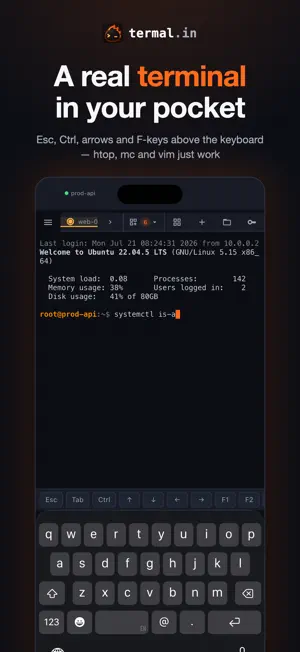
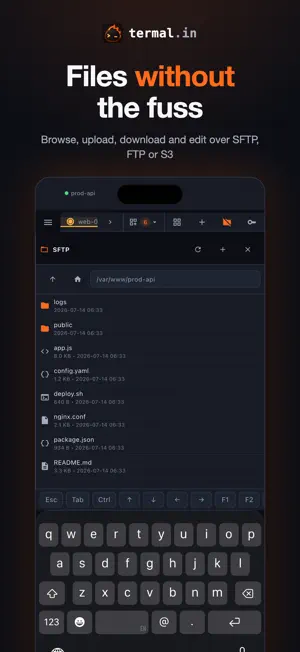
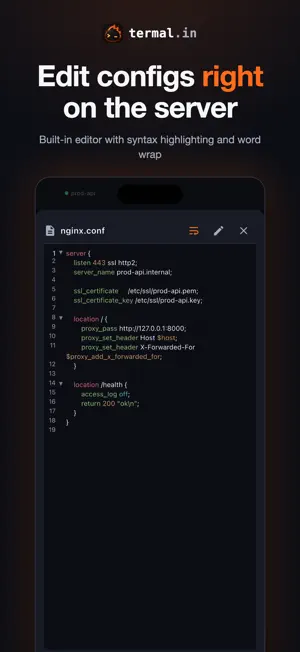
Termalin is a fast, no-nonsense SSH client built for people who live in the terminal — and for working on servers from a phone, including with AI coding agents like Claude Code. A TERMINAL THAT WORKS FROM A PHONE • Real SSH terminal (xterm-256color) with tabs • Key row above the keyboard: Esc, Tab, Ctrl, Alt, Enter, Shift+Tab, arrows, Backspace, Delete, F1–F12, paste — keys repeat when held, Ctrl and Alt lock with a second tap • Message box: write a command or a message to Claude Code like a chat message — dictation, autocorrect, cursor — and send it with Enter in one tap • Slide on the space bar to move the cursor, pinch to change the font size, swipe between sessions • Live server stats while you're connected: CPU, memory, disk, load, network — right above the terminal • Watch grid: keep several servers on screen at once, and send a command to all of them • Snippets with variables, command history and inline suggestions • Remote desktops over RDP and VNC, made for touch AI ASSISTANT, ON YOUR TERMS • Ask for a command in plain words — it is typed at the cursor, never run for you • Explain selected output: what it means, the likely cause, what to do • Summarize a recorded session: what was done, what went wrong, what is left • Works with the built-in model, your own Anthropic key, or any compatible chat-completions endpoint — including a local model, where nothing leaves your network • Nothing is sent until you allow it, and Termalin does not store what you send CONNECT WITHOUT COPYING KEYS AROUND • Install the Termalin Connector on a server once (one command, from the app) — then connect from any of your devices with no keys on the phone at all • Works behind firewalls and NAT: the server connects out, nothing to open • Or use classic SSH keys: generate, import, sync. Jump hosts and port forwarding included FILES AND DATA • SFTP file manager: browse, upload, download, edit • Built-in editor with syntax highlighting, word wrap and full-screen mode • FTP and S3 buckets • Database client for PostgreSQL, MySQL, Redis, MongoDB, ClickHouse and more — directly or through a Connector, with a structure view and query export YOUR SECRETS STAY YOURS • Hosts, keys and snippets are end-to-end encrypted with your master password before they ever leave the device • We can't read your data — and that's the point • Face ID / Touch ID unlock, two-factor sign-in, recovery codes, sign out a lost device remotely KEEP WATCH FROM THE HOME SCREEN AND YOUR WRIST • Server stats widget: CPU, memory and disk for your servers at a glance • Dynamic Island shows your active SSH sessions • Apple Watch app: your servers and their stats on the wrist WORKS EVERYWHERE • iPhone and iPad (with a full desktop-style layout), plus desktop apps for macOS, Windows and Linux and a web cabinet at termal.in • Sign in with email, Google, GitHub or Apple • Free to use as a local SSH client. Termalin Pro adds cloud sync across devices, Connectors, session recordings and a monthly AI allowance. Questions? [email protected] — we read everything. Terms of Use (EULA): https://www.apple.com/legal/internet-services/itunes/dev/stdeula/ Privacy Policy: https://termal.in/privacy/
What’s new
Version 0.1.50 · Updated October 29, 2026
Connectors now keep themselves up to date, backups can include your PostgreSQL and MySQL databases, and an AI app can draft a backup job for you to confirm. Plus a one-line Linux install and a round of desktop fixes. Connectors update themselves: • A Connector keeps itself up to date (Connector 0.2.0). Each Connector reports its version, and the cabinet shows update available or up to date, any rollback, an Update automatically switch per Connector (on by default) and Update now. It installs a new version only after checking the signed version list, the download's size and checksum and the binary's own signature, then a trial run; a routine update waits up to an hour for open sessions to finish. If the new version can't connect within 10 minutes it rolls back by itself, and that version is skipped for 7 days. • Connectors installed before this release need one manual update. The cabinet shows the one-line command; until you run it they keep working as before. Database backups: • Back up PostgreSQL and MySQL/MariaDB, not just files. A backup job can now dump a database — on the server or inside a Docker container, one database or all of them — into the same encrypted archive as your files, with a README inside on how to restore it. Linux and macOS servers; on Windows servers backups stay files-only for now. • No database password is kept at Termalin. It signs in as the server's own local user, through a credentials file on the server (.pgpass / my.cnf) or with the container's own settings. A dump needs free disk on the server about its own size while it runs. AI apps and API keys: • An AI app can set up a backup job: backup_job_create, 22 tools in all. The app drafts the job — files and/or databases, a schedule, how many copies to keep, where to store them — and you confirm it in the cabinet with one click, where the encryption key is made in your browser as for any backup; only then does it run. A draft expires after 7 days and counts toward your plan's job limit. Needs full access on the Connector. • Background jobs now run on Windows servers. job_start, job_status, job_stop and job_list work on Windows Connectors too (in PowerShell), and a job keeps running after the session closes. • Commands on Windows servers report what really happened. ssh_exec runs in PowerShell 7 when the server has it, else Windows PowerShell 5.1; a program's stderr comes back as plain text instead of red error records, and the exit code is the program's own — no more exit code 1 for a program that succeeded. • Longer single commands. ssh_exec and ssh_exec_many take a timeout of up to 300 seconds (60 by default); a command that runs out says so and points to job_start for long work. • sftp_write creates missing folders. Writing to a path whose folders don't exist yet makes them first, on Linux, macOS and Windows servers; with create_dirs: false it names the missing folder instead of a bare "No such file". • When an AI finds no server, it's told what to say. Instead of a bare "no servers", it now explains that you install a Connector on the server itself — typing an address into the chat or saving a host doesn't connect it. Cabinet: • A tidier backup form. The fields line up and it works at phone width, it adds databases, and it shows a draft an AI proposed with a Confirm button. Translated into all 9 languages. • A note when a host address is private. For 192.168.x.x, 10.x, localhost, .local and the like, the host form now says termal.in can't reach it: direct web SSH is for signing in by hand to a public server, and for ChatGPT or Claude to work with a server you install the Connector on it (with a link). • Clearer trial and plan labels. The trial line now says your account moves to Free afterwards — free forever, nothing charged — and a Lifetime plan shows as Pro · Lifetime. • The host form says exactly what's stored: an optional password inside your vault, encrypted in your browser with your master password. Accounts: • Delete your
App privacy
The developer, Sviatoslav Pavlov, reported these privacy practices to Apple.
Data Linked to You
The following data, which may be collected and linked to your identity, may be used for the following purposes:
- Purchases: Purchase History
- Contact Info: Email Address
- User Content: Other User Content
- Identifiers: User ID
Used for: App Functionality
Alternatives to Termalin: SSH & SFTP Client
Looking for apps like Termalin: SSH & SFTP Client? Here are 6 similar apps on the App Store. The highest rated is Opsivo: SSH, SFTP & Docker (5.0/5), and all 6 are free to download.
-
 Shellter: SSH & SFTP Client
-
 ShellDiver: SSH Client
-
 Light SSI Wallet
-
 Shepd: SSH with herdr & tmux
-
 ShellPhone - SSH client
-
 Opsivo: SSH, SFTP & Docker
5.0
Opsivo: SSH, SFTP & Docker
5.0
| App | Rating | Price | Last updated | Compare |
|---|---|---|---|---|
| Termalin: SSH & SFTP Client | – | Free | October 29, 2026 | |
| Shellter: SSH & SFTP Client | – | Free | Sep 15, 2026 | Compare |
| ShellDiver: SSH Client | – | Free | Oct 10, 2026 | Compare |
| Light SSI Wallet | – | Free | Jul 15, 2026 | Compare |
| Shepd: SSH with herdr & tmux | – | Free | Oct 11, 2026 | Compare |
| ShellPhone - SSH client | – | Free | Oct 23, 2026 | Compare |
| Opsivo: SSH, SFTP & Docker | 5.0 / 5 (1) | Free | Oct 2, 2026 | Compare |