

Reminder Planner
Habib ALKANDARI Productivity iPhoneiPadiPod touch
Reminder Planner is a free Productivity app for iPhone and iPad by Habib ALKANDARI. Rated 5.0/5 from 1 ratings. Requires iOS 17.0.
- Rating
- 5.0
- 1 ratings
- Price
- Free
- on the App Store
- Size
- 22 MB
- Age 4+
- Updated
- Sep 21
- 2026 · v1.0.2
Screenshots

About Reminder Planner
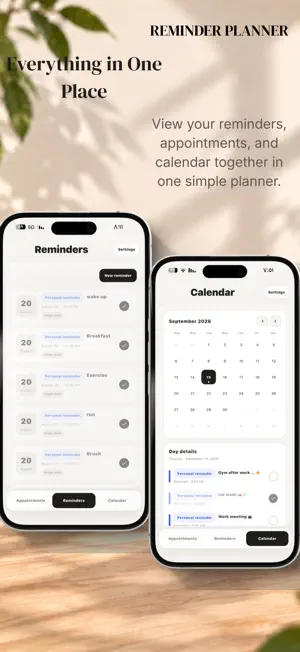
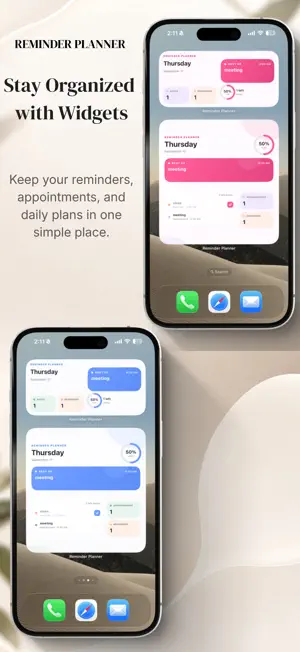
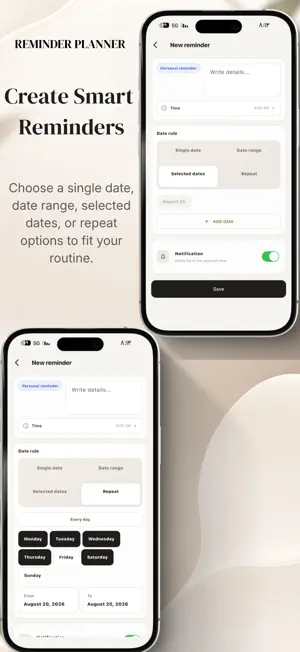
Plan your day your way with Reminder Planner. Reminder Planner is a simple and flexible way to organize appointments and reminders without unnecessary complexity. Create what you need, choose the schedule that fits your routine, and keep track of your day through the calendar and Home Screen widgets. Schedule an appointment or reminder using a single date, a date range, multiple selected dates, or specific weekdays within a period you choose. You can also quickly repeat items every day, choose a time, add optional notes, and enable notifications. Each occurrence can be marked as completed independently without affecting future repeats. Calendar See appointments and reminders together in one place. Select any date to view everything scheduled for that day and keep your plans easy to follow. Home Screen Widgets Reminder Planner includes interactive Home Screen widgets in multiple styles and sizes, giving you quick access to your day without opening the app. View today’s appointments and reminders, mark items as completed directly from the widget, and track remaining items and daily progress in supported widget designs. The widgets use an update system designed to move to the new day after midnight and refresh when your data changes. When the scheduled time for an appointment or reminder has passed, it is no longer included in remaining-item counts or progress calculations in widget designs that use this information. The amount of information and text displayed may vary depending on widget size, device, and available screen space. Notifications Reminder Planner supports local notifications for appointments and reminders. On iPhone, the app keeps up to 50 upcoming notifications scheduled at the same time and refreshes upcoming notifications when the app is used, within a planning range of up to 366 days. The app uses a bell sound only for notifications in the current version. Languages & Data Reminder Planner supports both English and Arabic. In the current version, planning data, appointments, and reminders are stored locally on your device. The appointment and reminder screens use a consistent design for dates, times, notifications, and repeat options, helping keep scheduling simple and familiar throughout the app. Subscription Full access requires an auto-renewable annual subscription. Your local price is shown in the App Store before purchase. Purchases, renewals, cancellations, and purchase restoration are managed through the App Store. To view all app features and a full explanation, go to: https://ha-techapps.com/#r-v Privacy Policy: https://ha-techapps.com/#privacy-policy-2 Terms of Use (EULA): https://www.apple.com/legal/internet-services/itunes/dev/stdeula/
What’s new
Version 1.0.2 · Updated September 21, 2026
What’s New in Reminder Planner • Added more Home Screen widget styles and sizes. • Improved widget updates when data changes and after midnight. • Improved daily tracking so appointments and reminders whose scheduled time has passed are no longer counted as remaining items or in progress calculations. • Improved Arabic and English language support. • General performance, stability, and usability improvements.
App privacy
The developer, Habib ALKANDARI, reported these privacy practices to Apple.
Data Not Collected
The developer does not collect any data from this app.
Alternatives to Reminder Planner
Looking for apps like Reminder Planner? Here are 6 similar apps on the App Store. The highest rated is Ottolist: AI To Do List & ADHD (5.0/5), and 5 of the 6 are free to download.
-
 Injaz — Task Organizer
-
 Locked In: Screen Time Blocker
4.8
Locked In: Screen Time Blocker
4.8
-
 Barcode Organizer
4.0
Barcode Organizer
4.0
-
 Ottolist: AI To Do List & ADHD
5.0
Ottolist: AI To Do List & ADHD
5.0
-
 Nothing Notes, Tasks, AI
2.0
Nothing Notes, Tasks, AI
2.0
-
 Triloop - Tasks Habits Journal
| App | Rating | Price | Last updated | Compare |
|---|---|---|---|---|
| Reminder Planner | 5.0 / 5 (1 rating) | Free | September 21, 2026 | |
| Injaz — Task Organizer | – | Free | Sep 21, 2026 | Compare |
| Locked In: Screen Time Blocker | 4.8 / 5 (5) | Free | Jun 17, 2026 | Compare |
| Barcode Organizer | 4.0 / 5 (2) | 2.99 USD | Oct 31, 2024 | Compare |
| Ottolist: AI To Do List & ADHD | 5.0 / 5 (8) | Free | Sep 10, 2026 | Compare |
| Nothing Notes, Tasks, AI | 2.0 / 5 (1) | Free | Aug 17, 2026 | Compare |
| Triloop - Tasks Habits Journal | – | Free | Aug 29, 2026 | Compare |
Compare Reminder Planner with the top alternatives: ratings, updates, ASO score and keyword gaps →