

WishKeep: Wishlist & Gifts
Anton Kuznetsov Shopping iPhoneiPadiPod touch
WishKeep: Wishlist & Gifts is a free Shopping app for iPhone and iPad by Anton Kuznetsov. Requires iOS 17.0. Updated October 21, 2026.
- Price
- Free
- on the App Store
- Size
- 9 MB
- Age 4+
- Updated
- Oct 21
- 2026 · v1.6
Screenshots



About WishKeep: Wishlist & Gifts
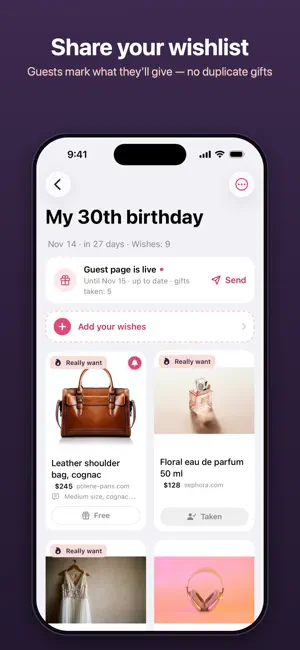
WishKeep is a wishlist that fills itself in. Paste a link and the app opens the shop's page and takes the title, the price and the photo off it. Type a few words and it finds a picture and works out the folder. Add a screenshot, or take a photo of the thing itself, and it reads the name off the picture. Whatever you give it, the wish is on the list in one move. ADD IT WITHOUT OPENING THE APP Share → WishKeep, from Safari, TikTok, Instagram, Telegram, Photos, or anywhere else with a share button. A card opens on top of the app you are already in: the title, the price, the photo, the folder, the priority and a note. Tap Add and you are back where you were. IT SORTS ITSELF 28 folders — clothes, shoes, electronics, kitchen, kids, travel and the rest — and only the ones you use are shown. The folder is worked out from the words, the shop and the picture, and you can always change it. IT WATCHES THE PRICE Shops move their prices after a wish is saved, and the app says so: it re-reads a few pages by itself and shows what has got cheaper and by how much. Over Wi-Fi only, and nothing about the list leaves the phone. IT REMINDS YOU TO BUY IT Give a wish an evening — tonight, the weekend, next week — and the phone reminds you. Bought and Remind me tomorrow sit right on the notification. LISTS FOR AN OCCASION A birthday, a trip, a new flat. Put any wish into any number of lists; give a list its day and its card counts down. SEND A LINK, NOT AN APP A list becomes a web page anyone can open — nothing to install, nothing to sign up for. In a chat the link opens out into a card drawn for that list. Guests mark what they are giving, and everybody else sees it is taken. No name is ever asked for, and who took what is never shown — not even to you. Choose the photos, the language of the page and a word to the guests; the page ends with the occasion, and you can revoke it at any moment. GIVING A second tab for the other direction. A link to somebody's wishlist becomes a card that says what has appeared since you last looked; mark your gift without leaving the app, and the phone reminds you before their day. Price chips narrow a list to what you meant to spend. My gifts gathers everything you are giving, list by list. SECRET SANTA Make a group and send the link to the chat. Everyone joins under a name and attaches a wishlist or writes wishes in words — in the app or straight from a browser, no iPhone needed. The organizer's phone draws the names, keeping couples apart, and each phone opens only its own envelope: nobody, the organizer included, sees who gives to whom. A reminder comes a week before the exchange and the evening before. BUILD ONE TOGETHER Invite your own people by a link: everybody adds things and ticks off what has been bought, on every phone. The list counts how much is left to buy. FIND IT AGAIN Search the whole wishlist by the name, the note, the shop or the folder, and narrow it to what you want most. Offline: the query never leaves the phone. NO ACCOUNT There is nothing to sign up for. The list is a file on your phone; keep a copy in your own iCloud Drive or export it to an archive. Nothing about what you want leaves the device unless you publish a list, build one with somebody or join a Secret Santa. ALSO • Priority: Low, Medium, Really want • A note on every wish — the size, the colour, the reason • Mark what has been bought • Paste a whole chat of links at once: every link becomes a wish • Sort a folder by priority, date or price • Deleted wishes wait 30 days in the trash • Light and dark
What’s new
Version 1.6 · Updated October 21, 2026
A new look, and a wishlist made in four steps. • A new wishlist in four steps: a name — or tap an occasion — with the very card your guests will see in the chat; then the wishes; then who it is for: guests who mark their gifts, or your own people who build the list with you. • Who sees a list, in one place: guests and the people building it with you, side by side — what each of them can do, and a link of their own for each. • A list built together shows how much is left for you to buy, with a bar of what is bought, what guests are giving and what is still free. • A redrawn wish card: the name and the price large, and the shop, a reminder, a list and Bought one tap away. The photo can be replaced from the gallery or the camera. • The Giving tab names your gifts themselves, says each friend's day and what you are giving them, and shows which step your Secret Santa group is at. The group screen and the sheet that starts one were redrawn too.
App privacy
The developer, Anton Kuznetsov, reported these privacy practices to Apple.
Data Not Linked to You
The following data, which may be collected but is not linked to your identity, may be used for the following purposes:
- User Content: Other User Content, Photos or Videos
- Identifiers: Device ID
- Usage Data: Product Interaction
- Diagnostics: Crash Data, Performance Data
Used for: Analytics, Other Purposes
Alternatives to WishKeep: Wishlist & Gifts
Looking for apps like WishKeep: Wishlist & Gifts? Here are 6 similar apps on the App Store.
-
 Wantory
-
 PulseWiish
-
 MyWishy: Wishlists & Gifts
-
 PromoUA
-
 WishFlow: Wishlist Tracker
-
 GRYZON.JE sklep zoologiczny
| App | Rating | Price | Last updated | Compare |
|---|---|---|---|---|
| WishKeep: Wishlist & Gifts | – | Free | October 21, 2026 | |
| Wantory | – | Free | Aug 4, 2026 | Compare |
| PulseWiish | – | Free | Oct 1, 2026 | Compare |
| MyWishy: Wishlists & Gifts | – | Free | Oct 22, 2026 | Compare |
| PromoUA | – | Free | Oct 3, 2026 | Compare |
| WishFlow: Wishlist Tracker | – | Free | May 23, 2026 | Compare |
| GRYZON.JE sklep zoologiczny | – | Free | Aug 4, 2025 | Compare |