

DustFox: Photo Storage Cleaner
Muhammed Furkan Kaya Photo & Video iPhoneiPadiPod touch
DustFox: Photo Storage Cleaner is a free Photo & Video app for iPhone and iPad by Muhammed Furkan Kaya. Requires iOS 18.0. Updated October 23, 2026.
- Price
- Free
- on the App Store
- Size
- 46 MB
- Age 4+
- Updated
- Oct 23
- 2026 · v2.0.1
Screenshots



About DustFox: Photo Storage Cleaner
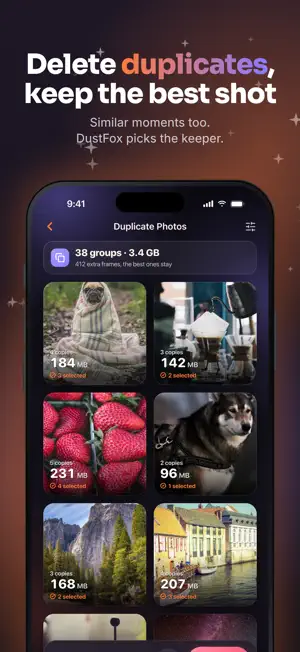
Phone storage full? DustFox is a photo and storage cleaner for iPhone and iPad. It deletes duplicate and similar photos, compresses videos, clears old screenshots and frees up space, often without deleting anything at all. Version 2.0 goes beyond the photo library: duplicate contacts, large files and your iCloud plan. Everything runs on your device: no account, no ads, no uploads and no weekly subscription. TELL IT HOW MUCH SPACE YOU NEED Say "I need 5 GB" and DustFox builds the plan that gets there with the least regret: exact copies and burst extras first, then old screenshots, lossless conversions last. Every step is listed and can be switched off; iOS asks once to confirm all deletions. NEW ARRIVALS AND GALLERY HEALTH Clean before it piles up. New Arrivals puts every photo added since your last visit in one short queue: keep or delete, and you are done in seconds. Gallery Health turns your library into a score from 0 to 100, shows how it moves day by day and what would raise it. METHODS THAT FREE SPACE WITHOUT DELETING • Shrink Videos — DustFox re-encodes the very same frames with HEVC, unhurried; resolution and smoothness stay put, the file shrinks. On iOS 26 the queue keeps running in the background. • Compressible Photos — the same frame, in less space, at a quality difference you cannot see. • Live Photos — drops the motion, keeps the frame. METHODS THAT FIND WHAT TO DELETE • Duplicate Photos — groups identical and similar frames, and now similar moments: the twenty takes of the same sunset. A jury of measures (sharpness, exposure, resolution, size) picks the frame that stays. • Clutter Shots — receipts, documents, QR codes and photos of screens. • Blurry Shots — out of focus or shaken. • Large Videos, Large Photos — the biggest space eaters first. • Screenshots — the screen captures that piled up. • Sent to You — images from chat apps and downloads; one tap selects the extra copies. • Swipe to Clean — left to delete, right to keep. BEYOND THE PHOTO LIBRARY • Large Files — finds the biggest files in iCloud Drive and Files: old downloads, ZIPs, videos. • Contacts — finds duplicate contacts and merges them, plus empty cards with no number or email. Nothing changes without your confirmation. • Save on your iCloud plan — shows how much you need to clear to fit a smaller, cheaper iCloud+ plan. NO MEMORY LOST BY ACCIDENT Everything you delete waits 30 days in the "Recently Deleted" album in Apple Photos. DustFox shows when each batch will be gone for good and reminds you that device space is reclaimed only once that album is emptied. IT WORKS WITH WHAT IS ACTUALLY ON THE DEVICE If you use iCloud Photos, frames that live in the cloud take up no device space. By default DustFox only lists frames whose original is on the device. Flip the iCloud switch to see the whole library. PRIVACY Every scan, comparison and compression runs on your iPhone, contacts included. There is no account and no advertising or tracking SDK. Apart from the Pro purchase, the only thing sent is anonymous usage statistics, which you can turn off in Settings. REPORT CARD, WIDGET AND WEEKLY DIGEST Your first scan gives your gallery a title and a card to share; it holds only numbers, never a photo. The widget shows free space and what DustFox can free. An optional weekly notification says how much has piled up. FREE AND PRO DustFox is free to download. Screenshots are always unlimited; every other method shares a free 3 GB of reclaimed space, and your first 2 video shrinks don't count toward it. DustFox Pro removes every limit and comes two ways: a yearly subscription or a one-time lifetime purchase. Family Sharing included. The yearly subscription renews automatically unless cancelled at least 24 hours before the end of the current period; manage or cancel it in your Apple ID account settings. Terms of Use: https://dustfox.app/terms Privacy Policy: https://dustfox.app/privacy
What’s new
Version 2.0.1 · Updated October 23, 2026
• The free version now frees up to 3 GB of space, and your first 2 video shrinks are free on top. • The photo access screen now explains clearly why DustFox needs your library and how your photos stay private. • A refreshed Pro page, plus offer codes you can redeem in Settings.
App privacy
The developer, Muhammed Furkan Kaya, reported these privacy practices to Apple.
Data Not Linked to You
The following data, which may be collected but is not linked to your identity, may be used for the following purposes:
- Purchases: Purchase History
- Usage Data: Product Interaction
Used for: Analytics, App Functionality
Alternatives to DustFox: Photo Storage Cleaner
Looking for apps like DustFox: Photo Storage Cleaner? Here are 6 similar apps on the App Store. The highest rated is Sortie - Photo Cleaner (5.0/5), and all 6 are free to download.
-
 Sortie - Photo Cleaner
5.0
-
 AI Photo Cleaner: Storage
5.0
-
 CamMonitor: Live Viewfinder
5.0
-
 PhotoSweeper Mobile
4.6
-
 Temfy: Swipe Photo Cleaner
-
 MidnightBright
| App | Rating | Price | Last updated | Compare |
|---|---|---|---|---|
| DustFox: Photo Storage Cleaner | – | Free | October 23, 2026 | |
| Sortie - Photo Cleaner | 5.0 / 5 (2) | Free | Apr 10, 2026 | Compare |
| AI Photo Cleaner: Storage | 5.0 / 5 (1) | Free | Oct 12, 2026 | Compare |
| CamMonitor: Live Viewfinder | 5.0 / 5 (1) | Free | Sep 3, 2026 | Compare |
| PhotoSweeper Mobile | 4.6 / 5 (40) | Free | Oct 11, 2026 | Compare |
| Temfy: Swipe Photo Cleaner | – | Free | Oct 23, 2026 | Compare |
| MidnightBright | – | Free | Aug 3, 2026 | Compare |