

Chamber: Film Camera & Editor
Kiryl Zhukouski Photo & Video iPhoneiPadiPod touch
Chamber: Film Camera & Editor is a free Photo & Video app for iPhone and iPad by Kiryl Zhukouski. Requires iOS 18.0. Updated October 26, 2026.
- Price
- Free
- on the App Store
- Size
- 19 MB
- Age 4+
- Updated
- Oct 26
- 2026 · v2.3
Screenshots


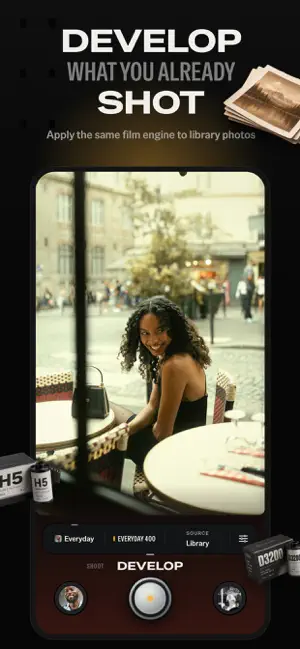

About Chamber: Film Camera & Editor
A camera, a darkroom and a roll, under your thumb. Chamber turns your iPhone into a tactile film camera. Choose a look, see it live in the viewfinder, and keep every photo without a watermark. NEW IN 2.3 The early-2000s digicam, a lab that pushes and pulls, a roll that ends, a blur filter, looks shared by QR code, eight layouts, and one tap to Instagram, TikTok, WhatsApp or Messages. THE DIGITAL FAMILY The early-2000s pocket compact. Compact 03 is free: 3 megapixels, a party flash, purple fringing and an orange date in the corner. Card 06 and CCD 100, a sensor color with no film grain, come with Chamber Pro. THREE ROOMS, ONE DOCK Turn the dial under your thumb to move between SHOOT, DEVELOP and ROLL. LOOKS, BODIES AND FILMS IN ONE TRAY Tap LOOK or FILM and a row of cards rises over the rail. Nine starter looks are free, from Everyday and Late Flash to Party 03 and Haze. Change a body, a film or a knob and the look is your own. MATCH finds the closest body, film and settings to a photo you choose, read on your iPhone. Keep the looks you love and share them as cards, links or files. DATE, DUST, BLUR AND THE LAB The date stamp comes in five faces and four inks, in either bottom corner. Dust and scratches fall differently on every frame. BLUR puts a filter on the lens: SOFT makes highlights glow, NEON blooms night lights into colored halos. PROCESS develops a roll pushed, pulled, expired, cross-processed or with the bleach bypassed. MANUAL WHEN YOU WANT IT Pull EXPOSURE up for manual. On supported cameras, set ISO, shutter speed, focus and white balance on the sensor. Aperture and depth of field are simulated. Where your iPhone shoots RAW, a frame can keep its DNG, on the roll and in Photos. CAMERA CONTROL AND THE BUTTONS On iPhone 16 and later, press Camera Control to shoot and slide it to change the film or the exposure. The volume buttons shoot on every iPhone. Add Chamber to Control Center to open it in one tap. A DARKROOM IN PLACE Develop the newest frame from your roll, a photo from your library or a set at once, through any look; swipe the row up to see them all. Every frame keeps its negative, so it can be developed again on another film or body. THE ROLL A contact sheet of everything you have shot. Each body winds on with its own haptic, and SOUND adds its shutter. Shoot an endless roll, or one of 12, 24 or 36 that comes back from the lab at once, in an hour or overnight. LAYOUT lays frames out eight ways, from a diptych to a film strip or a contact sheet. A deleted frame waits 30 days in Recently Deleted. FREE, AND STAYING FREE Nine starter looks, 5 bodies including Compact 03, 6 films, the darkroom and sets, every date-stamp face and ink, dust, the SOFT filter, delayed develop, PUSH +1 and PULL −1, MATCH, the finite roll, sharing and layouts, sound, Recently Deleted, taking a border off, and full-resolution exports without a watermark. Nothing that was free has moved to Pro. CHAMBER PRO All 19 bodies, all 29 films, the halation, light-leak and warmth knobs, every border and print frame, the NEON filter, the lab's other processes, a date of your own on the stamp, and two more app icons. Choose monthly, annual or a one-time Lifetime purchase. Prices and any available trial are shown in the app before purchase. Subscriptions renew automatically unless cancelled at least 24 hours before the end of the period. Have an offer code? Redeem it in Settings. ON YOUR DEVICE No account. Photos are processed on your iPhone. No ads, no tracking. Chamber follows Reduce Motion and Differentiate Without Color, and supports VoiceOver and Dynamic Type. Chamber is independent and is not affiliated with, sponsored by, or endorsed by any camera, lens, film, imaging or social media brand. Terms of Use: https://www.apple.com/legal/internet-services/itunes/dev/stdeula/ Privacy Policy: https://zhukouski.com/chamber/privacy.html
What’s new
Version 2.3 · Updated October 26, 2026
Chamber 2.3 is three updates in one: The Compact, sharing, and a deeper lab. THE COMPACT The early-2000s pocket digicam arrives. Compact 03 is free: 3 megapixels, a party flash, purple fringing and an orange date in the corner, and Party 03, a new free look, loads it with the flash on. Card 06 and CCD 100, a sensor color with no film grain, come with Chamber Pro. The date stamp gains five faces and four inks, all free. Dust and scratches change with every frame; dust is free, and four new light leaks join Chamber Pro. On iPhone 16 and later, Camera Control shoots and slides through films and exposure; the volume buttons shoot on every iPhone. Open Chamber from Control Center or the Lock Screen, pick one of three new icons in Settings (the first is free), and redeem offer codes there. SHARE Share a look as a card with a QR code, a link or a file: a friend with Chamber taps it and the look opens. Send a frame straight to Instagram, TikTok, WhatsApp or Messages, or anywhere under MORE. LAYOUT lays your roll out eight ways, from a grid or a diptych to an instant wall, a film strip or a contact sheet: choose the frame for each place and share it large. A deleted frame waits 30 days in Recently Deleted. DEVELOP Swipe up on the photo row in DEVELOP to see your library or roll as a full-screen grid. The new BLUR key puts a filter on the lens: SOFT, a glowing mist, is free; NEON, night lights blooming into colored halos, comes with Chamber Pro. Two new looks wear them, Haze (free) and Neon Night (Pro). Keep RAW keeps each frame's DNG on the roll and in Photos where your iPhone shoots RAW, and SOUND lets you hear each body's shutter. DEPTH PROCESS takes a roll to the lab: pushed, pulled, expired, cross-processed or with the bleach bypassed; PUSH +1 and PULL −1 are free. MATCH reads a photo you choose, on your iPhone, and offers the closest body, film and settings. A roll can now end at 12, 24 or 36 exposures and come back from the lab at once, in an hour or overnight; Chamber can tell you when it's ready. LANGUAGES Chamber now speaks German, French, Japanese and Brazilian Portuguese. AND Five print frames for Chamber Pro, from an edge print to a data strip, and taking a border off is free. ROLL's contact sheet fills the screen, VoiceOver announces each kept frame, and two rare crashes are fixed. Nothing that was free has become Pro. Sharing, layouts, MATCH, the finite roll, PUSH +1 and PULL −1, SOFT, sound, Recently Deleted and Keep RAW are free, and so are the free bodies, films and looks, the date stamp, and full-resolution saves without a watermark.
App privacy
The developer, Kiryl Zhukouski, reported these privacy practices to Apple.
Data Not Collected
The developer does not collect any data from this app.
Alternatives to Chamber: Film Camera & Editor
Looking for apps like Chamber: Film Camera & Editor? Here are 6 similar apps on the App Store. The highest rated is Retrograde - Vintage Camera (5.0/5), and 4 of the 6 are free to download.
-
 EXIS 70
-
 Toned: Halation & Darkroom
-
 phtgrph - Film Camera & Filter
-
 Retrograde - Vintage Camera
5.0
Retrograde - Vintage Camera
5.0
-
 Flare Camera
-
 Filmo - Vintage Film Camera
| App | Rating | Price | Last updated | Compare |
|---|---|---|---|---|
| Chamber: Film Camera & Editor | – | Free | October 26, 2026 | |
| EXIS 70 | – | 5.99 USD | Sep 17, 2026 | Compare |
| Toned: Halation & Darkroom | – | Free | Oct 22, 2026 | Compare |
| phtgrph - Film Camera & Filter | – | 2.99 USD | Aug 31, 2026 | Compare |
| Retrograde - Vintage Camera | 5.0 / 5 (7) | Free | Sep 13, 2026 | Compare |
| Flare Camera | – | Free | Oct 27, 2026 | Compare |
| Filmo - Vintage Film Camera | – | Free | Sep 14, 2026 | Compare |