

Prism Ping
George Field Utilities iPhoneiPadiPod touch
Prism Ping is a free Utilities app for iPhone and iPad by George Field. Requires iOS 17.0. Updated September 3, 2026.
- Price
- Free
- on the App Store
- Size
- 3 MB
- Age 4+
- Updated
- Sep 3
- 2026 · v1.0
Screenshots
About Prism Ping
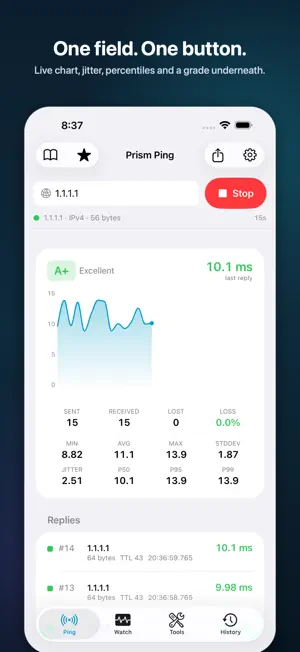
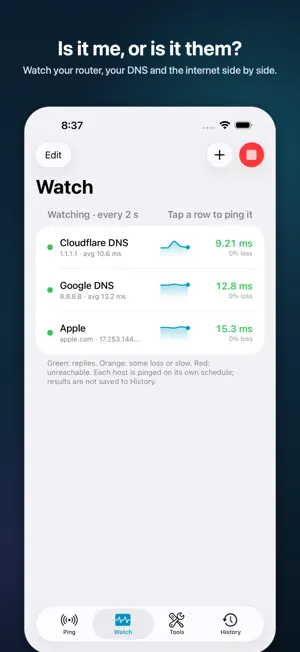
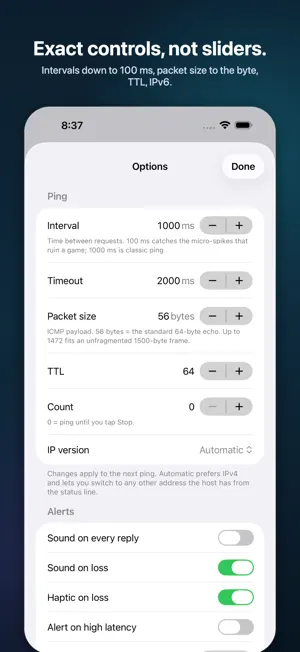
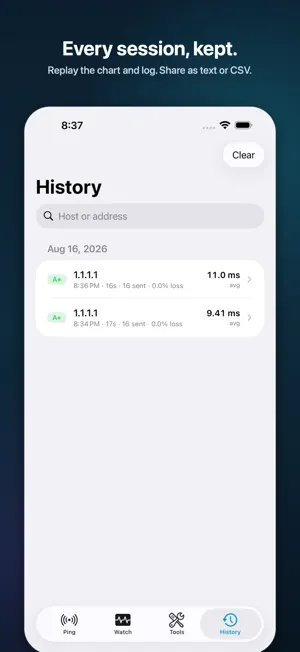
Prism Ping is the ping app, reimagined: one field, one button — and underneath, everything a technician, gamer or remote worker actually wants to know about a connection. Free. No ads. No account. No tracking. PING, DONE PROPERLY • ICMP ping over IPv4 and IPv6 to any host name or IP address • The resolved address is always shown — even on timeouts, when you need it most • Live latency chart with lost packets marked in red • Every reply timestamped, with sequence, bytes, TTL and round-trip time • Sent / received / lost / loss %, min / avg / max / stddev • Jitter, p50 / p95 / p99 percentiles and an A+ to F quality grade • Exact controls, not sliders: interval from 100 ms to 60 s, timeout, packet size 0–1472 bytes, TTL, count or continuous • Switch to any other address the host resolves to with one tap HEAR IT • Audible ping: a tick for every reply, a low buzz when a packet is lost • Haptics on loss and on latency spikes above a threshold you set • Walk a site and listen instead of watching the screen WATCH SEVERAL HOSTS AT ONCE • Put your router, your DNS resolver and a public site side by side • Status colour, last round-trip, loss % and a sparkline for each • "Is it me or is it them?" answered at a glance FAVORITES THAT STAY PUT • Save hosts with a name and a group; reorder, edit, one-tap ping • Recents remembered; both survive restarts and updates HISTORY YOU CAN KEEP • Every finished session saved on the device with its chart, statistics and full log • Share as text (ping-command style) or CSV • Search by host or address; delete anything, any time TOOLS • DNS lookup — A, AAAA, CNAME and reverse (PTR) • Port check — TCP connect to one port or the common set, with timings • My Network — interfaces and local addresses; public IP only when you ask BUILT LIKE AN APPLE APP • Native SwiftUI on iPhone and iPad, light and dark, Dynamic Type, VoiceOver labels • A few megabytes, no third-party frameworks • iOS suspends apps in the background after about 30 seconds — Prism Ping stops the run cleanly and tells you, instead of freezing and leaving a gap in the log PRIVACY Prism Ping collects nothing. Favorites, recents and history live in the app's own folder on your device. The only network traffic it makes is the traffic you ask for: pings to the hosts you enter, DNS through the device's resolver, TCP connects for port checks. The optional public-IP button asks a lookup service, and only when you tap it. Support: https://prismdatagroup.com/prismping/support Privacy: https://prismdatagroup.com/prismping/privacy
App privacy
The developer, George Field, reported these privacy practices to Apple.
Data Not Collected
The developer does not collect any data from this app.
Alternatives to Prism Ping
Looking for apps like Prism Ping? Here are 6 similar apps on the App Store. The highest rated is Pingly - Ping Network Utility (5.0/5), and all 6 are free to download.
-
 ComDeck
-
 BrainEquity Track Your Habits
-
 SweetSpot Signal Finder
-
 Pingly - Ping Network Utility
5.0
Pingly - Ping Network Utility
5.0
-
 Network Tools: Net Toolkit
-
 WQBLEOTA
| App | Rating | Price | Last updated | Compare |
|---|---|---|---|---|
| Prism Ping | – | Free | September 3, 2026 | |
| ComDeck | – | Free | Apr 26, 2026 | Compare |
| BrainEquity Track Your Habits | – | Free | Apr 30, 2026 | Compare |
| SweetSpot Signal Finder | – | Free | Jul 9, 2026 | Compare |
| Pingly - Ping Network Utility | 5.0 / 5 (1) | Free | Jul 28, 2026 | Compare |
| Network Tools: Net Toolkit | – | Free | Sep 16, 2026 | Compare |
| WQBLEOTA | – | Free | Nov 1, 2023 | Compare |
Compare Prism Ping with the top alternatives: ratings, updates, ASO score and keyword gaps →