

Basement Remodel AI Planner
Erna Yuli Astuti Graphics & Design iPhoneiPadiPod touch
Basement Remodel AI Planner is a free Graphics & Design app for iPhone and iPad by Erna Yuli Astuti. Requires iOS 15.0. Updated September 14, 2026.
- Price
- Free
- on the App Store
- Size
- 47 MB
- Age 4+
- Updated
- Sep 14
- 2026 · v1.0
Screenshots
About Basement Remodel AI Planner
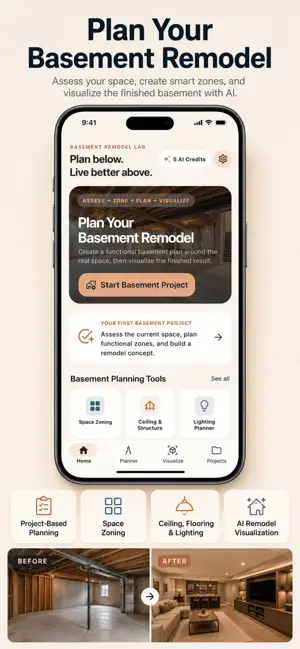
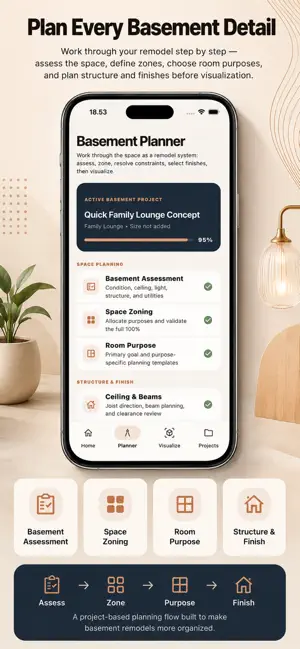
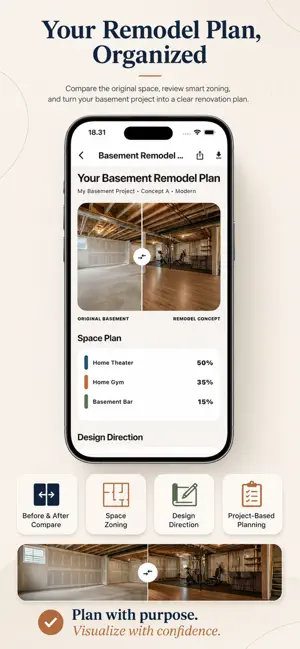
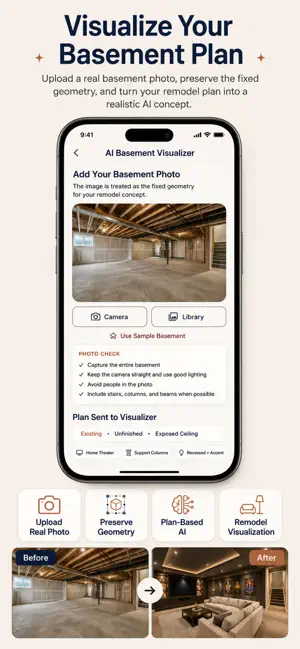
Revised App Store Description Transform an unfinished, outdated, or underused basement into a clear remodeling concept with a project-based planning workflow. AI Basement Design Ideas helps you assess your existing basement, define functional zones, plan finishes and lighting, organize multiple design concepts, and visualize the finished space with AI. PLAN YOUR BASEMENT BEFORE YOU VISUALIZE Create a dedicated Basement Project and work through each remodeling step in one organized workflow: Assess → Goals → Zones → Plan → Visualize → Compare → Track Instead of simply choosing a style and generating an image, the app helps you build a structured basement remodel concept first. BASEMENT ASSESSMENT Document the current characteristics of your basement, including: • Finished or unfinished condition • Ceiling type and exposed beams • Support columns • Stairs and windows • Natural light level • Utility areas • Existing structural elements These details help guide your planning and AI visualization. SMART SPACE ZONING Turn one basement into multiple functional areas. Choose purposes such as: • Family Lounge • Home Theater • Basement Bar • Home Gym • Game Room • Kids Playroom • Home Office • Guest Space • Storage • Multi-Purpose Basement Allocate your available space across selected zones and validate a complete 100% layout plan. PLAN STRUCTURE, FINISHES & LIGHTING Customize the design direction of your project with basement-focused planning tools: • Ceiling treatments • Beam and column treatments • Flooring options • Wall finishes • Color palettes • Recessed and ambient lighting • Accent and functional lighting • Design style and overall direction AI BASEMENT VISUALIZER Upload a real basement photo and turn your remodel plan into an AI-generated design concept. The visualizer is designed to preserve visible room geometry and important existing elements such as walls, windows, stairs, columns, and ceiling structure while applying your selected design plan. BEFORE & AFTER COMPARISON Compare your original basement with the generated remodel concept using an interactive before-and-after view. See how your planned zones, finishes, lighting, and design direction change the overall space. DESIGN VERSIONS & CONCEPT COMPARISON Create multiple concepts for the same Basement Project. Compare different: • Styles • Space allocations • Flooring choices • Lighting plans • Design directions Review your options and keep your preferred concept organized within the same project. PROJECT-BASED REMODEL PLANNING Track your progress through a structured project system, including: • Basement Assessment • Space Zones • Structure & Finishes • Lighting • AI Visualization • Design Versions • Remodel Checklist • Project Progress Your generated designs become part of a complete Basement Project—not just isolated images. DISCLAIMER AI-generated designs and planning tools are intended for conceptual visualization and inspiration only. The app does not provide structural engineering, building-code approval, electrical, plumbing, foundation, or construction-safety advice. Always consult qualified contractors, architects, engineers, or other licensed professionals before making structural or construction changes. PREMIUM ACCESS Unlock additional features with Premium Access. Billing options may include Monthly or Annual subscription plans. Current pricing is displayed in the App Store and purchase screen. Subscriptions automatically renew unless auto-renewal is turned off at least 24 hours before the end of the current subscription period. Your Apple ID account will be charged for renewal within 24 hours prior to the end of the current period. You can manage or cancel your subscription anytime through your Apple ID Account Settings. Terms of Use: http://devopsid.my.id/terms.html Privacy Policy: http://devopsid.my.id/privacy.html Support: [email protected]
App privacy
The developer, Erna Yuli Astuti, reported these privacy practices to Apple.
Data Used to Track You
The following data may be used to track you across apps and websites owned by other companies:
- Identifiers: Device ID
Data Not Linked to You
The following data, which may be collected but is not linked to your identity, may be used for the following purposes:
- Identifiers: Device ID
- User Content: Photos or Videos
Used for: Third-Party Advertising, Analytics, App Functionality
Alternatives to Basement Remodel AI Planner
Looking for apps like Basement Remodel AI Planner? Here are 3 similar apps on the App Store. The highest rated is T-Shirt Designer - TeeCraft (4.8/5), and all 3 are free to download.
-
 T-Shirt Designer - TeeCraft
4.8
T-Shirt Designer - TeeCraft
4.8
-
 Invitation Maker: Card Creator
4.6
Invitation Maker: Card Creator
4.6
-
 Remodel AI - Home Room Design
3.5
Remodel AI - Home Room Design
3.5
| App | Rating | Price | Last updated | Compare |
|---|---|---|---|---|
| Basement Remodel AI Planner | – | Free | September 14, 2026 | |
| T-Shirt Designer - TeeCraft | 4.8 / 5 (395) | Free | May 29, 2026 | Compare |
| Invitation Maker: Card Creator | 4.6 / 5 (27,031) | Free | Jan 10, 2025 | Compare |
| Remodel AI - Home Room Design | 3.5 / 5 (806) | Free | Sep 23, 2026 | Compare |