

Alarm Clock: Skins & Sounds
MASASHI YOSHIDA Utilities iPhoneiPadiPod touch
Alarm Clock: Skins & Sounds is a free Utilities app for iPhone and iPad by MASASHI YOSHIDA. Requires iOS 26.1. Updated October 11, 2026.
- Price
- Free
- on the App Store
- Size
- 39 MB
- Age 4+
- Updated
- Oct 11
- 2026 · v1.5
Screenshots


About Alarm Clock: Skins & Sounds
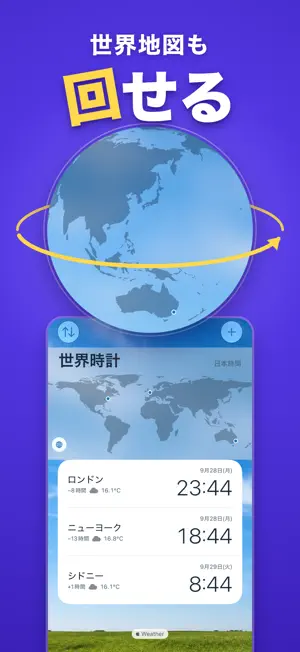
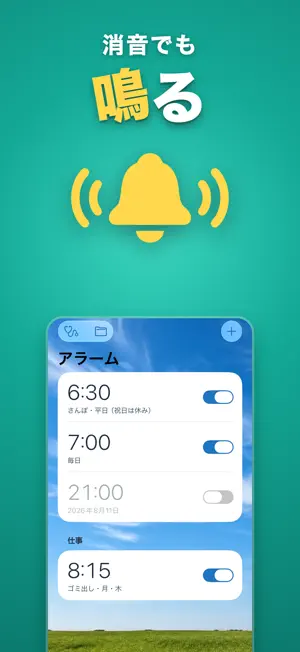
"I hit snooze too many times and fell back asleep." [Made for people who] - Have slept through an alarm because the phone was on silent - Keep hitting snooze - Want a weekday alarm to stay quiet on Japanese holidays - Hate being jolted awake by a loud sound - Want to know if you need an umbrella as soon as you wake up - Want the clock app to look the way they like [Rings even in silent mode] Rings even when your iPhone is muted or in a Focus. Loudness follows the ringer volume. [Set the snooze interval and count] For example, "every 5 minutes, up to 3 times." You decide. [Skip Japanese holidays] Turn this on for a weekday alarm and it stays quiet on Japanese public holidays. [Volume that fades in] Starts quiet and slowly gets louder. [The weather opens when you stop the alarm] You don't have to go looking for it right after you wake up. You can turn it on for each alarm. [Hourly and weekly forecasts] Hourly shows temperature, chance of rain and wind direction; the week shows highs, lows and chance of rain. Choose 1-, 3- or 6-hour steps. [Weather in the world clock too] Each city you add shows its current temperature and conditions on its card. [7 skins] Sky, Plain, Tool, Night, Numeral, Soft and Pop. The whole look of the app changes. With "Sky" the background becomes one photo of the sky, shifting from morning to night. [8 alarm sounds] Chime, Bell, Marimba, Harp, Piano, Twin Bell, Beep, and Digital. Pick one and hear it right away. [World clock with a world map] Cities you add appear as dots on the map. Tap a dot to jump to that city's time. [Timer and stopwatch] Restart a recent timer with one tap. The stopwatch records laps too. [Multiple languages] The app follows your device language. Download "Alarm Clock" and give it a try. Terms of Use: https://www.apple.com/legal/internet-services/itunes/dev/stdeula/ Privacy Policy: https://www.musuby.jp/tokei-privacy/
What’s new
Version 1.5 · Updated October 11, 2026
• Turn your iPhone sideways and it becomes a large desk clock. Choose from 4 styles, pick your colors, and show or hide seconds • The world clock globe now slowly rotates, and flight-path lines reach out to your cities • Cards in the Sky theme now let the sky show through • Delete cities and weather locations from their edit screens • Supports the large screen of iPhone Duo • Minor bug fixes
App privacy
The developer, MASASHI YOSHIDA, reported these privacy practices to Apple.
Data Used to Track You
The following data may be used to track you across apps and websites owned by other companies:
- Identifiers: Device ID
- Usage Data: Advertising Data
Data Not Linked to You
The following data, which may be collected but is not linked to your identity, may be used for the following purposes:
- Identifiers: Device ID
- Usage Data: Advertising Data, Product Interaction
- Purchases: Purchase History
Used for: Third-Party Advertising, Analytics
Alternatives to Alarm Clock: Skins & Sounds
Looking for apps like Alarm Clock: Skins & Sounds? Here are 6 similar apps on the App Store.
-
 Gradual
-
 Japan Holiday Alarm Clock
-
 ClockTimer
-
 AlarmAround
-
 Remind You - Simple Reminder
-
 Infinite Alarm: Interval Timer
| App | Rating | Price | Last updated | Compare |
|---|---|---|---|---|
| Alarm Clock: Skins & Sounds | – | Free | October 11, 2026 | |
| Gradual | – | Free | Sep 25, 2026 | Compare |
| Japan Holiday Alarm Clock | – | Free | Oct 20, 2026 | Compare |
| ClockTimer | – | Free | Feb 1, 2026 | Compare |
| AlarmAround | – | Free | Oct 22, 2026 | Compare |
| Remind You - Simple Reminder | – | Free | Jun 20, 2024 | Compare |
| Infinite Alarm: Interval Timer | – | Free | Aug 20, 2026 | Compare |