

Murmel: Voice Notes & Tasks
Peter Bognar Productivity iPhoneiPadiPod touchApple Watch
Murmel: Voice Notes & Tasks is a free Productivity app for iPhone and iPad by Peter Bognar. Requires iOS 26.0. Updated October 21, 2026.
- Price
- Free
- on the App Store
- Size
- 17 MB
- Age 4+
- Updated
- Oct 21
- 2026 · v1.1
Screenshots


About Murmel: Voice Notes & Tasks
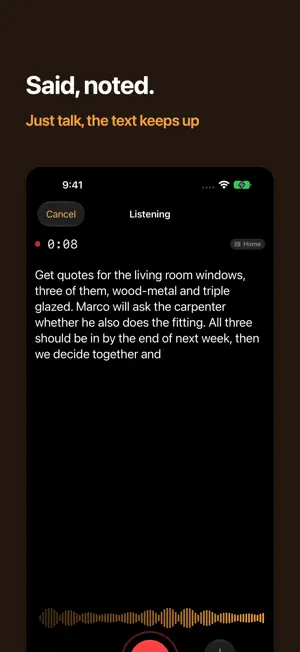
Said, noted. Speak an idea and the entry is ready. Murmel records, writes along and files a clean entry: title, note, due date and the right category. No account, no sign-in, no subscription. Transcript and sorting run on your iPhone, with Apple's speech recognition and Apple Intelligence. TALK INSTEAD OF TYPING One tap on the microphone and you're recording. The text appears live while you speak. You can also record with the Action button, Siri, the Shortcuts app or the quick menu on the app icon. Done before the processing is? Drop the recording in the queue and keep talking. TASK, REMINDER OR IDEA, RECOGNIZED BY ITSELF Apple Intelligence sorts and phrases each kind differently: a task gets an action as its title, a reminder keeps names and numbers word for word, an idea stays as open as you said it. After recording you see the result and save it with a tap, or change it first. DUE DATES FROM WHAT YOU SAID "Next Tuesday" becomes a date. The app does the math, the model doesn't guess. TAGS THAT ARE RECOGNIZED Create a tag for a project, a person or a place once, and next time it's set automatically. RECORD ON YOUR WRIST Complication, Control button or the Watch app. If the iPhone is away, the recording waits on your wrist and goes as soon as it's back. MANY LANGUAGES Murmel understands the languages Apple's speech recognition knows on your iPhone, and you choose with a single setting. MURMEL PRO Murmel is free: unlimited recording, transcript, sorting, tags, Watch and Shortcuts. A one-time purchase, no subscription, unlocks two things: • Your own server: your own Whisper server transcribes, on your home network or over the internet. More accurate with dialects. • Reminders: every entry also lands in Apple Reminders, one list per kind, and the checkmark works both ways. WHAT STAYS ON YOUR IPHONE No account, no analytics, no ads, no tracker. Without your own server, no recording and no text leaves your device. With your own server, the recording goes only there, never to us. REQUIREMENTS iPhone with iOS 26, Apple Watch with watchOS 26. Apple Intelligence is recommended; without it Murmel keeps working with simpler rules. Privacy: https://murmel.bognar.net/en/privacy/ Terms: https://www.apple.com/legal/internet-services/itunes/dev/stdeula/
What’s new
Version 1.1 · Updated October 21, 2026
Optimized for iPhone Duo and iPad. • Tabs for Notes, Tags and Settings, as a sidebar on iPad • On a wide screen, the list and the note sit side by side • Transcribe again: run a recording through the iPhone or your own server once more • Cancel during a recording responds right away again • Pure Black (OLED) for the dark appearance
App privacy
The developer, Peter Bognar, reported these privacy practices to Apple.
Data Not Collected
The developer does not collect any data from this app.
Alternatives to Murmel: Voice Notes & Tasks
Looking for apps like Murmel: Voice Notes & Tasks? Here are 6 similar apps on the App Store.
-
 Notiz : liste de tâches
-
 Dictalia Mobile
-
 Summio: AI Meeting Note Taker
-
 AI Markdown Notes - WASHINOTE
-
 Stinger: Weld Settings Calc
-
 Clarity – Agenda Vocal Rapide
| App | Rating | Price | Last updated | Compare |
|---|---|---|---|---|
| Murmel: Voice Notes & Tasks | – | Free | October 21, 2026 | |
| Notiz : liste de tâches | – | Free | Nov 5, 2026 | Compare |
| Dictalia Mobile | – | Free | Nov 14, 2026 | Compare |
| Summio: AI Meeting Note Taker | – | Free | Oct 9, 2026 | Compare |
| AI Markdown Notes - WASHINOTE | – | Free | Apr 27, 2026 | Compare |
| Stinger: Weld Settings Calc | – | Free | Sep 13, 2026 | Compare |
| Clarity – Agenda Vocal Rapide | – | Free | Feb 12, 2026 | Compare |