

Flashcards & Study: Qardbox
Simon Harre Education iPhoneiPadiPod touchApple Watch
Flashcards & Study: Qardbox is a free Education app for iPhone and iPad by Simon Harre. Rated 5.0/5 from 1 ratings. Requires iOS 26.0.
- Rating
- 5.0
- 1 ratings
- Price
- Free
- on the App Store
- Size
- 286 MB
- Age 4+
- Updated
- Nov 2
- 2026 · v1.4
Screenshots


About Flashcards & Study: Qardbox
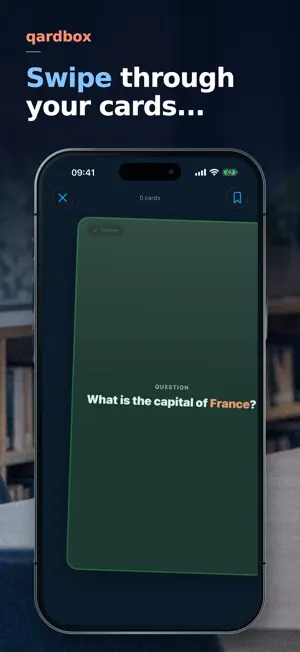
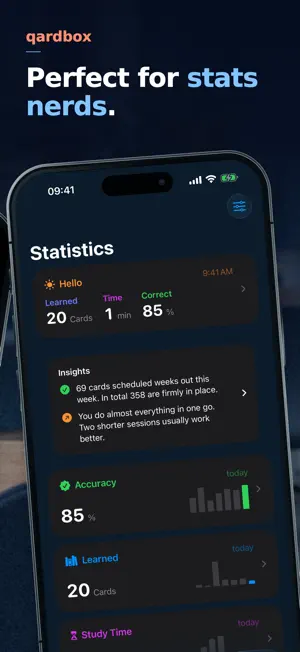
Qardbox remembers what you don’t. The app schedules each card individually: it shows you a card exactly when you are about to forget it. Not on fixed intervals, but based on what you actually knew. Behind it is FSRS-6, a method from memory research that learns from your answers. HOW IT WORKS One card, one swipe. Right if you knew it, left if you didn’t. Prefer tapping? Turn on the buttons. The card follows your finger and flies off in the direction you push it. YOUR NUMBERS Twenty-nine statistics modules you put together yourself: accuracy, study time, streak, time of day, durability, recall probability. Plus an evaluation in plain sentences, such as “Your accuracy is highest in the afternoon.” YOUR DATA STAYS YOURS No account. No sign-in. No server. No tracking. No ads. Not a single third-party component. Everything lives on your device. If you want, turn on sync through your own iCloud and the same cards are on iPhone, iPad and Apple Watch. Card content, subject names and study times are end-to-end encrypted. Sync is off out of the box; you turn it on yourself. The full privacy policy is in the app, not behind a link. IMPORT AND EXPORT Cards come in as CSV files, including “Open in Qardbox” from any other app. A text template helps you have an AI of your choice build a deck for you. Everything goes back out again: single subjects as CSV, or your complete library including learning states and statistics as a backup. ACCESSIBILITY Nine accessibility settings can be turned on for Qardbox alone, independently of your system settings: reduce motion, bold text, increase contrast, reduce transparency, invert colors, visible buttons instead of swiping, reduced visuals, highlighted controls, and a minimum text size of your own up to the largest step. VoiceOver reads every card and every chart. ON IPHONE, IPAD AND APPLE WATCH On your wrist you see what is due today and study a short round. On the Home Screen there is a widget with today’s progress, and a Live Activity runs during a session. The Action button starts a session or rates the card in front. Siri answers “How many cards are due today?”. WHAT IT COSTS The app is free, with no subscription and no ads. Your own cards are unlimited, and no feature depends on a purchase. Ready-made decks are one-time purchases and work with Family Sharing.
What’s new
Version 1.4 · Updated November 2, 2026
Qardbox for Apple Watch is all new: switch seamlessly between devices such as iPad, Apple Watch and iPhone during a study session without losing your progress. Deleting and syncing now work more reliably and faster. And of course we fixed many small bugs, too.
App privacy
The developer, Simon Harre, reported these privacy practices to Apple.
Data Not Collected
The developer does not collect any data from this app.
Alternatives to Flashcards & Study: Qardbox
Looking for apps like Flashcards & Study: Qardbox? Here are 6 similar apps on the App Store. The highest rated is AYCM Manuscript (4.8/5), and all 6 are free to download.
-
 Livnot: Shidduch Organizer
-
 Tischly: Family Calendar
-
 YouViCo: Video Review&Feedback
-
 AYCM Manuscript
4.8
-
 CLM Timer – Meeting Stopwatch
4.2
-
 Wohnungsbot Hamburg
| App | Rating | Price | Last updated | Compare |
|---|---|---|---|---|
| Flashcards & Study: Qardbox | 5.0 / 5 (1 rating) | Free | November 2, 2026 | |
| Livnot: Shidduch Organizer | – | Free | Nov 2, 2026 | Compare |
| Tischly: Family Calendar | – | Free | Oct 31, 2026 | Compare |
| YouViCo: Video Review&Feedback | – | Free | Aug 31, 2026 | Compare |
| AYCM Manuscript | 4.8 / 5 (6) | Free | Nov 3, 2026 | Compare |
| CLM Timer – Meeting Stopwatch | 4.2 / 5 (20) | Free | Oct 29, 2026 | Compare |
| Wohnungsbot Hamburg | – | Free | Jul 23, 2026 | Compare |