

RaceLineCalc: Track Analyzer
Aleksandr Patsukevich Sports iPhoneiPadiPod touchMac
RaceLineCalc: Track Analyzer is a free Sports app for iPhone and iPad by Aleksandr Patsukevich. Requires iOS 15.1. Updated October 13, 2026.
- Price
- Free
- on the App Store
- Size
- 97 MB
- Age 4+
- Updated
- Oct 13
- 2026 · v0.6.18
Screenshots


About RaceLineCalc: Track Analyzer
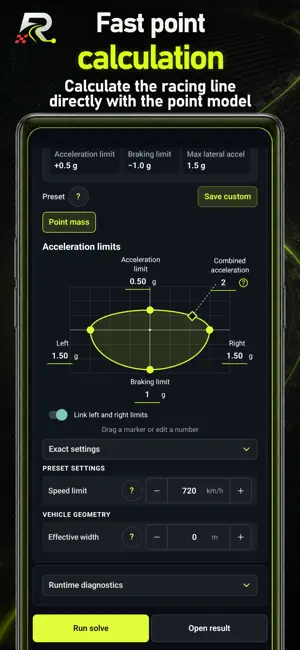
RaceLineCalc calculates a racing line from your own track image, map, plan, sketch, or satellite screenshot. Use the optimized racing line to improve your lap times. Use track analysis to study apex placement, cornering, braking points, speed, and lap time. Create a track project: • Import an image and calibrate it with a known real-world distance. • Trace the left and right track boundaries and place the start/finish reference. • Choose a point-based, car-based, or motorcycle-based model and a vehicle preset. • Run the calculation on your device. Review the result: • Calculated racing line and lap time. • Speed, longitudinal acceleration, lateral acceleration, and braking points. • Calculation stations, source boundaries, and generated track geometry. • Run history and comparison of compatible results on the same track. The point-based model quickly calculates a stable racing line. Car and motorcycle models add vehicle mass, power, grip, braking, dimensions, steering, and lean-related parameters. Presets cover karting, road cars, track cars, and motorcycles, while advanced controls allow deeper experiments. RaceLineCalc is local-first: the calculation runs on the device, and the core project flow does not require an account or upload your track project to a RaceLineCalc server. Model scope: RaceLineCalc calculates on a calibrated flat 2D track model. Elevation, banking, jumps, ruts, changing grip, weather, traffic, live surface conditions, and other real-world factors remain outside the current model. Always combine the calculation with real track knowledge and safe driving or riding practices. RaceLineCalc combines a racing line calculator, track analyzer, lap time calculator, and racing line optimizer in one local-first toolkit. As a practical race line calc, it uses calibrated track geometry and vehicle parameters to estimate the optimal line, speed profile, braking points, and lap time. Minimum-time trajectory optimization: RaceLineCalc solves a constrained minimum-time race trajectory problem on a calibrated flat 2D track. It combines track geometry with a point-based, car-based, or motorcycle-based model to calculate a minimum-time racing line, speed profile, braking points, longitudinal and lateral acceleration, and lap time. Use RaceLineCalc as a race trajectory optimizer, racing line calculator, lap time calculator, vehicle dynamics analysis tool, track analyzer, and trajectory planner. It supports image-based track analysis for karting circuits, indoor tracks, road courses, custom layouts, private test tracks, and local racing venues. The result is a time-optimized trajectory within the selected geometry, vehicle model, grip, power, braking, and configuration limits. Five physics models: point mass, Car V1 and V2, and Moto V1 and V2. Explore additional model-specific overlays and legends, then compare saved runs on the same track. Project run history is preserved after track edits, and results from an older track version are marked.
What’s new
Version 0.6.18 · Updated October 13, 2026
Motorcycle and car V2 models, detailed result layers and five demo runs per track. Adaptive phone, tablet and desktop UI. Interactive Point-model acceleration chart and canvas ruler. Demo presets align power, torque, grip and acceleration limits. Improved navigation, solve cancellation and help. Auto grid respects limits; layer access and result transition are fixed. The screen stays awake while solving; V2 startup and stability are fixed. Project run history is preserved after track edits, and results from an older track version are marked. Project archives now retain more past runs. Racing-line and boundary overlays stay smooth at high zoom and in exports. Parameter menus stay visible on narrow screens. Legacy saved runs now display correctly even when the original track snapshot is missing. Lap time is highlighted in the result summary; statuses, layer legends and parameter descriptions are clearer and more consistent. Improved stability of the solve setup screen and screen transitions.
App privacy
The developer, Aleksandr Patsukevich, reported these privacy practices to Apple.
Data Used to Track You
The following data may be used to track you across apps and websites owned by other companies:
- Identifiers: Device ID
- Usage Data: Product Interaction
Data Not Linked to You
The following data, which may be collected but is not linked to your identity, may be used for the following purposes:
- Purchases: Purchase History
- Location: Coarse Location
- Identifiers: Device ID
- Usage Data: Product Interaction
- Diagnostics: Other Diagnostic Data
Used for: Analytics
Alternatives to RaceLineCalc: Track Analyzer
Looking for apps like RaceLineCalc: Track Analyzer? Here are 6 similar apps on the App Store. The highest rated is ApexLap: Lap Timer & Telemetry (5.0/5), and 5 of the 6 are free to download.
-
 SOR Motorsport
-
 xracing – GPS Lap Timer
-
 ApexLap: Lap Timer & Telemetry
5.0
ApexLap: Lap Timer & Telemetry
5.0
-
 Test-Drive: Drag car 0-60 mph
2.7
Test-Drive: Drag car 0-60 mph
2.7
-
 MonteVerde Karting
5.0
MonteVerde Karting
5.0
-
 MySpotter
| App | Rating | Price | Last updated | Compare |
|---|---|---|---|---|
| RaceLineCalc: Track Analyzer | – | Free | October 13, 2026 | |
| SOR Motorsport | – | Free | May 9, 2025 | Compare |
| xracing – GPS Lap Timer | – | Free | May 17, 2026 | Compare |
| ApexLap: Lap Timer & Telemetry | 5.0 / 5 (1) | Free | Oct 19, 2026 | Compare |
| Test-Drive: Drag car 0-60 mph | 2.7 / 5 (3) | 10.99 USD | Mar 12, 2024 | Compare |
| MonteVerde Karting | 5.0 / 5 (1) | Free | May 19, 2026 | Compare |
| MySpotter | – | Free | Jul 28, 2026 | Compare |