

aoiko
HSIENCHING CHANG Finance iPhoneiPadiPod touch
aoiko is a free Finance app for iPhone and iPad by HSIENCHING CHANG. Requires iOS 16.4. Updated October 27, 2026.
- Price
- Free
- on the App Store
- Size
- 10 MB
- Age 4+
- Updated
- Oct 27
- 2026 · v1.2.5
Screenshots



About aoiko
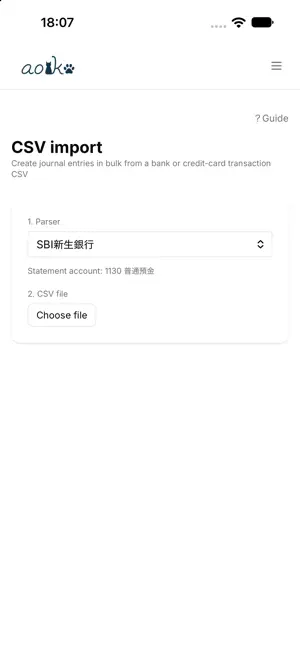
aoiko is a bookkeeping tool for sole proprietors filing taxes in Japan. Journal entries, financial statements, and the .xtx file you submit to e-Tax — all in one app. Blue Return and White Return Supports both the 750,000 yen Blue Return special deduction (from the Reiwa 9 tax year; requires on-time e-Tax submission and qualified electronic ledger storage) and the 650,000 yen deduction. The White Return income and expense statement is covered as well. e-Tax .xtx export Bundles the tax return (KOA020) with the matching financial statement (Blue Return statement KOA210, or income and expense statement KOA110) into a single file that follows the NTA's official XSD. Consumption tax returns are supported too, including the standard method, the simplified method, and the 20 percent special provision. Import Read CSV files from banks, credit cards, and payment services to build journal entry candidates. Receipts can be read by OCR, and orders can be imported from e-commerce order history pages. Everything imported stays a candidate until you confirm it. Double-entry bookkeeping and depreciation Journal, general ledger, trial balance, balance sheet, and profit and loss statement. Handles fixed asset depreciation, lump-sum depreciable assets, and start-up costs as deferred assets. Your books stay on this device No account to create. There is no aoiko server. Your books are stored on this device, and you choose where backups go — including a folder inside iCloud Drive. With the AI features, content may be sent outside the device, depending on the engine you choose. AI features are optional (they use generative AI) Automatic entry classification and receipt OCR pass the text or photo you provide to a generative AI you choose and show the result in the app. They are off by default. On supported devices you can choose Apple Intelligence, which processes everything on the device and needs no API key; external services run only if you set up your own API key. Bookkeeping, financial statements, and .xtx export all work without them. When sending to an external service, you can see what is sent and where before it leaves.
What’s new
Version 1.2.5 · Updated October 27, 2026
Bug fixes - Fixed: the procedure version written into consumption tax .xtx files did not match the e-Tax software's consumption tax module used for a sole proprietor's 2026 (Reiwa 8) return.
App privacy
The developer, HSIENCHING CHANG, reported these privacy practices to Apple.
Data Not Collected
The developer does not collect any data from this app.
Alternatives to aoiko
Looking for apps like aoiko? Here are 6 similar apps on the App Store. The highest rated is 確定申告はマネーフォワード 青色申告・白色申告対応 (5.0/5), and all 6 are free to download.
-
 CapyMoney: AI Expense Tracker
-
 消費税++
-
 「ワケタラ」 分割払い専用アプリ
-
 確定申告はマネーフォワード 青色申告・白色申告対応
5.0
-
 Currency Converter by Wise
4.0
-
 JACCS
| App | Rating | Price | Last updated | Compare |
|---|---|---|---|---|
| aoiko | – | Free | October 27, 2026 | |
| CapyMoney: AI Expense Tracker | – | Free | Aug 11, 2026 | Compare |
| 消費税++ | – | Free | Apr 8, 2026 | Compare |
| 「ワケタラ」 分割払い専用アプリ | – | Free | Jun 25, 2026 | Compare |
| 確定申告はマネーフォワード 青色申告・白色申告対応 | 5.0 / 5 (4) | Free | Oct 21, 2026 | Compare |
| Currency Converter by Wise | 4.0 / 5 (204) | Free | Sep 3, 2026 | Compare |
| JACCS | – | Free | Sep 17, 2026 | Compare |
Compare aoiko with the top alternatives: ratings, updates, ASO score and keyword gaps →