

JetPilot: KVM Remote
RIGWIG LLC Utilities iPhoneiPadiPod touch
JetPilot: KVM Remote is a free Utilities app for iPhone and iPad by RIGWIG LLC. Rated 5.0/5 from 1 ratings. Requires iOS 17.0. Updated October 24, 2026.
- Rating
- 5.0
- 1 ratings
- Price
- Free
- on the App Store
- Size
- 19 MB
- Age 4+
- Updated
- Oct 24
- 2026 · v1.2
Screenshots

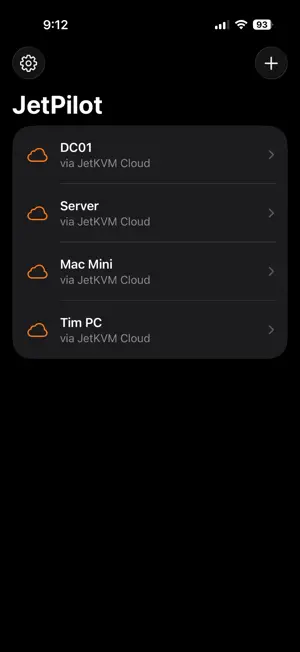
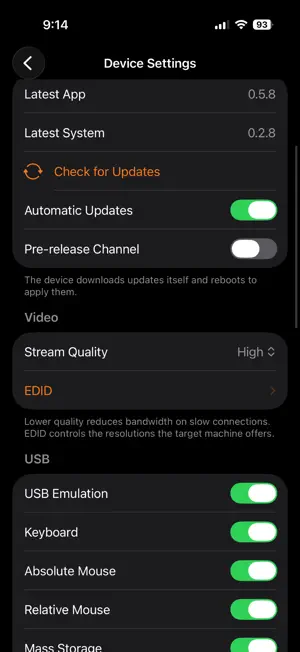

About JetPilot: KVM Remote
JetPilot is a remote control app for two kinds of machines: JetKVM — the tiny KVM-over-IP device that gives you keyboard, video, and mouse access to any computer, even when its operating system is down — and Windows PCs and servers over Remote Desktop (RDP). Bring that control to your iPhone and iPad, from one app. JETKVM: CONTROL FROM ANYWHERE • See the target machine's live screen and control its keyboard and mouse. • Connect directly on your local network for the lowest latency, or reach your devices from anywhere through JetKVM Cloud. • Nothing is installed on the target machine — JetKVM presents as a standard USB keyboard, mouse, and display, so it works from the BIOS/UEFI up. REMOTE DESKTOP: YOUR WINDOWS MACHINES • Connect to Windows PCs and servers with Remote Desktop, with Network Level Authentication and encrypted connections. • Clipboard sync both ways: copy on Windows and paste on your phone, or copy on your phone and paste on Windows. • Pick the desktop resolution per computer, or let Automatic fit your screen. • Server certificates are trusted on first use, and can be forgotten and re-trusted after a reinstall. BUILT FOR TOUCH • Touch-screen and trackpad mouse modes, with tap to click, two-finger tap to right-click, two-finger scroll, pinch to zoom, and tap-and-hold to drag. • On-screen keyboard with a dedicated special-keys row — Esc, Tab, arrows, function keys, and latching Ctrl/Alt/Cmd/Shift. • One-tap Ctrl+Alt+Delete, paste-as-typing, and on-demand portrait/landscape. • Hardware keyboard support. MANAGE THE WHOLE JETKVM DEVICE • Firmware updates with live progress. • Video quality, EDID, USB emulation and identifiers, display backlight, network info, developer mode and SSH keys, Wake-on-LAN, reboot, and factory reset. POWER AND SERIAL EXTENSIONS • ATX power board: power, reset, and force-off, with live power/HDD LED state. • DC power board: switch output and read live voltage, current, and wattage. • Serial console over an interactive terminal. PRIVATE BY DESIGN • No Rigwig account, no analytics, no trackers. • Device passwords, Windows credentials, and cloud session tokens are stored in the iOS Keychain and sent only to your own devices or to JetKVM Cloud. FREE TO TRY • Use the full app free: sessions share a 3-minute budget of connected time, followed by a short break before the next one. • A one-time JetPilot Pro purchase removes the limit and unlocks the ATX/DC power boards and serial console. No subscription. JetPilot is an independent app. A JetKVM device, or a computer with Remote Desktop enabled, is required. "JetKVM" is a trademark of its respective owner; Windows and Remote Desktop are trademarks of Microsoft Corporation. JetPilot is not affiliated with or endorsed by the makers of JetKVM or by Microsoft.
What’s new
Version 1.2 · Updated October 24, 2026
JetPilot 1.2 — now a remote for Windows too. REMOTE DESKTOP (RDP) • Add a Windows PC or server and connect over Remote Desktop with Network Level Authentication, using the same touch, trackpad, and keyboard controls as JetKVM sessions. • Clipboard sync both ways: copy on Windows and paste on your phone, or the other way round. • Choose the desktop resolution per computer, or let Automatic fit your screen. • Server certificates are trusted on first use; Forget Certificate on the computer's page resets that after a reinstall. • A cursor is drawn for Remote Desktop sessions, with Automatic or fixed sizes in Settings. ALSO • Free sessions now share a 3-minute budget followed by a short break before the next one; JetPilot Pro removes both. • Open Source Licenses are listed in Settings › About. • Built with the iOS 27 SDK.
App privacy
The developer, RIGWIG LLC, reported these privacy practices to Apple.
Data Not Collected
The developer does not collect any data from this app.
Alternatives to JetPilot: KVM Remote
Looking for apps like JetPilot: KVM Remote? Here are 6 similar apps on the App Store. The highest rated is TouchKVM (4.4/5), and 3 of the 6 are free to download.
-
 TouchKVM
4.4
-
 CIDR Tool
-
 Sealva - VDS Validator
-
 NetAdmin - Network Scanner
1.0
-
 Dashboard for TrueNAS
2.0
-
 Flap Unraid
3.5
| App | Rating | Price | Last updated | Compare |
|---|---|---|---|---|
| JetPilot: KVM Remote | 5.0 / 5 (1 rating) | Free | October 24, 2026 | |
| TouchKVM | 4.4 / 5 (5) | Free | Aug 21, 2026 | Compare |
| CIDR Tool | – | 0.99 USD | Aug 5, 2024 | Compare |
| Sealva - VDS Validator | – | Free | Oct 20, 2026 | Compare |
| NetAdmin - Network Scanner | 1.0 / 5 (1) | 29.99 USD | Oct 7, 2026 | Compare |
| Dashboard for TrueNAS | 2.0 / 5 (1) | 1.99 USD | Aug 23, 2026 | Compare |
| Flap Unraid | 3.5 / 5 (2) | Free | Jan 22, 2026 | Compare |