

8Terminal: SSH Client
Milos Vesic Developer Tools iPhoneiPadiPod touchMac
8Terminal: SSH Client is a free Developer Tools app for iPhone and iPad by Milos Vesic. Rated 5.0/5 from 1 ratings. Requires iOS 17.0.
- Rating
- 5.0
- 1 ratings
- Price
- Free
- on the App Store
- Size
- 59 MB
- Age 4+
- Updated
- Oct 7
- 2026 · v1.0.6
Screenshots

About 8Terminal: SSH Client
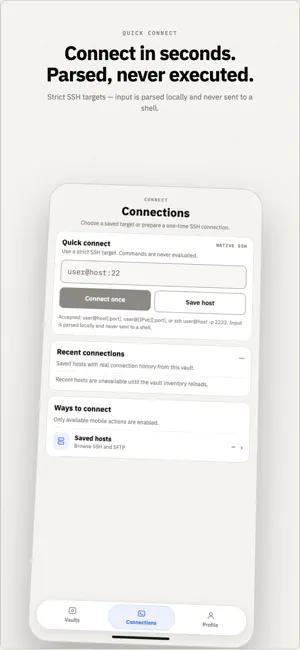
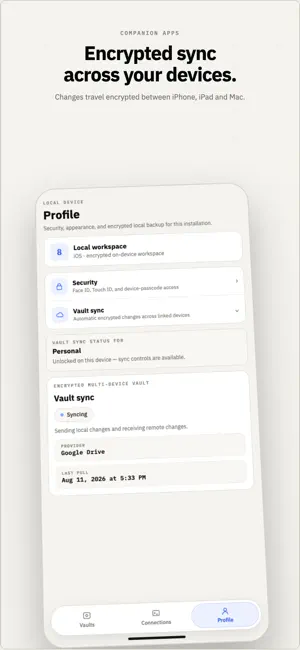
8Terminal is an SSH client for iPhone and iPad that needs no account. Your hosts, keys and passwords live in an encrypted vault on your device — there is nothing to sign up for and no server of ours in between. TERMINAL • Native SSH, built in — not a wrapper around another client • GPU-accelerated terminal with a key row for Esc, Ctrl, Alt, Tab, arrows, Shift-Tab, Home, End, Page Up/Down and F1–F12 • Hardware keyboard on iPad: Esc, Tab, Ctrl keys, Cmd+T, Cmd+W and Cmd+1–9 • Several sessions at once, with a Live Activity that shows when a coding agent is waiting — and Return, Ctrl-C and Reconnect buttons • Reconnects when you come back, and reattaches your tmux or zellij session • Paste a screenshot straight into the terminal; its location data is removed first • Find in the terminal, and open https links after you confirm • Send a saved password into a prompt with Face ID — it never touches the clipboard HOSTS AND KEYS • Password, key and two-factor keyboard-interactive sign-in; Ed25519, ECDSA and RSA keys in OpenSSH and PuTTY formats • Generate a key on the phone and install it on a host in one step • OpenSSH certificates from your CA • A key kept in the Secure Enclave, used with Face ID for every sign-in • Agent forwarding that asks you before every signature • Chains of up to four jump hosts, and environment variables per host • Unknown host keys ask first; a changed host key blocks the connection • Post-quantum key exchange (mlkem768x25519-sha256) with servers that offer it SFTP AND TUNNELS • Browse, upload and download over the connection you already opened • Folders, permissions, Quick Look and Share, keep both or replace • An interrupted transfer resumes where it stopped • Local, remote and dynamic (SOCKS5) port forwarding WIDGETS AND SHORTCUTS • A Home Screen widget with your recent hosts • Shortcuts to connect to a host, run a snippet (after you review it) or start a tunnel ENCRYPTED VAULT, ON YOUR TERMS • Argon2id and XChaCha20-Poly1305; unlock with Face ID or your master password • Several vaults if you keep work and home apart • Back up to your own iCloud Drive or Google Drive, or export one file — free • Import hosts from MobaXterm, PuTTY, Tabby and your OpenSSH config; export and import readable JSON without secrets AI ASSISTANT, YOUR KEY • Bring your own OpenAI, Anthropic, OpenRouter or compatible key; it stays on this device • By default you choose what it reads, and a command it suggests runs only after you approve it, exactly once • Optional Auto mode, off until you turn it on: give it a goal and it runs read-only checks on your Linux server by itself, without touching your terminal, and asks before anything that changes the server • In Auto mode what those checks print is sent to your AI provider. Your passwords, keys and vault are never sent, and you agree before the first run • Stop ends a run at once 8TERMINAL PRO — $5.99 ONCE • End-to-end encrypted vault sync between your iPhone, iPad and Mac, through your own cloud • Link a new device with a verification code • One purchase covers every device on your Apple Account and your Family Sharing group. No subscription. Everything else in 8Terminal is free, on every device, with no time limit. PRIVACY No account, no tracking, no analytics. Crash reports stay off until you turn them on, and never contain hostnames, usernames, terminal output or anything from your vault. Terms of Use: https://www.apple.com/legal/internet-services/itunes/dev/stdeula/
What’s new
Version 1.0.6 · Updated October 7, 2026
Fixes for iPhone: • "Delete local vault" and "Recover synced vault" were cut off at the bottom of the screen, so their buttons could not be reached. They now open over the whole screen. • The New snippet form no longer runs under the status bar. New in 1.0.5, in case you missed it: Auto mode for the AI assistant. Give it a goal and it runs read-only checks on your Linux server by itself, and asks before anything that changes the server. It is off until you turn it on.
App privacy
The developer, Milos Vesic, reported these privacy practices to Apple.
Data Not Linked to You
The following data, which may be collected but is not linked to your identity, may be used for the following purposes:
- Diagnostics: Crash Data
Used for: App Functionality
Alternatives to 8Terminal: SSH Client
Looking for apps like 8Terminal: SSH Client? Here are 6 similar apps on the App Store. The highest rated is pmosh (5.0/5), and all 6 are free to download.
-
 Gitzy
4.0
Gitzy
4.0
-
 Loopsy Terminal
-
 GitGarden: Commit Graph Widget
-
 pmosh
5.0
pmosh
5.0
-
 GateShell - SSH Client & SFTP
5.0
GateShell - SSH Client & SFTP
5.0
-
 BalauDeck
5.0
BalauDeck
5.0
| App | Rating | Price | Last updated | Compare |
|---|---|---|---|---|
| 8Terminal: SSH Client | 5.0 / 5 (1 rating) | Free | October 7, 2026 | |
| Gitzy | 4.0 / 5 (1) | Free | Apr 7, 2026 | Compare |
| Loopsy Terminal | – | Free | May 22, 2026 | Compare |
| GitGarden: Commit Graph Widget | – | Free | Sep 8, 2026 | Compare |
| pmosh | 5.0 / 5 (1) | Free | Oct 12, 2026 | Compare |
| GateShell - SSH Client & SFTP | 5.0 / 5 (1) | Free | Sep 15, 2026 | Compare |
| BalauDeck | 5.0 / 5 (1) | Free | Oct 20, 2026 | Compare |