

Backtick: Terminal Widgets
Elvis Mederos Utilities iPhoneiPadiPod touch
Backtick: Terminal Widgets is a free Utilities app for iPhone and iPad by Elvis Mederos. Rated 5.0/5 from 4 ratings. Requires iOS 17.0.
- Rating
- 5.0
- 4 ratings
- Price
- Free
- on the App Store
- Size
- 4 MB
- Age 4+
- Updated
- Oct 13
- 2026 · v1.4
Screenshots
About Backtick: Terminal Widgets
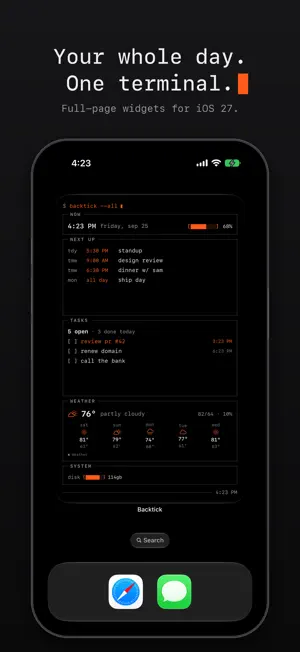
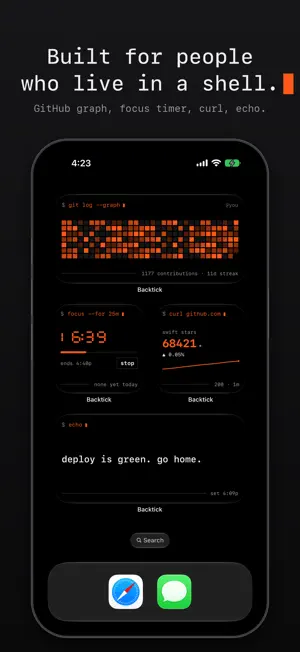
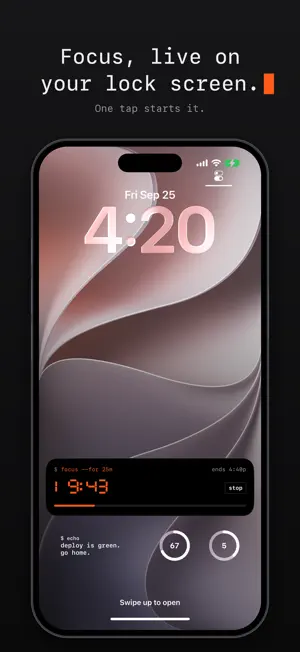
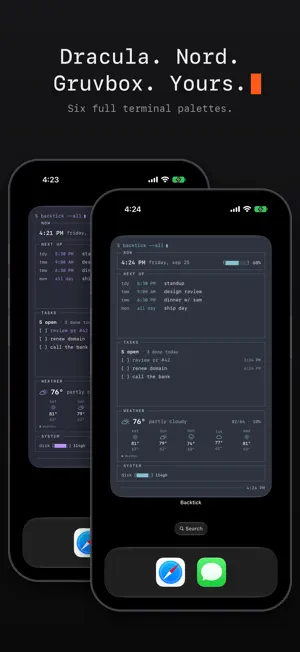
Backtick turns your home and lock screen into a terminal. Not a picture of one — a working one. Panels drawn with hairline rules, a tab bar you actually tap, a cursor that genuinely blinks, and your real life inside it: calendar, reminders, weather, steps, battery — and now your GitHub, your focus sessions and anything your automations want to say. FULL-PAGE WIDGETS (iOS 27) The Terminal fills an entire home screen page — now, next up, tasks, weather and system as one live session. The Console goes full page too, with bit idling above the menu. THE WIDGETS — 35 OF THEM • Terminal — five panels switched by tapping tabs on the widget; small, medium, large and full page • Console — a navigable menu: arrows move, enter selects, esc backs out, without opening an app • git log — your GitHub contribution graph, streak and recent activity • focus — one tap starts a timer, with a Live Activity on your lock screen and Dynamic Island • curl — any number from a JSON endpoint you choose, with a sparkline of recent values • echo — shows whatever you send it from Shortcuts; build automations that write to your home and lock screen • Weather — current, hourly and forecast; the small one pages when you tap it • Clock — a live 7-segment face with ticking seconds, zero battery cost, 12h or 24h • Countdown — days to a date you pick; ticks live on the final day, counts up after • Daylight — sunrise to sunset as a gauge, golden hour, light left • Year Progress — every day of the year as a dot; watch it fill • Elapsed — day, week, month and year as block gauges • Month — the full month with event markers • Timeline — upcoming events with durations drawn to scale • Steps — today's count and distance, with the week as bars • Disk — storage as a block gauge • Moon — tonight's phase as a dot matrix • motd — a daily line from bit, free • bit — a resident terminal creature. It has moods, it types little lines, its heartbeat blinks, and it reacts when you poke it. Bond over time. LOCK SCREEN Nine rectangular widgets (next up, tasks, weather, forecast, hourly, elapsed, battery, daylight, echo), six circular gauges, and inline status lines. STANDBY Charge your phone on its side and the Terminal, Weather, Clock and bit widgets switch to big, glanceable layouts you can read from across the room. THEMES Six full terminal palettes — Dracula, Gruvbox, Nord, Solarized, Catppuccin and Tokyo Night — or classic true black with one of five accent phosphors. Every widget follows instantly. SHORTCUTS, SIRI & CONTROL CENTER • "Set Backtick Message" puts any text on the echo widgets — when you arrive at work, when your battery runs low, whenever • Start or stop a focus session from Siri, Shortcuts or Control Center • Tick your top task, poke bit, or jump to your agenda from Control Center or the Action button BUILT LIKE A TOOL • Tick reminders off from the widget — writes straight to Apple Reminders • Tap a section to open YOUR apps: choose which calendar, reminders and weather apps widget taps launch • Battery, weather and steps refresh in the background through the day • Live clocks, countdowns and a blinking cursor with zero widget refreshes • True black. Made for OLED and dark home screens. PRIVATE BY CONSTRUCTION • No account, no sign-in, no Backtick server — there isn't one • Calendar, reminders, steps and device stats are read on-device via Apple's frameworks • Weather comes from Apple Weather using your approximate location • git log and curl talk only to the addresses you give them; an optional GitHub token stays in your phone's keychain • Nothing is collected. There is nowhere to collect it to. FREE / PRO The Terminal widget, Next Up, the inline status line, motd and the classic amber theme are free forever. One purchase unlocks everything else — every widget, every palette — no subscription, no upsell treadmill. — Privacy policy: https://backtick.app/privacy.html Terms of use: https://backtick.app/terms.html
What’s new
Version 1.4 · Updated October 13, 2026
$ backtick --version 1.4 try pro free · seven days of every widget and theme. it's free, nothing renews, and you're never charged. we'll remind you the day before it ends. a theme per widget · long-press any widget, edit widget, pick its theme. dracula next to nord next to classic. light themes · paper, solarized light, latte and gruvbox light. ink on paper for your home screen; the lock screen and standby stay dark so they're always readable. two new dark palettes · rosé pine and everforest fresher widgets · weather and steps now refresh on their own, about every half hour, even when you haven't opened the app · a stale reading says how old it is fonts · pick sf mono, menlo or courier. widgets follow. ready for iphone duo · every widget, including the full page, fits both displays · the focus timer fits the new vertical dynamic island a proper pro page · see everything pro unlocks, in every theme, before you buy
App privacy
The developer, Elvis Mederos, reported these privacy practices to Apple.
Data Not Collected
The developer does not collect any data from this app.
Alternatives to Backtick: Terminal Widgets
Looking for apps like Backtick: Terminal Widgets? Here are 6 similar apps on the App Store. The highest rated is Elyr — Aesthetic Home Widgets (5.0/5), and all 6 are free to download.
-
 MNML: Minimal Widgets
-
 Hands: Analog Clock Widgets
2.7
Hands: Analog Clock Widgets
2.7
-
 Elyr — Aesthetic Home Widgets
5.0
Elyr — Aesthetic Home Widgets
5.0
-
 nxnote: Offline Notes
5.0
nxnote: Offline Notes
5.0
-
 Woper: Y2K Pixel Art Widgets
-
 Clearwing: Transparent Widgets
| App | Rating | Price | Last updated | Compare |
|---|---|---|---|---|
| Backtick: Terminal Widgets | 5.0 / 5 (4 ratings) | Free | October 13, 2026 | |
| MNML: Minimal Widgets | – | Free | Oct 13, 2026 | Compare |
| Hands: Analog Clock Widgets | 2.7 / 5 (3) | Free | Sep 28, 2026 | Compare |
| Elyr — Aesthetic Home Widgets | 5.0 / 5 (1) | Free | Sep 27, 2026 | Compare |
| nxnote: Offline Notes | 5.0 / 5 (3) | Free | Oct 6, 2026 | Compare |
| Woper: Y2K Pixel Art Widgets | – | Free | Oct 13, 2026 | Compare |
| Clearwing: Transparent Widgets | – | Free | Sep 3, 2026 | Compare |