

Feed Planner: Grid Preview
Oliver Welman Photo & Video iPhoneiPadiPod touch
Feed Planner: Grid Preview is a free Photo & Video app for iPhone and iPad by Oliver Welman. Requires iOS 17.0. Updated September 10, 2026.
- Price
- Free
- on the App Store
- Size
- 15 MB
- Age 4+
- Updated
- Sep 10
- 2026 · v1.1
Screenshots


About Feed Planner: Grid Preview
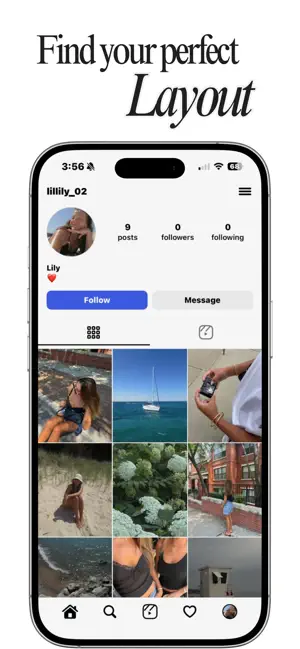
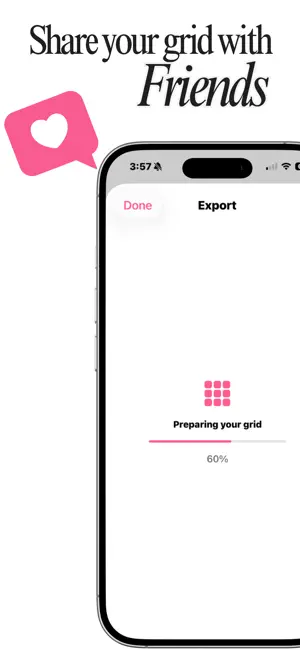
Stop guessing how your next post will look. Feed Planner lets you drag your photos into place and see your whole grid before you post a single one. Rearrange until it feels right — then post with confidence. DRAG UNTIL IT FEELS RIGHT Move any photo anywhere in your grid. Try a shot in the corner, swap two tiles, push something to the next row. Your feed updates instantly, so you can experiment as long as you like before committing to anything. SEE IT BEFORE YOU POST Preview your profile exactly the way someone visiting it would — full-screen posts, swipeable carousels, captions and all. No more posting something and realizing afterwards that it clashed. MAKE IT COHESIVE Eight subtle filters with adjustable strength, plus fine controls for exposure, contrast, warmth, shadows and more. Crop and reposition any photo. Everything is non-destructive — your originals are never touched. BUILT FOR REAL POSTS Plan single photos or multi-photo carousels. Write your captions ahead of time. Archive posts you're not sure about and bring them back whenever you want. YOUR PHOTOS STAY YOURS No account. No sign-up. No uploads. Feed Planner works entirely on your device, and your photos never leave it. FEED PLANNER PRO Unlock unlimited photos, custom follower and following counts, story highlights, multiple profiles, and the full set of editing tools. • Monthly — $4.99 • Lifetime — $14.99, one time, never renews Feed Planner is an independent planning tool. It is not affiliated with, endorsed by, or connected to Instagram or Meta Platforms, Inc. It does not connect to your account and never posts anywhere on your behalf. Terms of Use: https://gardedllc.com/feedplanner/terms Privacy Policy: https://gardedllc.com/feedplanner/privacy
What’s new
Version 1.1 · Updated September 10, 2026
Pin up to three posts to the top of your grid, so your planned feed matches what people actually see. Plan your stories. Add frames, set the order, and watch the run play at real speed before you post it. Save hashtag sets and drop them into any caption in a tap. Caption limits as you type — characters, hashtags, and where the preview cuts off. Add a location, tagged people, and alt text to a post. Room for up to five links on your profile.
App privacy
The developer, Oliver Welman, reported these privacy practices to Apple.
Data Not Linked to You
The following data, which may be collected but is not linked to your identity, may be used for the following purposes:
- Purchases: Purchase History
Used for: App Functionality
Alternatives to Feed Planner: Grid Preview
Looking for apps like Feed Planner: Grid Preview? Here are 6 similar apps on the App Store. The highest rated is Cam Interval (5.0/5), and all 6 are free to download.
-
 Instagram Planner: Swatch
-
 FeedPeek: Feed Planner
-
 Feed Planner: Preview Grid
-
 Snapback – RAW Camera & Editor
-
 Cam Interval
5.0
-
 Gridder: Planner for Instagram
4.5
| App | Rating | Price | Last updated | Compare |
|---|---|---|---|---|
| Feed Planner: Grid Preview | – | Free | September 10, 2026 | |
| Instagram Planner: Swatch | – | Free | Oct 20, 2026 | Compare |
| FeedPeek: Feed Planner | – | Free | Jun 25, 2026 | Compare |
| Feed Planner: Preview Grid | – | Free | Apr 12, 2026 | Compare |
| Snapback – RAW Camera & Editor | – | Free | Oct 10, 2026 | Compare |
| Cam Interval | 5.0 / 5 (2) | Free | Jun 17, 2024 | Compare |
| Gridder: Planner for Instagram | 4.5 / 5 (2) | Free | Oct 8, 2026 | Compare |