

Resee - Photo Memories
Lunadence Photo & Video iPhoneiPadiPod touch
Resee - Photo Memories is a free Photo & Video app for iPhone and iPad by Lunadence. Rated 5.0/5 from 1 ratings. Requires iOS 18.0.
- Rating
- 5.0
- 1 ratings
- Price
- Free
- on the App Store
- Size
- 13 MB
- Age 4+
- Updated
- Sep 29
- 2026 · v1.0.3
Screenshots

About Resee - Photo Memories
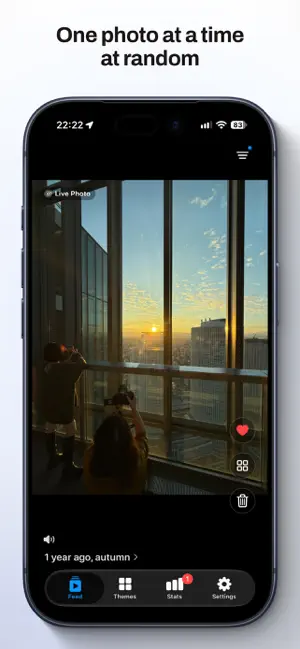
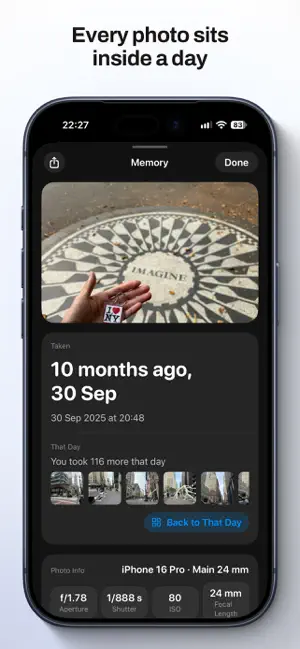
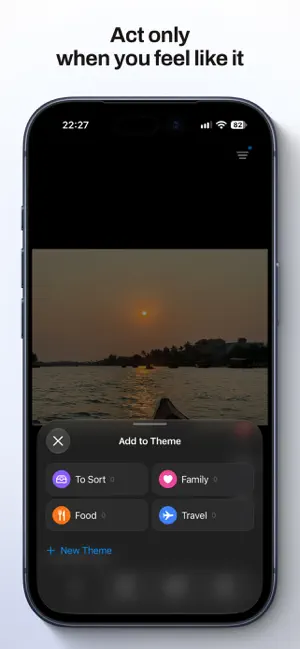
Your camera roll holds thousands of photos you’ll never open again. Resee hands them back one at a time, in random order, full screen. Swipe up for the next one. That’s the whole app. Swiping asks nothing of you Go through photo after photo and decide nothing at all. There’s no queue, no list to finish, no progress bar counting down. Stop whenever you want, and nothing is waiting for you when you come back. Act on a photo only when you feel like it • Double tap to favorite. It’s the same Favorites you already have in Photos, so it syncs both ways. • Add a photo to a theme. Themes live inside Resee, so sorting never writes anything to your library. • Tap delete and the photo goes to Pending Deletion. Nothing leaves your library until you say so. • Changed your mind? The last action can be undone for eight seconds, and anything in Pending Deletion goes back with one tap. Deleting takes two steps on purpose When you’re ready, a single confirmation covers the whole batch. The photos then sit in Recently Deleted for 30 days, so the space comes back later and a mistake is never final. Seen is not the same as done A photo you’ve already seen goes quiet for 90 days and then returns to the feed; in a small library it may come back sooner. A photo is allowed to be worth a second look. Want a shorter or longer gap? Choose 30, 90 or 180 days, or never repeat. Every photo sits inside a day Pinch to open the day a photo was taken, with everything else you shot that day. A memory card tells you how long ago it was, where you were, and how much else that day holds. On This Day brings back the same date from earlier years. Turn any photo into a share card for the person who was there. Videos and Live Photos play right where they are, with sound on from the start. Mute is one tap away, and Settings can start them silent. Filter by date range, by media type or by favorites. Stats leads with one number: the photos you’ve seen again. Everything stays on your device No account, no sign-in, no ads, no analytics, no tracking. Your photos are read from your own library and are never uploaded. Place names are the one exception, and it starts on: a photo’s coordinates go to the system’s place-name and map services so a memory card can say where you were. One switch in Settings turns it off. Free every day Resee gives you 30 photos a day, every day. Resee Pro removes the daily limit with a one-time purchase, not a subscription, and it works with Family Sharing. The rest is free either way: your themes, your Pending Deletion list, your stats, and every photo you’ve already seen today.
What’s new
Version 1.0.3 · Updated September 29, 2026
This update brings a range of refinements and improves stability.
App privacy
The developer, Lunadence, reported these privacy practices to Apple.
Data Not Collected
The developer does not collect any data from this app.
Alternatives to Resee - Photo Memories
Looking for apps like Resee - Photo Memories? Here are 6 similar apps on the App Store.
-
 Memory Drift
-
 轻册-让相册整理变得更有趣
-
 shuffle slide
-
 Somio - Photo Slideshow
-
 OpenPhotos
-
 BlindBox - Photo Organizer
| App | Rating | Price | Last updated | Compare |
|---|---|---|---|---|
| Resee - Photo Memories | 5.0 / 5 (1 rating) | Free | September 29, 2026 | |
| Memory Drift | – | Free | Jul 29, 2026 | Compare |
| 轻册-让相册整理变得更有趣 | – | Free | Aug 7, 2026 | Compare |
| shuffle slide | – | Free | Jul 14, 2026 | Compare |
| Somio - Photo Slideshow | – | Free | Oct 11, 2026 | Compare |
| OpenPhotos | – | Free | Jun 22, 2026 | Compare |
| BlindBox - Photo Organizer | – | Free | Oct 10, 2026 | Compare |