

Longpath CW
Tobias Wissmueller Education iPhoneiPadiPod touchMac
Longpath CW is a free Education app for iPhone and iPad by Tobias Wissmueller. Requires iOS 18.2. Updated October 21, 2026.
- Price
- Free
- on the App Store
- Size
- 49 MB
- Age 4+
- Updated
- Oct 21
- 2026 · v1.6.1
Screenshots


About Longpath CW
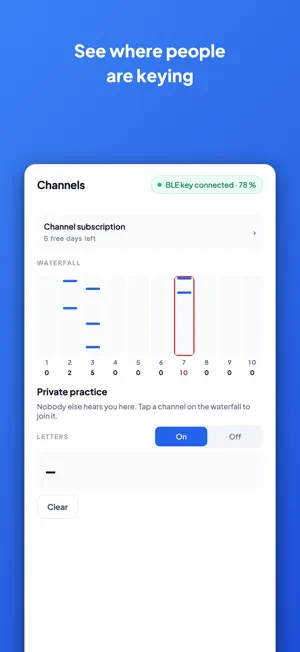
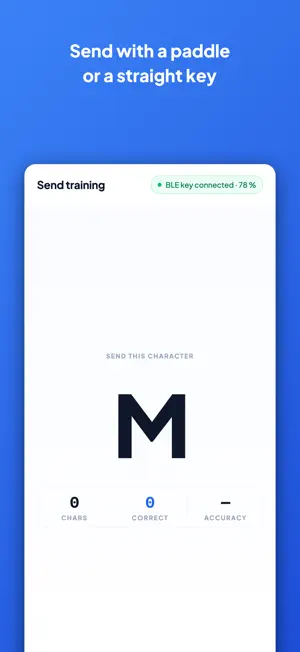
Longpath teaches you to hear Morse code, not to decode it letter by letter. And it lets you practise on the Morse key you already own, and with other learners, live. FREE TO LEARN Longpath and all of its training are free: copy and send training, Learn characters, your own Morse key over Bluetooth, the statistics, and private practice on the channels. On iPhone and iPad, Longpath shows a small banner and, now and then during training, a full-screen ad. The ads are non-personalized, and the app does not track you. Remove Ads, a one-time purchase under Settings, Ads, takes them away for good. The Mac app shows no ads. CHANNELS: LIVE MORSE WITH OTHER LEARNERS Morse is meant to be shared. Channels gives you ten numbered channels where learners send to each other, live. The waterfall shows where people have been keying in the last ten minutes and how many are on each channel; tap one to join. Inside a channel the Morse reads like a chat: every sender's characters appear in bubbles, with their nickname above, and you hear everyone with their real timing and their real mistakes. Send with your own Morse key or the on-screen key. Not ready yet? Private practice is always there: nobody hears you, and it works offline. CHANNEL SUBSCRIPTION The channel subscription is only for joining the live channels with other learners. Your first seven days there are free, then it is monthly or yearly. Training never needs it, nor do private practice and the waterfall. Channels, Channel subscription shows your free days left and opens it at any time, with prices and Restore purchases. YOUR OWN MORSE KEY Every telegraphist has a favourite key. With the BLE key interface you plug it straight into Longpath: a straight key, a single paddle or an iambic paddle, connected over Bluetooth to your phone, tablet or Mac. The app produces the sidetone, decodes what you send and shows exactly where your timing drifts, so you train on the very key you will use on the air. The interface is open hardware: build it yourself from the public ble-key project, or order a parts kit or an assembled key straight from the app. Bluetooth key support is free. COPY TRAINING BY EAR Copy training follows the Koch method. You start with two characters at full speed and add the next one only when you are ready. Because every character is sent at full speed from the first minute, you learn its rhythm as a sound, never as a row of dots and dashes you have to count. Farnsworth spacing keeps the gaps between characters wide while each character stays fast: thinking time without the wrong rhythm. CHOOSE YOUR CHARACTERS Learn characters shows every character with its rhythm and a toggle. You decide which ones are in play, and copy and send training draw from that one set. SENDING No key at hand? Practise on the on-screen key, straight or iambic, with the same sidetone and the same decoder. YOUR PRACTICE, IN VIEW A practice stopwatch, a daily goal and a statistics view show what you actually practised rather than what you meant to practise. LOCAL AND PRIVATE Training runs on your device. No account, no sign-up, and copy and send training work without a network connection; only the channels go online. Your progress belongs to you, and on Apple devices it follows you to your other devices through your own iCloud. Longpath counts anonymous usage statistics so we can see which parts of the app are used. It asks you once whether they may also carry a random install ID; saying no keeps them anonymous, and you can change it any time under Settings, Usage statistics. SUPPORT LONGPATH If Longpath helps you learn Morse, you can say thanks with a donation under Settings, Support Longpath. A donation unlocks nothing; it simply supports the development. Longpath is named after the long way round: the path a Morse signal takes around the globe, and the path you take to learn it. Terms of Use: https://www.apple.com/legal/internet-services/itunes/dev/stdeula/
What’s new
Version 1.6.1 · Updated October 21, 2026
Learn characters now has Z, and all 40 characters come in the Koch order: Z after 9, and 2 after 4. Characters you had already enabled stay enabled. New: a switch under Settings, Device swaps dit and dah for the BLE key, for paddles wired the other way round or used left-handed. How to connect your key in the BLE key screen opens the setup guide with what plugs where. A donation that went through while the store answered slowly now ends on the thank-you screen.
App privacy
The developer, Tobias Wissmueller, reported these privacy practices to Apple.
Data Linked to You
The following data, which may be collected and linked to your identity, may be used for the following purposes:
- Location: Coarse Location
- Identifiers: Device ID
- Usage Data: Product Interaction
- Diagnostics: Crash Data, Other Diagnostic Data
Used for: Third-Party Advertising, Analytics
Data Not Linked to You
The following data, which may be collected but is not linked to your identity, may be used for the following purposes:
- Purchases: Purchase History
- User Content: Other User Content
- Identifiers: Device ID
Used for: App Functionality
Alternatives to Longpath CW
Looking for apps like Longpath CW? Here are 6 similar apps on the App Store. The highest rated is Cadenza: Morse Code Trainer (5.0/5), and all 6 are free to download.
-
 MTP Callsign Trainer
-
 Cadenza: Morse Code Trainer
5.0
Cadenza: Morse Code Trainer
5.0
-
 MTP Morse Machine
3.0
MTP Morse Machine
3.0
-
 Morse Tutor and Trainer
3.6
Morse Tutor and Trainer
3.6
-
 Flashcard Italian
5.0
Flashcard Italian
5.0
-
 Poland Quiz (Qbis Studio)
| App | Rating | Price | Last updated | Compare |
|---|---|---|---|---|
| Longpath CW | – | Free | October 21, 2026 | |
| MTP Callsign Trainer | – | Free | Sep 24, 2026 | Compare |
| Cadenza: Morse Code Trainer | 5.0 / 5 (1) | Free | Oct 21, 2026 | Compare |
| MTP Morse Machine | 3.0 / 5 (1) | Free | Sep 24, 2026 | Compare |
| Morse Tutor and Trainer | 3.6 / 5 (5) | Free | Apr 6, 2025 | Compare |
| Flashcard Italian | 5.0 / 5 (5) | Free | Oct 20, 2026 | Compare |
| Poland Quiz (Qbis Studio) | – | Free | Dec 16, 2025 | Compare |
Compare Longpath CW with the top alternatives: ratings, updates, ASO score and keyword gaps →