

KubeGlance: Kubernetes Client
Fancygames, Ltd. Developer Tools iPhoneiPadiPod touchMac
KubeGlance: Kubernetes Client is a free Developer Tools app for iPhone and iPad by Fancygames, Ltd. Requires iOS 26.0. Updated October 7, 2026.
- Price
- Free
- on the App Store
- Size
- 23 MB
- Age 4+
- Updated
- Oct 7
- 2026 · v1.2.1
Screenshots



About KubeGlance: Kubernetes Client
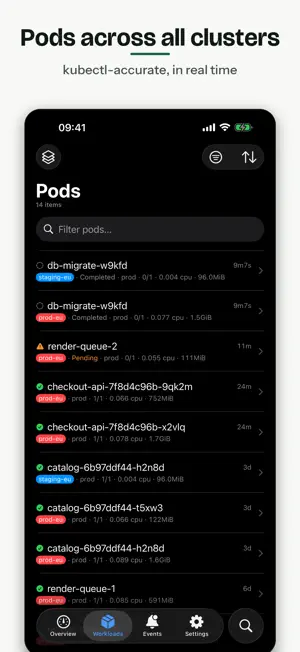
KubeGlance is a native Kubernetes dashboard for iPhone, iPad, and Mac — a real client for the everyday questions: is my cluster okay, what are my pods doing, and what just changed? Import a kubeconfig and you are looking at your clusters in seconds. No account, no in-cluster agent, no telemetry. KubeGlance talks directly to your Kubernetes API servers with the credentials you already have, and it is read-only by default — you can leave it open against production without a second thought. ONE VIEW, EVERY CLUSTER Enable any set of contexts and pods, workloads, nodes, and events merge into a single live view, each row tagged with its source cluster. Name your clusters and color them — a red "prod" banner follows you everywhere. One unreachable cluster never blanks the others. BUILT FOR INCIDENTS Follow merged logs across all replicas of a workload — or hand-pick any pods, even across namespaces and clusters — in one chronological stream. Structured JSON and nginx lines parse into fields with level filters. Bookmark the line that matters and jump back to it. Search the whole buffer instantly, with regex when you want it. THE DETAILS THAT MATTER - Live pod tables with kubectl-accurate statuses (CrashLoopBackOff and friends) - Workload tables: Deployments, StatefulSets, DaemonSets, Jobs — ready over desired, trouble highlighted - Rollout history with revision compare: see exactly what each deploy changed - Search that speaks kubectl: type namespace:prod status:crash and filters become chips - CPU and memory from metrics-server; history and efficiency (reserved vs used, suggested requests) from Prometheus, VictoriaMetrics or Thanos, auto-detected - Cluster events feed with reason and namespace filters AFTER EVERY DEPLOY The checks you would otherwise run in a terminal, as views that appear only when your cluster has the capability: - GitOps: Flux Kustomizations and Helm releases with applied vs attempted revision and what blocks a reconcile, plus Argo CD apps with sync, health and drift - Autoscaling: HPA and KEDA merged per workload, with fallback, missing metrics and at-max called out, and replica and metric charts - Certificates: cert-manager and TLS secrets sorted by days left - Network: Services with the endpoints actually behind them, plus Ingress routing and Gateway API - Config: ConfigMaps and Secrets with the pods that read them, and which pods still run an older version - Releases: what image is running where, and when it rolled out - CronJobs with a last-run verdict, pod memory as a percent of its limit, and node pools against the provider ceiling - Storage: claims that never bound, volumes nobody mounts, namespace quotas and GPU claims - Resources: browse any kind the API server knows, with kubectl's own columns ALERTS Native notifications for crash loops, restart storms, NotReady nodes, stalled rollouts, failed jobs, expiring certificates, services without endpoints, and pods near their memory limit. Rules are scoped by cluster color, namespace and name patterns. Real-time on the Mac; best-effort background checks on iPhone and iPad. No kubeconfig handy? Tap "Try with a Demo Cluster" and explore with sample data — nothing real is contacted. Auth support: client certificates (mTLS) and bearer tokens, including inline PEM and multi-file kubeconfigs with kubectl merge semantics. KUBEGLANCE PRO — WHAT'S PAID, WHAT'S FREE Connecting your own clusters on iPhone and iPad requires a subscription: KubeGlance Pro. Current pricing and any free trial are shown in the app before you subscribe. Everything else is free — the built-in demo cluster, where you can explore the full app with sample data first, and the entire Mac app, which has no in-app purchases at all. Subscriptions renew automatically unless cancelled at least 24 hours before the end of the current period; manage or cancel anytime in your App Store account settings. Terms of Use: https://kubeglance.com/terms Privacy Policy: https://kubeglance.com/privacy
What’s new
Version 1.2.1 · Updated October 7, 2026
Bug fixes and overall stability improvements.
App privacy
The developer, Fancygames, Ltd., reported these privacy practices to Apple.
Data Not Collected
The developer does not collect any data from this app.
Alternatives to KubeGlance: Kubernetes Client
Looking for apps like KubeGlance: Kubernetes Client? Here are 6 similar apps on the App Store. The highest rated is OC Remote - OpenCode Client (5.0/5), and all 6 are free to download.
-
 goDeploy
-
 InKuber - Kubernetes Dashboard
4.5
InKuber - Kubernetes Dashboard
4.5
-
 OC Remote - OpenCode Client
5.0
OC Remote - OpenCode Client
5.0
-
 K8Z - kubernetes server admin
5.0
K8Z - kubernetes server admin
5.0
-
 Dyno PaaS
-
 GLab — Client for GitLab
5.0
GLab — Client for GitLab
5.0
| App | Rating | Price | Last updated | Compare |
|---|---|---|---|---|
| KubeGlance: Kubernetes Client | – | Free | October 7, 2026 | |
| goDeploy | – | Free | May 1, 2026 | Compare |
| InKuber - Kubernetes Dashboard | 4.5 / 5 (2) | Free | Aug 30, 2026 | Compare |
| OC Remote - OpenCode Client | 5.0 / 5 (1) | Free | Oct 29, 2026 | Compare |
| K8Z - kubernetes server admin | 5.0 / 5 (3) | Free | Feb 17, 2025 | Compare |
| Dyno PaaS | – | Free | Feb 5, 2024 | Compare |
| GLab — Client for GitLab | 5.0 / 5 (1) | Free | Oct 29, 2026 | Compare |