

Skyblue Note
Seongdong Gim Productivity iPhoneiPadiPod touch
Skyblue Note is a free Productivity app for iPhone and iPad by Seongdong Gim. Requires iOS 15.0. Updated September 14, 2026.
- Price
- Free
- on the App Store
- Size
- 45 MB
- Age 4+
- Updated
- Sep 14
- 2026 · v3.19
Screenshots


About Skyblue Note
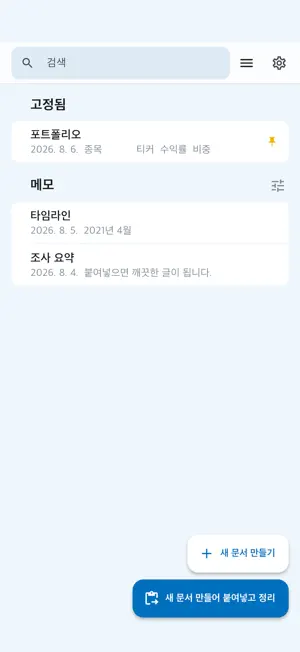
That answer the AI gave you is useful. The formatting is not. Paste it in. Asterisks, hash marks and throat-clearing intros come out, and what is left is clean text you can drop anywhere. WHAT IT REMOVES - Markdown markers (**bold**, ## headings, --- rules) - Emoji and openers like "Sure, here is a summary" - Citation marks such as [1] and the link block at the end - Invisible spaces and zero-width characters WHAT IT DOES WITH TABLES Misaligned rows and missing cells get repaired. Narrow tables are aligned into neat columns. Wide tables full of sentences are broken out row by row, so they stay readable on a phone. You can also copy any table straight into Google Sheets or Excel. IT STAYS ON YOUR DEVICE Cleanup runs entirely on your device. It works with no connection, and your text is never sent to a server. YOU CAN ALWAYS GO BACK Cleanup applies the moment you tap. If you do not like it, one undo puts it back. YOUR RULES Decide whether emphasis becomes quotes or disappears, pick your bullet character and indent, set the spacing around subheadings. Your choices carry over to the next paste. IT IS ALSO YOUR NOTEBOOK What you clean up stays as a note. Pin it, tag it, search it. Sign in with Google and your iPhone, iPad, Mac and web browser all see the same notes. Apple-only households can choose iCloud sync instead. Notes live only in your iCloud or your Google Drive — there is no server of ours. Lock the app with Face ID, and pick the paper you write on: cream, manuscript grid or graph. Tuned for answers from ChatGPT, Claude, Gemini, Grok and Perplexity. PREMIUM SUBSCRIPTION - Premium Base — monthly or yearly - Premium All Devices — monthly or yearly - Premium Lifetime — one-time purchase Prices are shown on the purchase screen and on the App Store. A subscription renews automatically unless it is cancelled at least 24 hours before the end of the current period, and your Apple Account is charged at that time. You can manage or cancel it any time in Settings > Apple Account > Subscriptions. Terms of Use (EULA): https://www.apple.com/legal/internet-services/itunes/dev/stdeula/ Privacy Policy: https://ezlong.com/skybluenote/privacy/
What’s new
Version 3.19 · Updated September 14, 2026
When the keyboard comes up, the ad bar at the top steps aside. That space goes back to your writing. The two floating buttons are smaller and lighter now, and they sit at the very bottom, out of your text. The reading rail on the right got quieter. Only your position stays; the line behind it is gone. Settings can now check for the newest version and take you straight to the update.
App privacy
The developer, Seongdong Gim, reported these privacy practices to Apple.
Data Used to Track You
The following data may be used to track you across apps and websites owned by other companies:
- Identifiers: Device ID
- Usage Data: Advertising Data
Data Not Linked to You
The following data, which may be collected but is not linked to your identity, may be used for the following purposes:
- Identifiers: Device ID
- Usage Data: Advertising Data
Used for: Third-Party Advertising
Alternatives to Skyblue Note
Looking for apps like Skyblue Note? Here are 6 similar apps on the App Store. The highest rated is pensiv: Writing app for novels (4.5/5), and all 6 are free to download.
-
 휠렛 Wheelet: AI 차계부·바이크
-
 ScrivenerBridge
-
 Glit - Web Novel Writing
-
 SnapStash - AI Screenshot org
2.0
SnapStash - AI Screenshot org
2.0
-
 FolderStory
2.9
FolderStory
2.9
-
 pensiv: Writing app for novels
4.5
pensiv: Writing app for novels
4.5
| App | Rating | Price | Last updated | Compare |
|---|---|---|---|---|
| Skyblue Note | – | Free | September 14, 2026 | |
| 휠렛 Wheelet: AI 차계부·바이크 | – | Free | Jul 21, 2026 | Compare |
| ScrivenerBridge | – | Free | Aug 23, 2026 | Compare |
| Glit - Web Novel Writing | – | Free | Sep 9, 2026 | Compare |
| SnapStash - AI Screenshot org | 2.0 / 5 (1) | Free | Jul 28, 2026 | Compare |
| FolderStory | 2.9 / 5 (17) | Free | Oct 31, 2024 | Compare |
| pensiv: Writing app for novels | 4.5 / 5 (4) | Free | Sep 27, 2026 | Compare |
Compare Skyblue Note with the top alternatives: ratings, updates, ASO score and keyword gaps →