

Hoops Basketball Scoreboard
Blacknosaur Sports iPhoneiPadiPod touchMacApple Watch
Hoops Basketball Scoreboard is a free Sports app for iPhone and iPad by Blacknosaur. Requires iOS 17.0. Updated September 7, 2026.
- Price
- Free
- on the App Store
- Size
- 9 MB
- Age 4+
- Updated
- Sep 7
- 2026 · v0.8.0
Screenshots

About Hoops Basketball Scoreboard
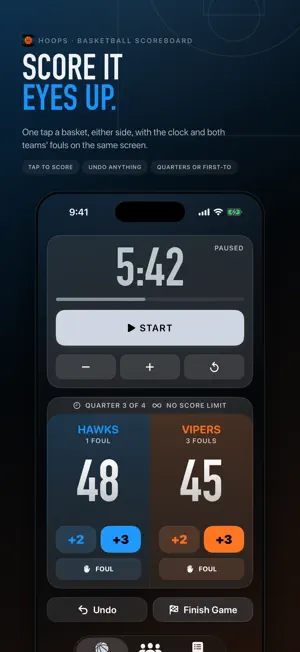
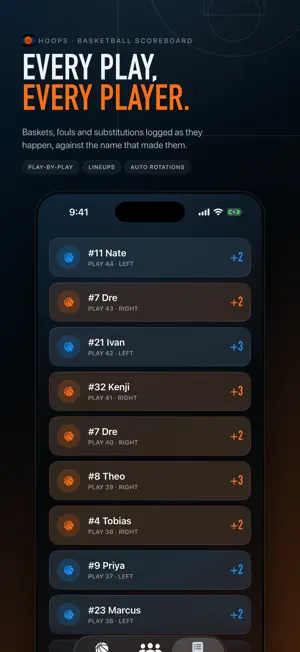
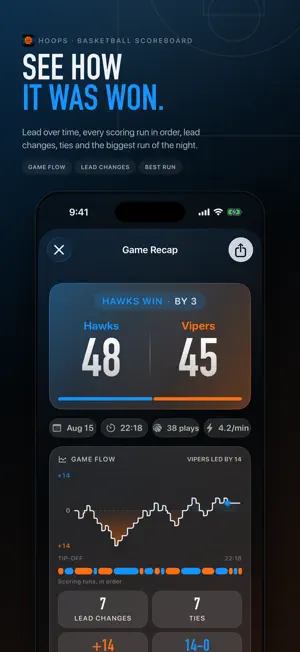
Hoops is a fast basketball scoreboard for pickup games, rec leagues and local competitions on iPhone, iPad, Mac and Apple Watch. Keep your eyes on the game, not the screen. START FREE Run a complete game with scores, game clock, periods, team fouls, possession and timeouts. UNLOCK HOOPS PRO FOREVER One purchase unlocks full game history, player profiles, advanced setup, detailed recaps and statistics. Use iPad or Mac as a dedicated external scoreboard. Build two or more balanced teams from a searchable player pool by name or number. Export games and player stats to CSV, including full game summaries with totals, roster and every play. Sync through iCloud when your devices use the same Apple Account; sync can take time. MADE FOR EVERY COURT • iPhone, iPad and resizable Mac windows • Apple Watch companion • Fast keyboard controls on Mac • Clear simple and advanced modes • Works offline after setup PRIVATE BY DESIGN No account, advertising or third-party analytics. Your game and player data stays on your devices and in your private iCloud account.
What’s new
Version 0.8.0 · Updated September 7, 2026
Hoops 0.8.0 (build 93) release candidate. This build adds the universal iPad experience: try portrait, landscape, window resizing, and the full game controls on a large screen. HoopsTrackeriPad is an internal iPad-only development target and is not part of this test build. On Mac, Hoops is a standalone Catalyst app. Test the Control window and the read-only Scoreboard window, including Space (start/pause), Q/W (left scoring), O/P (right scoring), Command-Z (undo), and Command-D (open Scoreboard). Test Settings → Tools: search Team Maker players while preserving selected players and team count, then export the games and player-stat CSV files. In Games, open a completed game and use Export full game CSV. Test Hoops Pro Restore Purchase, including after reinstall. Use the same Apple Account on iPhone/iPad and Mac. Test offline edits, reconnect, and eventual iCloud key-value-store synchronization; it is not real-time. Apple Watch syncs through its paired iPhone using WatchConnectivity. Physical-device iCloud sync remains unverified. Please test the complete basketball workflow on iPhone and, if available, a paired Apple Watch: • Start and finish a free simple-scoreboard game. • Confirm simple games show every score and timeout in the Timeline tab. • In quarter games, confirm the live and saved timelines show quarter-ready, rest-started, quarter-ended, and timeout-ended markers. • Run a quarter clock to zero, verify the rest timer loads paused, then start it and verify the next quarter is prepared paused. • Configure timeouts, call one for each team, and verify the count and timeout clock start immediately. • During a timeout, confirm add-point and foul controls are disabled on iPhone and Apple Watch. • Confirm the timer is neutral during play, amber during rest, and matches the requesting team during a timeout. • Hold the timer reset control for three seconds and verify the fill animation prevents accidental resets. • Confirm a haptic and bell play when a clock reaches zero. • Confirm the finish-game banner appears only when the final quarter ends, never when a timeout or rest clock ends. • Open a game's delete confirmation and verify its row stays visible until deletion is confirmed. • Swipe to remove a saved player and verify the row stays visible until removal is confirmed. • Open Games or Players and purchase Hoops Pro with an Apple sandbox account. • Confirm history, player profiles, advanced game setup, recaps, and statistics unlock immediately. • Delete and reinstall the app, then use Settings → Hoops Pro → Restore Purchase. • Change the app language in Settings and check the main setup, live game, history, players, and Pro screens. • Confirm score, clock, fouls, possession, and game state remain synchronized between iPhone and Apple Watch. Please report the device models, OS versions, selected language, and exact steps for any issue.
App privacy
The developer, Blacknosaur, reported these privacy practices to Apple.
Data Not Collected
The developer does not collect any data from this app.
Alternatives to Hoops Basketball Scoreboard
Looking for apps like Hoops Basketball Scoreboard? Here are 6 similar apps on the App Store. The highest rated is Match Time Pro (5.0/5), and all 6 are free to download.
-
 Match Time Pro
5.0
Match Time Pro
5.0
-
 TAIMA - sports timer
-
 Soccer Pitch Timer
-
 GameTime: Football
-
 C4HH Training
5.0
C4HH Training
5.0
-
 SOCCER ELS
| App | Rating | Price | Last updated | Compare |
|---|---|---|---|---|
| Hoops Basketball Scoreboard | – | Free | September 7, 2026 | |
| Match Time Pro | 5.0 / 5 (3) | Free | Mar 20, 2026 | Compare |
| TAIMA - sports timer | – | Free | Mar 12, 2026 | Compare |
| Soccer Pitch Timer | – | Free | Sep 15, 2026 | Compare |
| GameTime: Football | – | Free | Sep 15, 2026 | Compare |
| C4HH Training | 5.0 / 5 (1) | Free | Oct 24, 2025 | Compare |
| SOCCER ELS | – | Free | Jan 24, 2024 | Compare |