

Remove Objects – Ciao
Silvio Stanco Photo & Video iPhoneiPadiPod touch
Remove Objects – Ciao is a free Photo & Video app for iPhone and iPad by Silvio Stanco. Rated 5.0/5 from 2 ratings. Requires iOS 17.0.
- Rating
- 5.0
- 2 ratings
- Price
- Free
- on the App Store
- Size
- 87 MB
- Age 4+
- Updated
- Oct 1
- 2026 · v1.0.7
Screenshots


About Remove Objects – Ciao
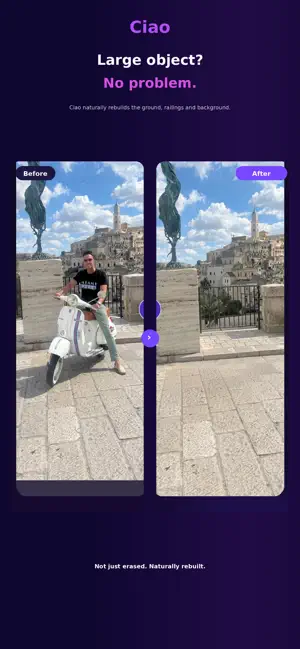
Remove unwanted people and objects from your photos — with one tap or precise manual control. A stranger in the background. A bin beside your best holiday shot. A person or object that simply shouldn't be there. Tap it, select it and let Ciao remove it. FOR THE HARD CASES Hard cases are where Ciao stands out. When automatic removers struggle with complex edges, overlapping subjects or difficult backgrounds, Ciao gives you full control. Use the brush and eraser to mark exactly what should disappear and what should stay. Zoom in, refine difficult edges and make the selection as precise as you need. One finger paints. Two fingers pan. Pinch to zoom. Where one-tap tools stop, Ciao lets you keep going. AI BACKGROUND RECONSTRUCTION Ciao doesn't simply blur or cover the selected area. It uses AI to reconstruct the missing part of the scene based on the surrounding photo. Remove people, tourists, distracting objects and other unwanted elements while keeping the result natural. BEFORE & AFTER Compare the edited photo with the original at any time using the before-and-after slider. See exactly what changed before saving or sharing your result. PRIVACY MODE Editing a personal photo around other people? With one tap, Ciao can hide behind a neutral screen — calculator, notes or weather, your choice. Privacy Mode can be disabled in Settings. PRICING Ciao Gold Weekly includes 20 removals per week. Ciao Gold Annual includes 240 removals per year. Eligible new subscribers can start with a free trial: 3 days with Ciao Gold Weekly or 7 days with Ciao Gold Annual. One-time Removal Boosts are also available: 10, 30 or 100 additional removals. Purchased Boost removals do not expire until used. YOUR PHOTOS STAY YOURS No account. No sign-in. No ads. No tracking. Ciao only processes the photos you choose when you start an edit. Terms of Use: https://www.apple.com/legal/internet-services/itunes/dev/stdeula/ Privacy Policy: https://ciao-backend.fly.dev/privacy
What’s new
Version 1.0.7 · Updated October 1, 2026
Ciao 1.0.7 makes upgrading and purchasing simpler. • New weekly and annual Ciao Gold options • Improved subscription and purchase experience • Updated removal packages • Improved translations • Bug fixes and performance improvements
App privacy
The developer, Silvio Stanco, reported these privacy practices to Apple.
Data Not Linked to You
The following data, which may be collected but is not linked to your identity, may be used for the following purposes:
- User Content: Photos or Videos
- Identifiers: Device ID
Used for: App Functionality
Alternatives to Remove Objects – Ciao
Looking for apps like Remove Objects – Ciao? Here are 6 similar apps on the App Store. The highest rated is Remove Objects: Photo DsignAI (5.0/5), and all 6 are free to download.
-
 Remove Object: AI Photo Eraser
-
 Person Remover: Omit
-
 Remove Objects: Photo DsignAI
5.0
Remove Objects: Photo DsignAI
5.0
-
 Photo Eraser: Object & BG AI
-
 Photo Erase Object Remover
5.0
Photo Erase Object Remover
5.0
-
 PixelGone
| App | Rating | Price | Last updated | Compare |
|---|---|---|---|---|
| Remove Objects – Ciao | 5.0 / 5 (2 ratings) | Free | October 1, 2026 | |
| Remove Object: AI Photo Eraser | – | Free | Aug 13, 2026 | Compare |
| Person Remover: Omit | – | Free | Oct 10, 2026 | Compare |
| Remove Objects: Photo DsignAI | 5.0 / 5 (1) | Free | May 28, 2026 | Compare |
| Photo Eraser: Object & BG AI | – | Free | Aug 13, 2026 | Compare |
| Photo Erase Object Remover | 5.0 / 5 (1) | Free | Oct 20, 2026 | Compare |
| PixelGone | – | Free | Oct 3, 2026 | Compare |