

Finance: Money Manager
Charles Peter Son Adison Finance iPhoneiPadiPod touch
Finance: Money Manager is a free Finance app for iPhone and iPad by Charles Peter Son Adison. Requires iOS 18.0. Updated October 26, 2026.
- Price
- Free
- on the App Store
- Size
- 19 MB
- Age 4+
- Updated
- Oct 26
- 2026 · v2.5.0
Screenshots
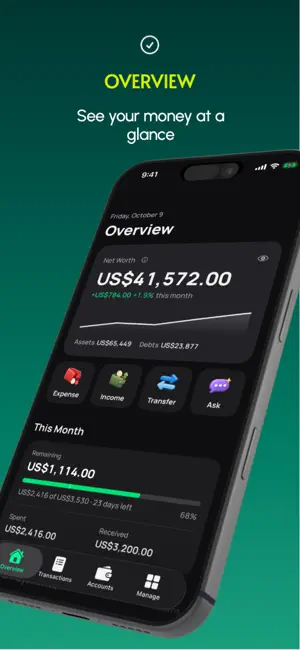

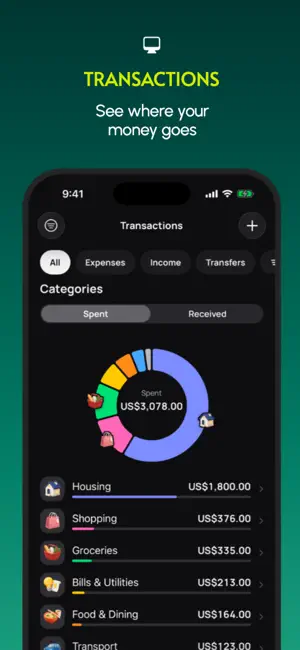

About Finance: Money Manager
Finance: Money Manager helps you track accounts, spending, budgets, goals, recurring payments, trips, warranties, and more in one clean app. Stay organized, understand where your money goes, and manage your financial life with a polished experience designed to feel at home on Apple devices. --- YOUR MONEY, CLEARLY ORGANIZED See your accounts, balances, net worth, monthly activity, upcoming payments, and recent transactions in one place. Finance keeps everyday tracking and longer-term planning connected without making the app feel complicated. TRACK ACCOUNTS IN ONE PLACE Organize cash, checking, savings, e-wallets, credit cards, investments, loans, and more. Each account keeps its original currency, while combined totals can use your chosen base currency and exchange rates. LOG TRANSACTIONS QUICKLY Add expenses, income, transfers, and refunds with a focused transaction flow. Use Quick Log for faster entry, or enter details manually when you want more control. UNDERSTAND YOUR SPENDING Browse your activity by list, month, or year. See category breakdowns, monthly cash flow, spending trends, and historical activity to better understand how your money changes over time. BUDGET YOUR WAY Create monthly category budgets, track what remains, and move budget between categories when priorities change. Add notes to individual months so you can remember why a budget was different later. PLAN AHEAD Keep track of recurring income and expenses, credit card payments, savings goals, trips and events, and product warranties. Finance helps you keep important money-related plans together without turning them into one complicated system. DESIGNED FOR APPLE DEVICES Finance is designed to feel at home on iPhone and iPad, with familiar navigation, thoughtful interactions, light and dark appearance, and layouts that adapt across screen sizes. PRIVATE & LOCAL-FIRST Your financial data is stored on your device and, if you enable iCloud Sync, can be kept in sync across your Apple devices through your iCloud account. Finance does not show ads, does not use third-party analytics or advertising trackers, and does not sell your personal or financial data. Create backups and export your transactions whenever you want. --- Privacy Policy: https://finance-money.github.io/manager/privacy Terms of Use (EULA): https://www.apple.com/legal/internet-services/itunes/dev/stdeula/
What’s new
Version 2.5.0 · Updated October 26, 2026
• A clearer Net Worth page, opened from Overview, with your total and each currency on one screen. • A refined Recurring view, with what's coming up grouped by week. • Transaction lists are a little more compact, so more fits on screen. • Minor fixes and improvements.
App privacy
The developer, Charles Peter Son Adison, reported these privacy practices to Apple.
Data Not Collected
The developer does not collect any data from this app.
Alternatives to Finance: Money Manager
Looking for apps like Finance: Money Manager? Here are 6 similar apps on the App Store. The highest rated is Monthly Bill Reminder Tracker (5.0/5), and all 6 are free to download.
-
 Clover: Personal Finance
-
 Shikli - Budget Management
-
 Budgefy: Receipt AI
-
 Dividend Tracker: Pulse
-
 Monthly Bill Reminder Tracker
5.0
Monthly Bill Reminder Tracker
5.0
-
 Investment Tracker: Trade Log
5.0
Investment Tracker: Trade Log
5.0
| App | Rating | Price | Last updated | Compare |
|---|---|---|---|---|
| Finance: Money Manager | – | Free | October 26, 2026 | |
| Clover: Personal Finance | – | Free | Oct 25, 2026 | Compare |
| Shikli - Budget Management | – | Free | Sep 17, 2026 | Compare |
| Budgefy: Receipt AI | – | Free | Oct 24, 2026 | Compare |
| Dividend Tracker: Pulse | – | Free | Jun 16, 2026 | Compare |
| Monthly Bill Reminder Tracker | 5.0 / 5 (1) | Free | Sep 28, 2026 | Compare |
| Investment Tracker: Trade Log | 5.0 / 5 (8) | Free | May 26, 2025 | Compare |