

OtoScan: OBD2 Car Scanner
ONUR SAHIN Utilities iPhoneiPadiPod touch
OtoScan: OBD2 Car Scanner is a free Utilities app for iPhone and iPad by ONUR SAHIN. Requires iOS 15.0. Updated October 26, 2026.
- Price
- Free
- on the App Store
- Size
- 134 MB
- Age 4+
- Updated
- Oct 26
- 2026 · v1.30.4
Screenshots


About OtoScan: OBD2 Car Scanner
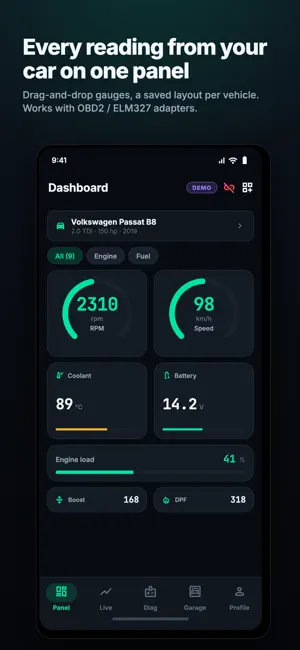
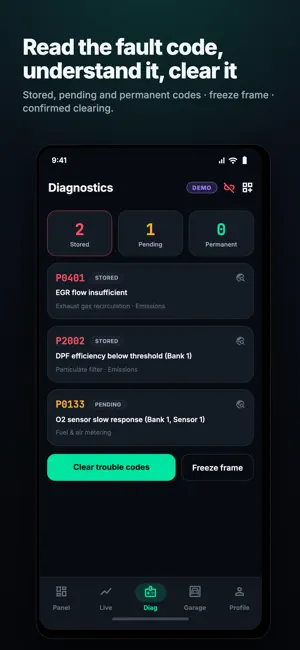
OtoScan turns an ELM327 adapter into a diagnostic tool you can actually read. Plug the adapter into your car's OBD2 socket, connect over Bluetooth or Wi-Fi, and see what the ECU is reporting — not a generic guess. WHAT IT DOES Fault codes Read stored, pending and permanent codes, each with a plain-language explanation and the system it belongs to. Freeze frame shows the conditions at the moment the fault was recorded. Clearing is confirmed, and OtoScan tells you plainly that clearing erases the record without fixing the fault. Live data Every parameter your car answers to, in one searchable list with category filters. Put several on one live chart and watch them move together — RPM against boost, coolant against load, lambda against fuel trim. Your own dashboard Drag-and-drop gauges, dials, bars and numeric tiles, saved as a layout per vehicle. Your diesel and your hybrid do not need the same panel, so they do not get one. Performance 0–100, 0–60, 0–140, 60–100 and 80–120 km/h, timed to the hundredth of a second. The run stops itself at the target and keeps your best. Trip and consumption Distance, duration, idle time, average and instant consumption, fuel used and an estimated cost per trip, with a per-vehicle fuel price. Garage Unlimited vehicles. Pick make, model, year, trim and engine and OtoScan resolves what that car supports; switch between them with one tap. Manufacturer parameters The extended PID scanner asks the car itself over UDS 0x22 and lists what actually answers. It is read-only — it never writes while scanning. Coding Coding and adaptation channels with a risk level on every one, the current value read and logged before the change, and the result read back afterwards. Nothing is written without an explicit confirmation, and every operation is kept in a log you can review. Recording Log every supported parameter to CSV, optionally with a GPS trace, and share the file straight out of the app. WORKS WITH Any ELM327-compatible adapter over Bluetooth Classic, Bluetooth LE or Wi-Fi. Most vehicles built from 2001 (petrol) and 2004 (diesel) in Europe, and 1996 onward in the US, speak OBD2. Manufacturer-specific parameters and coding depend on the car and the adapter, and OtoScan tells you which are available on yours instead of promising them in advance. DEMO MODE Try the whole app with a simulated car before you buy an adapter. Every screen works, with data that behaves like a real engine. OTOSCAN PRO Removes ads and unlocks performance timing, session recording, extended PIDs, the DID scanner, custom commands and coding. Monthly, yearly or a one-off lifetime purchase. IMPORTANT OtoScan is a diagnostic aid, not a substitute for a qualified workshop. Coding writes to your vehicle's control units and can cause permanent damage if misapplied — read the disclaimer in the app before you use it. Do not operate the app while driving. SUBSCRIPTION DETAILS OtoScan Pro is a monthly subscription (USD 4.99), a yearly subscription (USD 29.99), or a one-time lifetime purchase (USD 79.99). Prices are shown in your own currency in the app. Payment is charged to your Apple Account when you confirm the purchase. A subscription renews automatically unless it is cancelled at least 24 hours before the end of the current period, and the renewal is charged within the 24 hours before that period ends. Manage or cancel a subscription in your Apple Account settings. Terms of Use (EULA): https://www.apple.com/legal/internet-services/itunes/dev/stdeula/ Privacy Policy: https://sites.google.com/view/otoscan/privacy
What’s new
Version 1.30.4 · Updated October 26, 2026
The sensor list: tap a reading, see its chart. • Tapping a sensor opens its own screen — the value large, a live chart under it, and the lowest and highest seen so far. While that screen is open the parameter is read every pass, so the chart is genuinely live. • The list fills and refreshes markedly faster: several readings that come from one identifier are now decoded from a single request. • Readings whose formula does not fit the car, and which produced impossible values, are no longer shown. A plausible-looking wrong number is worse than a missing row. • The filter strip leads with the categories; "hide empty" moved to the end.
App privacy
The developer, ONUR SAHIN, reported these privacy practices to Apple.
Data Used to Track You
The following data may be used to track you across apps and websites owned by other companies:
- Identifiers: Device ID
Data Linked to You
The following data, which may be collected and linked to your identity, may be used for the following purposes:
- Identifiers: User ID
- Usage Data: Product Interaction
- Purchases: Purchase History
- Contact Info: Email Address, Name
- User Content: Other User Content
- Diagnostics: Crash Data, Performance Data
Used for: Analytics, App Functionality
Data Not Linked to You
The following data, which may be collected but is not linked to your identity, may be used for the following purposes:
- Identifiers: Device ID
Used for: Third-Party Advertising
Alternatives to OtoScan: OBD2 Car Scanner
Looking for apps like OtoScan: OBD2 Car Scanner? Here are 6 similar apps on the App Store.
-
 OtoSinyal
-
 2dakika: OBD Car Diagnostics
-
 Check Engine Codes by Motorvet
-
 Axlyne: AI OBD2 Car Scanner
-
 TayScan
-
 Klaro: OBD2 Car Scanner
| App | Rating | Price | Last updated | Compare |
|---|---|---|---|---|
| OtoScan: OBD2 Car Scanner | – | Free | October 26, 2026 | |
| OtoSinyal | – | Free | Oct 18, 2026 | Compare |
| 2dakika: OBD Car Diagnostics | – | Free | Oct 27, 2026 | Compare |
| Check Engine Codes by Motorvet | – | Free | Oct 26, 2026 | Compare |
| Axlyne: AI OBD2 Car Scanner | – | Free | Oct 1, 2026 | Compare |
| TayScan | – | Free | Oct 16, 2026 | Compare |
| Klaro: OBD2 Car Scanner | – | Free | Oct 25, 2026 | Compare |