

Feather: Swipe Photo Cleaner
园 高 Utilities iPhoneiPadiPod touch
Feather: Swipe Photo Cleaner is a free Utilities app for iPhone and iPad by 园 高. Requires iOS 18.0. Updated October 21, 2026.
- Price
- Free
- on the App Store
- Size
- 10 MB
- Age 4+
- Updated
- Oct 21
- 2026 · v1.3
Screenshots

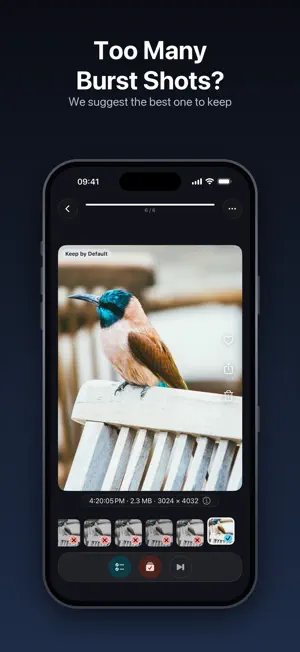

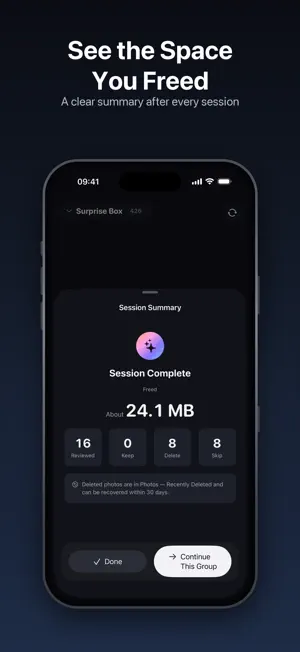
About Feather: Swipe Photo Cleaner
Cleaning up your camera roll, finally worth finishing. Feather is an on-device photo cleaner for iPhone. It pulls a small, random batch out of your library and you decide each photo with one swipe — right to keep, left to delete — while a running total shows exactly how much space you freed. ONE SMALL BATCH, PULLED AT RANDOM An endless camera roll is hard to start. Feather does not march through it in order: it shuffles out a batch of 20 (or 10, 15, 30, 50, 80, 100 — your choice). Finish one batch, stop whenever you like. AND IT IS NOT ALL CLUTTER Surprise Box shuffles your entire library. On This Day pulls the same date from a few years back. The trip you burst-shot twenty times, a sky you forgot you ever photographed. Clearing photos is usually a chore; sorted this way, it often turns into one more batch. Prefer something specific? Switch the source to a month, a media type (screenshots, Live Photos, selfies, portraits, panoramas, bursts, and more), a single album, or photos in no album; batches can run newest or oldest first. Albums you mark as organized are left out. SWIPE FOUR WAYS Swipe right to keep, left to mark for deletion, up to skip for now — the ones you cannot decide on can wait, so you are never forced to choose between forever and gone. Swipe down to file a photo into an album. Double-tap to favorite, tap once for a full-screen view and photo details. Directions can be reassigned in Settings. FILE A PHOTO WITH THE SAME SWIPE Swipe down and the Album Dock rises. Without lifting your finger, slide sideways to pick the album, then let go. Do not slide and it lands in the album you used last: a straight swipe down, no tapping, no aiming. Every photo can go somewhere different, so you never have to lock in one destination before you start. You can also tap an album in the dock, or open More for the full list, where the first tile is always New Album. Organizing and filing finish together, with no second pass in Photos. Rather not have the dock? Turn it off in Settings and swipe-down filing still works. DELETION YOU CAN TRUST Nothing is deleted the moment you swipe. Before you leave a batch, Feather lays out every marked photo for one final review; uncheck any to keep it. Confirmed deletions go through the system Photos library and remain in Recently Deleted for up to 30 days. Every session ends with a summary: photos handled, photos deleted, space freed. COMPARE SIMILAR PHOTOS AS A GROUP Feather uses on-device image analysis to group bursts, duplicates, and visually similar photos from the same day. It suggests which photo to keep and tells you why, then lets you overrule every choice. Compare full-size images, zoom in, and choose Strict, Standard, or Loose matching. LIVE PHOTOS AND ANIMATED IMAGES Press and hold to play a Live Photo while organizing or comparing. Auto-play, sound, and iCloud Live Photo downloads are controlled in Settings. iCloud downloading is off by default, and the app clearly labels network activity as download only, never upload. PRIVATE BY DESIGN Feather has no account, no server, no advertising SDK, and no analytics SDK. It collects no data. Photo analysis—including similar-photo detection—runs entirely on your iPhone. If Optimize iPhone Storage is enabled, Apple's PhotoKit may download the data needed to display or analyze your own iCloud photos. Your photos are never uploaded to us. CLEAR, ONE-TIME PRICING Organizing with swipes is always free and unlimited across every source. Similar Photo Grouping and File as You Go each include five free groups per day, refreshed the next day. Feather Pro unlocks both with one purchase. It is not a subscription and never auto-renews. WHAT FEATHER DOES NOT DO • Photos only; video cleanup is not supported. • No one-tap automatic deletion. You make the final decision for every photo. • No cloud photo library or cross-device sync. Requires iOS 18 or later. Questions or suggestions? Email [email protected].
What’s new
Version 1.3 · Updated October 21, 2026
Feather 1.3: now you can organize videos, too. VIDEOS (FREE, ALWAYS) • Switch the source panel to Videos and swipe through them full screen. Left, right, and up follow Settings → Gestures; swipe down to go back and change a decision • Largest First by default, so the videos taking up the most space come up first. Sizes are measured one by one in the background • Tap to pause, double-tap to favorite, press and hold to fast-forward, drag the progress bar, or pick 0.5×–3× under More • The same scopes as photos: All, On This Day, Not in an Album, By Month, By Album — plus Screen Recordings, Very Short Clips, Slo-mo, and Time-lapse • iCloud-only videos stream with download only, never upload. On cellular they do not auto-play unless you turn on Play iCloud Videos on Cellular (Settings → Playback) • Video organizing is unlimited and free. Videos are keep-or-delete only and are not filed into albums • Organization Progress in the History tab now includes videos SOURCES • A redesigned source panel: pick Media (Photos or Videos), Order, and Scope in one place • New order: Largest, to start with the photos taking up the most space • Screenshots, Live Photos, and Selfies sit right in Scope; other types are under More Types • Surprise Box is now All Photos. Photos per Group is set in Settings → Organize LOBBY • The lobby shows about how much space the current source takes up, and updates when you switch FIXES • The space to be freed during a session now uses measured sizes instead of staying on an estimate • File sizes use the same units as iOS Photos and Settings, so numbers no longer read low Everything stays on your device — no photos or videos are uploaded. File as You Go and Similar Photo Grouping remain Pro features, each with 5 free groups per day. Questions or ideas? Email [email protected].
App privacy
The developer, 园 高, reported these privacy practices to Apple.
Data Not Collected
The developer does not collect any data from this app.
Alternatives to Feather: Swipe Photo Cleaner
Looking for apps like Feather: Swipe Photo Cleaner? Here are 6 similar apps on the App Store. The highest rated is Duplicate Photos: LessPhoto (5.0/5), and all 6 are free to download.
-
 Duplicate Photos: LessPhoto
5.0
Duplicate Photos: LessPhoto
5.0
-
 Clean Up Storage: Cleaner AI
-
 Byepix: Swipe Photo Cleaner
-
 Oneby - Pick and Delete
4.5
Oneby - Pick and Delete
4.5
-
 Photo Pure: Photo Organizer
-
 ByePic
5.0
ByePic
5.0
| App | Rating | Price | Last updated | Compare |
|---|---|---|---|---|
| Feather: Swipe Photo Cleaner | – | Free | October 21, 2026 | |
| Duplicate Photos: LessPhoto | 5.0 / 5 (2) | Free | Oct 17, 2026 | Compare |
| Clean Up Storage: Cleaner AI | – | Free | Oct 26, 2026 | Compare |
| Byepix: Swipe Photo Cleaner | – | Free | Aug 21, 2026 | Compare |
| Oneby - Pick and Delete | 4.5 / 5 (2) | Free | Sep 17, 2026 | Compare |
| Photo Pure: Photo Organizer | – | Free | Oct 25, 2026 | Compare |
| ByePic | 5.0 / 5 (1) | Free | Dec 22, 2025 | Compare |