

NextClass – Teacher Timetable
江涛 隋 Education iPhoneiPadiPod touch
NextClass – Teacher Timetable is a free Education app for iPhone and iPad by 江涛 隋. Requires iOS 18.0. Updated October 11, 2026.
- Price
- Free
- on the App Store
- Size
- 18 MB
- Age 4+
- Updated
- Oct 11
- 2026 · v1.1
Screenshots

About NextClass – Teacher Timetable
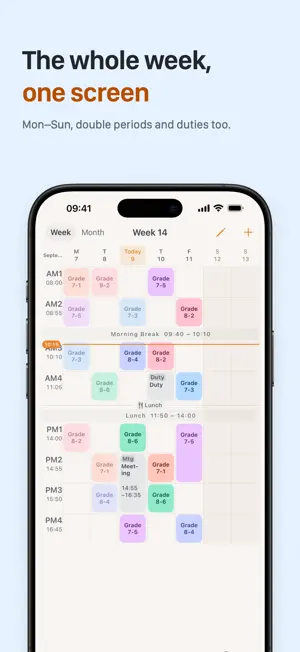
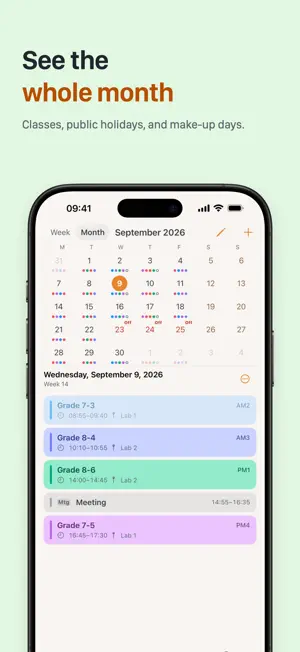
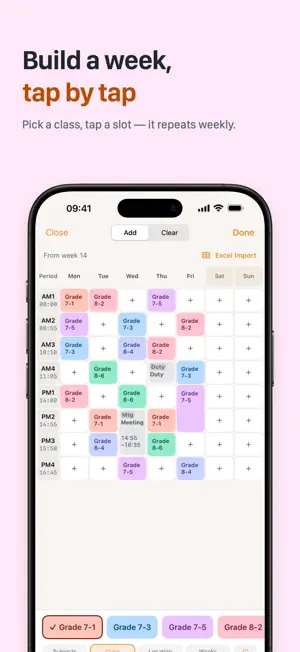
Which period are you in? Which room is next? NextClass ties your bell schedule, semester and weekly timetable together, and answers both the moment you open it. Two subjects, two school levels, meetings and duties on top — they all fit on one timetable, and it keeps up when the school changes. TODAY VIEW Real-time status for every period: done, in progress, or upcoming. The timeline follows your bell schedule automatically. Jot down a quick note after each class to track your teaching progress. Tap Tomorrow to see the next teaching day — on a Friday evening it shows Monday. WEEK VIEW See your whole week on one screen — double periods, meetings and duties included — and edit it in place. A monthly calendar shows lesson distribution at a glance; tap any date to jump there. FULL WEEK SCHEDULE Pick a subject, class and room, then tap cells to fill in a week that repeats automatically. Press and drag down on an empty cell for a double period. Placed one by mistake? Switch to Clear to remove it, with Undo. Or use the Excel template: the app generates it from your bell schedule, you pick classes from drop-down lists, and the import matches every period. SUBJECTS AND SCHOOL LEVELS Teach one class two subjects and still tell them apart — choose the subject when placing a lesson. Teaching both middle and high school? Add up to three school levels, each with its own bell schedule. Each class remembers its room, so the location fills in for you. MEETINGS AND DUTIES Put meetings, duty and supervision on the timetable. Set them by period: when the bell schedule changes, their times follow. They can remind you when they start. FLEXIBLE WEEKS Every week, odd or even weeks, or every few weeks — from any week to any week. Designate rest days for odd and even weeks separately within a semester. BELL SCHEDULE MANAGEMENT Multiple bell schedules take effect by date, and any weekday can have its own. Schedules are grouped by date range, so when your school changes times, the usual and weekday schedules switch together. Create one by hand or pre-fill it from a Word document, reviewing each row before applying. FLEXIBLE ADJUSTMENTS Cancel a class, change the room, or reschedule a one-off — single-day changes never affect your weekly template. CLASS REMINDERS Automatic local notifications before each class. Canceled classes are silently removed from the notification queue. Tap a notification to jump straight to the lesson. PRIVACY All your data stays on your device. No uploads, no cloud sync, no account required. Create up to 5 local backups, or export a snapshot to the Files app for safekeeping. WIDGETS Large widgets show your whole week, and the circular Lock Screen widget shows the countdown. PUBLIC HOLIDAYS Built-in holiday data for mainland China, Japan, South Korea, and Taiwan. When a holiday falls on a school day, the app lists affected classes for your confirmation before canceling anything.
What’s new
Version 1.1 · Updated October 11, 2026
NextClass 1.1 adds many of the features teachers have been asking for. • Multiple subjects: teach one class two subjects and still tell them apart — pick the subject when placing a lesson • Week view and Full Week Schedule: the timetable now opens on a whole week (replacing the 3-day view). Tap the pencil at the top right to fill in a week cell by cell; switch to Clear to remove lessons, with Undo • Double periods and week ranges: press and drag down on an empty cell for a double period; set every how many weeks, and from which week to which • Meetings and duties: put meetings, duty and supervision on the timetable. Their times follow the bell schedule, and they can remind you when they start • Bell schedules by weekday: give a weekday its own bell schedule. The bell schedule page is grouped by date range, and a whole group can be switched at once when your school changes times • Multiple school levels: teaching both middle and high school? Add up to three levels, each with its own bell schedule • Class rooms: each class remembers its room, so the location fills in when you schedule a lesson • Look ahead: tap Tomorrow on Today to see the next teaching day — on a Friday evening it shows Monday • Week widgets: large widgets show your whole week, and the circular Lock Screen widget shows the countdown • Public holidays: with automatic holidays on, weekly lessons and activities are skipped on public holidays, with no reminders. Choose "Teach on holiday" when needed; your original schedule is kept • The Excel timetable template now has drop-down lists Plus many display and stability fixes.
App privacy
The developer, 江涛 隋, reported these privacy practices to Apple.
Data Not Collected
The developer does not collect any data from this app.
Alternatives to NextClass – Teacher Timetable
Looking for apps like NextClass – Teacher Timetable? Here are 6 similar apps on the App Store. The highest rated is Classrin (5.0/5), and all 6 are free to download.
-
 Croissante
-
 Classrin
5.0
-
 CourseBell
4.0
-
 Bible Alarm: Daily Verse Alarm
5.0
-
 Bell+
4.9
-
 Bible: Read & Study
| App | Rating | Price | Last updated | Compare |
|---|---|---|---|---|
| NextClass – Teacher Timetable | – | Free | October 11, 2026 | |
| Croissante | – | Free | Apr 30, 2026 | Compare |
| Classrin | 5.0 / 5 (4) | Free | Oct 21, 2026 | Compare |
| CourseBell | 4.0 / 5 (1) | Free | Aug 31, 2026 | Compare |
| Bible Alarm: Daily Verse Alarm | 5.0 / 5 (16) | Free | Aug 25, 2026 | Compare |
| Bell+ | 4.9 / 5 (19) | Free | Oct 15, 2026 | Compare |
| Bible: Read & Study | – | Free | Apr 21, 2026 | Compare |