

Inkira: Coloring & Art
Cole stegman Entertainment iPhoneiPadiPod touch
Inkira: Coloring & Art is a free Entertainment app for iPhone and iPad by Cole stegman. Rated 5.0/5 from 2 ratings. Requires iOS 13.0.
- Rating
- 5.0
- 2 ratings
- Price
- Free
- on the App Store
- Size
- 94 MB
- Age 4+
- Updated
- Oct 14
- 2026 · v1.3.1
Screenshots

About Inkira: Coloring & Art
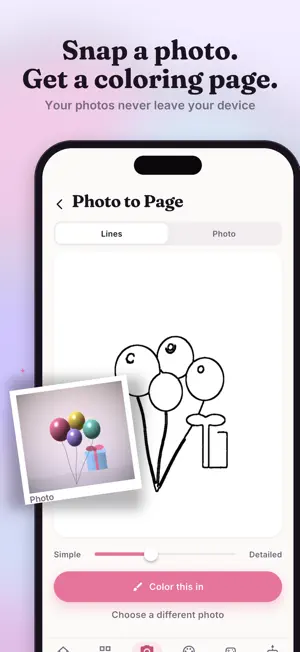
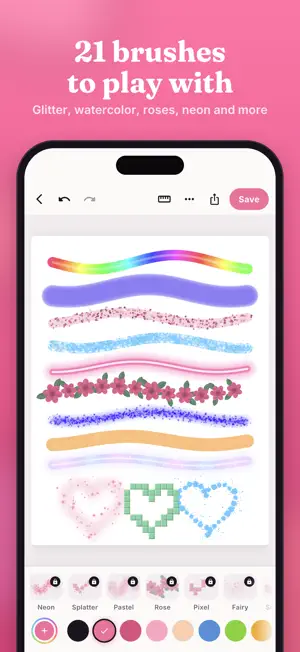
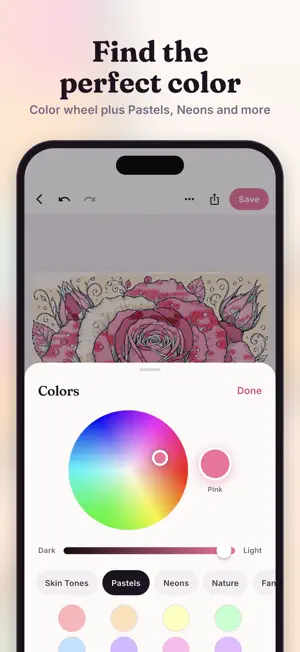
Turn anything into art. Color it. Make it yours. Inkira is the creative coloring app where kids can color ready-made pages, turn their own photos into coloring art, draw from scratch, and now create personalized birthday cards they can actually send to people they love. SNAP A PHOTO. MAKE A COLORING PAGE. Point your camera at anything, or pick a photo from your gallery. Inkira converts it into a clean line-art coloring page in seconds using on-device processing. Your photos never leave your phone. COLOR WITH REAL ARTIST BRUSHES. Choose from 21 artist brushes: colored pencil, marker, crayon, watercolor, airbrush, glitter, glow pen, chalk, oil pastel, fine liner, rainbow, magic shimmer, and 7 exclusive Plus brushes including neon spray, fairy dust, soft pastel, stamp rose, pixel, splatter, and smudge ink. Every stroke feels different. PICK YOUR COLORS YOUR WAY. The color wheel gives you precise control. Scroll through five curated palette rows: Skin Tones, Pastels, Neons, Nature, and Fantasy. Find the perfect shade without guessing. BROWSE BEAUTIFUL TEMPLATES. Choose from dozens of coloring pages across animals, nature, girls, and beauty. New pages added every month. Zoom in on any template to color the smallest details perfectly. CREATE BIRTHDAY CARDS TO SEND. Color a birthday card from scratch and share it with someone special. Choose from 7 beautiful birthday card templates or build your own. Color it, sign it, and send it directly from the app. DRAW ANYTHING. MAKE IT YOURS. Start with a blank canvas and draw freely. Use the ruler tool to make straight lines in inches and cm. Zoom in for detail work. Undo any stroke. Save everything to My Art. PLAY INK DROP. A built-in game where every round creates a unique piece of art. Each session is one-of-a-kind. LEARN THE TOOLS IN SECONDS. New to the app? Tap the "?" button to get a quick visual guide showing what every icon does. SAVE AND SHARE YOUR ART. Save any piece to My Art and keep it forever. Share directly to messages, email, or social. Your photos and artwork never leave your device. Inkira Plus unlocks 7 exclusive Plus brushes for $2.99/month. Cancel anytime. Terms of Use: https://www.apple.com/legal/internet-services/itunes/dev/stdeula/
What’s new
Version 1.3.1 · Updated October 14, 2026
New Halloween coloring pages are here! We also made coloring smoother and your drawings now save automatically as you color, so you never lose your work.
App privacy
The developer, Cole stegman, reported these privacy practices to Apple.
Data Not Collected
The developer does not collect any data from this app.
Alternatives to Inkira: Coloring & Art
Looking for apps like Inkira: Coloring & Art? Here are 6 similar apps on the App Store. The highest rated is Coloring Book - Drawing Book (5.0/5), and all 6 are free to download.
-
 PaintLab - Coloring Book
-
 Coloring Pages – AI Art Book
-
 Coloring Book - Drawing Book
5.0
-
 Groovy Coloring Books: Adults
4.0
-
 Color Zen: Paint Coloring Book
4.4
-
 Color My AI - Coloring Book
5.0
| App | Rating | Price | Last updated | Compare |
|---|---|---|---|---|
| Inkira: Coloring & Art | 5.0 / 5 (2 ratings) | Free | October 14, 2026 | |
| PaintLab - Coloring Book | – | Free | Aug 7, 2026 | Compare |
| Coloring Pages – AI Art Book | – | Free | Sep 3, 2026 | Compare |
| Coloring Book - Drawing Book | 5.0 / 5 (1) | Free | Oct 4, 2025 | Compare |
| Groovy Coloring Books: Adults | 4.0 / 5 (5) | Free | Sep 17, 2026 | Compare |
| Color Zen: Paint Coloring Book | 4.4 / 5 (9) | Free | Oct 31, 2026 | Compare |
| Color My AI - Coloring Book | 5.0 / 5 (1) | Free | Feb 6, 2026 | Compare |