

Day Genius
Craig Ricks Education iPhoneiPadiPod touch
Day Genius is a free Education app for iPhone and iPad by Craig Ricks. Rated 5.0/5 from 1 ratings. Requires iOS 26.0. Updated September 15, 2026.
- Rating
- 5.0
- 1 ratings
- Price
- Free
- on the App Store
- Size
- 6 MB
- Age 4+
- Updated
- Sep 15
- 2026 · v1.2
Screenshots

About Day Genius
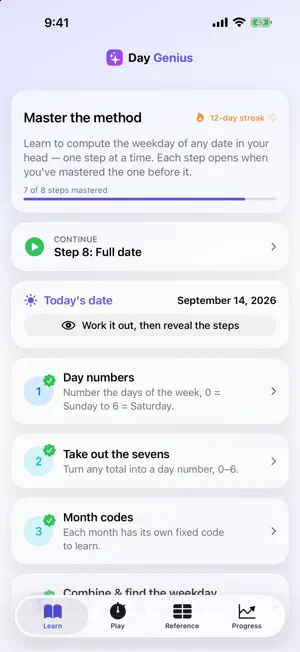
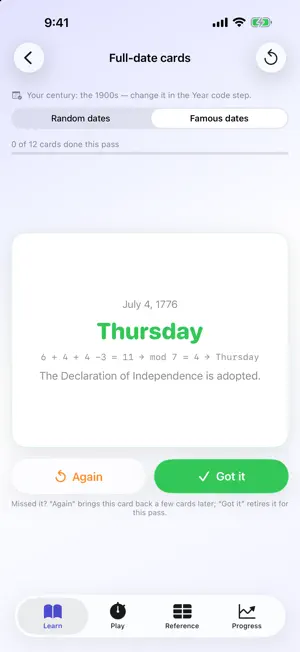
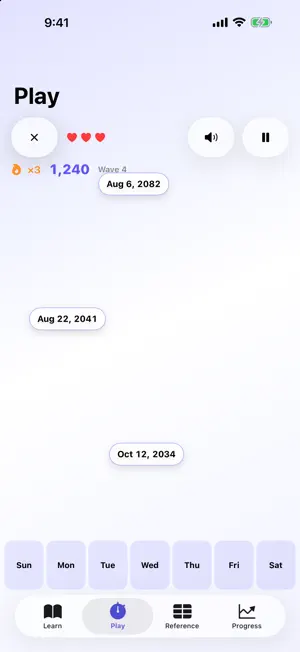
July 20, 1969? Sunday. July 4, 1776? Thursday. Your birthday? Work it out in your head, no calendar, no phone. It looks like a party trick. It's a method, and Day Genius teaches it one small step at a time. HOW IT WORKS Every month has a code. Add it to the day of the month and a code for the year, then take out the sevens. What's left is the weekday. 1. Day numbers — 0 = Sunday through 6 = Saturday 2. Take out the sevens — turn any total into a day number 3. Month codes — twelve values, each with a memory hook 4. Combine & find the weekday — your first real answer 5. Year code — turn any year into its code 6. Leap-year rule — a small fix for January and February 7. Century shift — any century, not just your own 8. Full date — everything together, on real dates Master a step with three drills at 90% or better and the next one opens. The first four steps are free; a one-time purchase, not a subscription, unlocks steps 5–8. THE MONTH CODES YOU ALREADY KNOW Learned month codes as January = 6? Keep them. The Month codes step offers the classic list (January = 0, the default) or the alternate list, every code one lower, with twelve memory hooks of its own. Year codes come matched, and every lesson, check, flashcard, drill, game, Reference table and widget follows your choice. Switch anytime. THREE WAYS TO PRACTICE Check yourself — untimed questions that show the reasoning, let you pick again, and record nothing. Flashcards — a deck for every step. Tap to flip, retire what sticks, and the rest come back around. Full date adds Famous dates: twelve dates from 1776 to 2001, with what happened on the back. Drills — timed and recorded, with no time limit: the path to mastery. DRILLS THAT FIND YOUR WEAK SPOTS Day Genius notices the months, years and centuries you miss or answer slowly, and mixes them back into later drills. Progress shows mastery, streak, speed trend and skill breakdown, plus a one-tap weak-spot drill and an optional daily reminder. TWO GAMES Speed Round — ten random dates against the clock, with a full breakdown afterward. Date Drop — dates fall, and you drag each into its weekday bucket before it lands. Catch them early for bonus points and in a row for combos. CORRECT BACK TO YEAR 1 Day Genius follows the calendar Britain and its colonies actually used. They skipped September 3–13, 1752, and before that every fourth year was a leap year, century years included. The Before 1752 bonus lesson shows how to work out older dates; countries that switched at other times can differ. An independent algorithm cross-checks the engine across thousands of dates. THE REFERENCE Every table behind the method, each opening as you master its step; tables for steps 5–8 also need the unlock. Check any date is open from the first launch: pick a date and it names the weekday. Unlock and master the Year code step, and it shows the full calculation too. Pick the 1900s or the 2000s as your home century, and the tables, examples and drills follow it. WIDGETS Date of the Day hands you a fresh date to solve, Code Cards keeps a code in front of you, and Practice Streak keeps the chain going. The last two fit the Lock Screen too. BUILT TO BE READ AND HEARD VoiceOver support throughout, and Dynamic Type including the accessibility sizes. With VoiceOver or Reduce Motion on, Date Drop switches to a calm, button-based mode: no falling, no dragging. FREE TO START, ONE PURCHASE FOR THE REST The first four steps are free, decks and checks included, and they're enough to find a weekday once you're given the year code. A one-time purchase, not a subscription, unlocks steps 5–8 and their decks, Famous dates included. Both games, the Before 1752 bonus lesson and the rest of the Reference open with it as you master the steps they use. PRIVATE BY DESIGN No account. No ads. No personal data collected. Your progress stays on your device, and purchases are handled by Apple.
What’s new
Version 1.2 · Updated September 15, 2026
Already know your month codes as January = 6? Day Genius now teaches from that list too. In the Month codes step, choose the classic list (January = 0, still the default) or the alternate list, every code one lower. Year codes match automatically, and every lesson, check question, flashcard, drill, game, Reference table and widget follows your choice. Switch anytime; the steps you've mastered stay mastered. ALSO NEW • Famous dates: a Full date flashcard deck of twelve dates from 1776 to 2001, with what happened on the back • Twelve memory hooks written for the alternate list • Where the codes come from, now a card of its own, plus a note on why two lists exist • A quick calendar check for any year code, and a dozens ladder for working year codes out in your head • New check questions (if July 4 is a Saturday, what day is Halloween?) and clearer wording in all eight steps REFINED • Drill and Speed Round answers now fit on screen without scrolling • Date Drop keeps every weekday bucket in view on smaller iPhones • Tidier iPad layouts • VoiceOver now reads the Leap year and Your own century tags on flashcards • Many corrections and clarifications across the lessons
App privacy
The developer, Craig Ricks, reported these privacy practices to Apple.
Data Not Collected
The developer does not collect any data from this app.
Alternatives to Day Genius
Looking for apps like Day Genius? Here are 6 similar apps on the App Store. The highest rated is Doomsday Practice (5.0/5), and all 6 are free to download.
-
 Doomsday Practice
5.0
Doomsday Practice
5.0
-
 Doomsday calculator memory
5.0
Doomsday calculator memory
5.0
-
 SparkStories: Kids Create
5.0
SparkStories: Kids Create
5.0
-
 Day of Week Pro
3.5
Day of Week Pro
3.5
-
 Ré nao Platform
-
 Doomsday Method | Mental Game
4.7
Doomsday Method | Mental Game
4.7
| App | Rating | Price | Last updated | Compare |
|---|---|---|---|---|
| Day Genius | 5.0 / 5 (1 rating) | Free | September 15, 2026 | |
| Doomsday Practice | 5.0 / 5 (1) | Free | Apr 27, 2026 | Compare |
| Doomsday calculator memory | 5.0 / 5 (1) | Free | Mar 9, 2025 | Compare |
| SparkStories: Kids Create | 5.0 / 5 (2) | Free | Oct 2, 2026 | Compare |
| Day of Week Pro | 3.5 / 5 (4) | Free | Jul 17, 2026 | Compare |
| Ré nao Platform | – | Free | Sep 14, 2026 | Compare |
| Doomsday Method | Mental Game | 4.7 / 5 (3) | Free | Sep 30, 2026 | Compare |
Compare Day Genius with the top alternatives: ratings, updates, ASO score and keyword gaps →