

ZIN Zine Maker
Daisaku Harasaki Photo & Video iPhoneiPadiPod touch
ZIN Zine Maker is a free Photo & Video app for iPhone and iPad by Daisaku Harasaki. Requires iOS 17.0. Updated October 6, 2026.
- Price
- Free
- on the App Store
- Size
- 2 MB
- Age 4+
- Updated
- Oct 6
- 2026 · v1.2
Screenshots


About ZIN Zine Maker
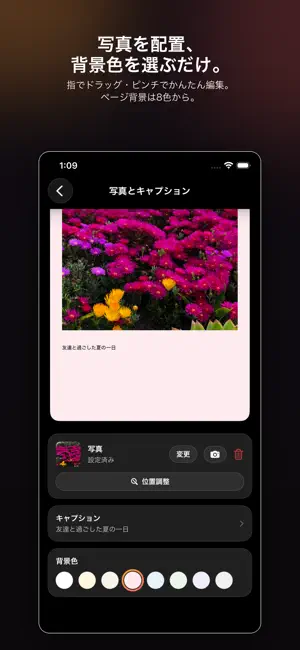
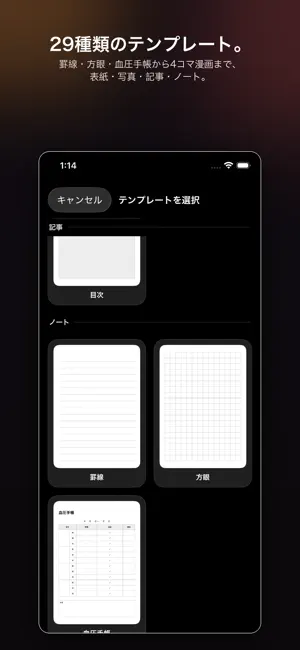
ZIN is a simple zine-making app. Drop your photos and text into templates, export a PDF, print it, fold it — and you have your own handmade booklet. Great for: - Making zines to sell or give away at doujinshi conventions and fan events - Turning travel or event photos into a photo book - Keeping a 4-panel comic diary - Logging everyday records like a blood pressure diary How it works: 1. Pick a page from 30+ templates — covers, photo grids, articles, manga panel layouts, scrapbook pages, ruled and graph notebook pages, a blood pressure log, table-top POP signs, back cover & colophon, and more 2. Add photos by shooting them on the spot or picking from your library. Drag to reposition, pinch to zoom 3. Choose a page background from 8 colors to set the mood 4. Export to PDF when you're done Print it as a real booklet: Export an A5 saddle-stitch booklet, imposed two-up on A4 sheets, with an adjustable gutter margin for the spine — right-bound layout is available for vertical-text works. Or just export plain A4 pages one at a time. A built-in print guide walks you through printing at a convenience store multi-copy machine, at home, or binding with paper and a stapler, plus guidance on how many pages you need and a warning if a photo's resolution is too low. Print it and fold it in half for a pocket-sized book. One-sheet zine: Turn a single sheet of A4 paper into an 8-page mini zine — print it, make a couple of cuts, and fold. The app shows you exactly where to cut and how to fold. Great for handouts or a zine-sized business card. Photo filters: Choose from three photo filters — mono, a rough photocopier look, and halftone dots — or apply mono to the whole book at once. Custom templates: Import your own drawings or scanned pages as JPG/PNG and combine them with the 30+ built-in layouts — use them as a background, layer them as a frame on top of a photo, or drop them in as a ready-made page. A transparent PNG works great as a frame that sits naturally over your photo. Perfect for a one-of-a-kind cover or decorative border. Manga panel layouts (generated): Generate manga panel layouts automatically. Set the number of tiers, the share of big panels, bleed, and border width, and each seed gives you a different layout — keep re-rolling like a gacha until you find one you like. Print it with the panels left empty and you have ready-to-use manuscript paper. Share your zine with a code: Publish a zine you made via iCloud and let others receive it with a 6-character share code or a QR code. Choose how long it stays available (30, 90, or 180 days), and take it down any time. A report feature lets people flag inappropriate content. Receiving needs no account (an iCloud sign-in is required). QR cards and back covers: New QR distribution cards and a back cover with a QR code make it easy to hand out your zine at events or point readers to your work. Table-top POP and price cards: New templates for table-top POP signs and price cards for your event booth. Scrapbook templates: Three new scrapbook-style templates with photos pinned like torn paper scraps. Auto-fill and auto-book: Pick several photos and they are placed into panels and grids automatically — portrait photos go into tall panels, landscape photos into wide ones. "Build from photos" assembles a whole zine from a batch of photos for you. Easier template picking: The template picker now has a "Recently used" row and a reordered list with comic templates first. Available in Japanese, English, and Traditional Chinese. Free, no ads, no account required. Only when you use the share feature, the PDF of the zine you choose is uploaded to iCloud (CloudKit) so that people who know the code can receive it. All other data stays on your device. Turn your memories, your daily log, or your own creative expression into a book with ZIN.
What’s new
Version 1.2 · Updated October 6, 2026
Added generated manga panel layouts: set tiers, big-panel ratio, bleed, and border width and roll as many layouts as you like from a seed — print it empty for manuscript paper. Added zine sharing: publish a zine via iCloud and let others receive it with a 6-character code or QR (30/90/180-day availability, take it down any time, report feature). Also new: QR distribution cards and a QR back cover, table-top POP and price cards, three scrapbook (paper-scrap) templates, and a "Recently used" row with a reordered template picker. Added an A4-portrait paper option for exports. Added auto-fill: pick several photos and they are placed into panels automatically (portrait photos into tall panels, landscape into wide ones). Also added auto-book: build a whole zine from a batch of photos.
App privacy
The developer, Daisaku Harasaki, reported these privacy practices to Apple.
Data Not Linked to You
The following data, which may be collected but is not linked to your identity, may be used for the following purposes:
- User Content: Photos or Videos, Other User Content
Used for: App Functionality
Alternatives to ZIN Zine Maker
Looking for apps like ZIN Zine Maker? Here are 6 similar apps on the App Store. The highest rated is Pleat — Photo Zines (5.0/5), and 4 of the 6 are free to download.
-
 Pleat — Photo Zines
5.0
Pleat — Photo Zines
5.0
-
 Emmi's Photo Studio
-
 PageTrue-Photobook Maker
-
 Sequence: Zines & Books
5.0
Sequence: Zines & Books
5.0
-
 Photo Compressor: Kompressor
-
 FilmArchive-Film Photography
| App | Rating | Price | Last updated | Compare |
|---|---|---|---|---|
| ZIN Zine Maker | – | Free | October 6, 2026 | |
| Pleat — Photo Zines | 5.0 / 5 (3) | Free | Sep 11, 2026 | Compare |
| Emmi's Photo Studio | – | Free | Aug 19, 2026 | Compare |
| PageTrue-Photobook Maker | – | Free | Sep 30, 2026 | Compare |
| Sequence: Zines & Books | 5.0 / 5 (2) | 2.99 USD | Aug 30, 2026 | Compare |
| Photo Compressor: Kompressor | – | 1.99 USD | Jul 22, 2026 | Compare |
| FilmArchive-Film Photography | – | Free | Sep 24, 2026 | Compare |
Compare ZIN Zine Maker with the top alternatives: ratings, updates, ASO score and keyword gaps →