

Shootzy AI: Photo Shoot Studio
Omer Faruk Aydin Photo & Video iPhoneiPadiPod touch
Shootzy AI: Photo Shoot Studio is a free Photo & Video app for iPhone and iPad by Omer Faruk Aydin. Requires iOS 15.1. Updated October 3, 2026.
- Price
- Free
- on the App Store
- Size
- 57 MB
- Age 4+
- Updated
- Oct 3
- 2026 · v1.2
Screenshots

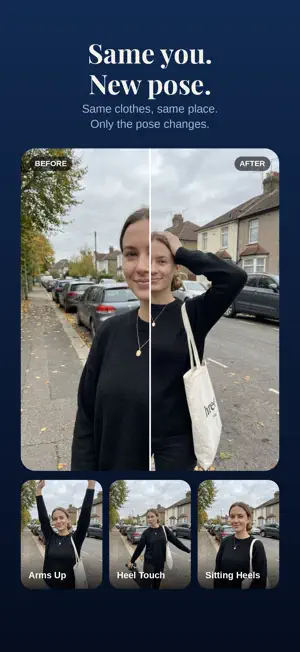


About Shootzy AI: Photo Shoot Studio
Shootzy AI gives you a photo shoot from the photos you already have. Choose a pose or a look, pick a photo, and the darkroom develops it in seconds. Same you, same clothes, same place: only the pose or the light changes. POSES Strike any pose without striking it. Choose one of 80 poses and Shootzy AI re-shoots you in it from a single photo. Every pose is drawn out on its card, so you know exactly what you get before you spend a credit. - Standing, sitting, laying and selfie poses - Same face, same outfit, same background, a brand new pose - Perfect for profile pictures, dating apps and social feeds LOOKS (AI FILTERS) Relight and restyle a photo with 12 curated looks, each shown as a real before and after example. - Light: True Light, Golden Hour, Sunset Flash, Night Flash - Film and retro: Editorial Film, Disposable, VHS Camcorder, Retro Nokia, CCTV - Background: Clean Background, City Evening - Editorial: Magazine Portrait HOW IT WORKS 1. Choose a pose or a look 2. Pick a photo from your library 3. Develop it in the darkroom and watch the before and after 4. Save it to your library or share it anywhere WHAT YOU GET - 80 poses and 12 looks, 15 credits each - A before and after preview for every develop - A private gallery of everything you have developed, backed up to your account - Works with selfies, portraits and everyday shots - Optional Sign in with Apple to keep your credits and gallery across devices CREDITS AND MEMBERSHIP Developing a photo uses 15 credits. Buy credit packs whenever you need them (they never expire), or join the Darkroom membership for 900 credits every month. The yearly plan is billed once a year and delivers the same 900 credits monthly. Unused monthly credits do not roll over. Payment is charged to your Apple ID account at confirmation of purchase. Subscriptions renew automatically unless cancelled at least 24 hours before the end of the current period, and can be managed or cancelled in your App Store account settings. Your photos stay yours: uploads are used only to develop your image, and results are visible only to you. Terms of Use: https://shootzyai.notion.site/Shootzy-AI-Terms-of-Use-3c43839511ed81fc9c28d5b672c8c2c4 Privacy Policy: https://shootzyai.notion.site/Shootzy-AI-Privacy-Policy-3c43839511ed810a835af78c816205cc
What’s new
Version 1.2 · Updated October 3, 2026
A simpler start: pick a pose or a look first, then your photo. The Poses and Studio tabs now open straight on their grids, and the separate Camera tab is gone, so there is one clear way to begin. Plus smaller fixes.
App privacy
The developer, Omer Faruk Aydin, reported these privacy practices to Apple.
Data Linked to You
The following data, which may be collected and linked to your identity, may be used for the following purposes:
- Usage Data: Product Interaction
- Purchases: Purchase History
- Contact Info: Email Address, Name
- User Content: Photos or Videos
- Identifiers: User ID
Used for: Analytics, App Functionality
Alternatives to Shootzy AI: Photo Shoot Studio
Looking for apps like Shootzy AI: Photo Shoot Studio? Here are 6 similar apps on the App Store. The highest rated is Hush Hush Snap Snap (5.0/5), and all 6 are free to download.
-
 Twinly: Front & Back Camera
-
 Scryer: Glitch Ritual
-
 Hush Hush Snap Snap
5.0
-
 PoseMe AI Camera
-
 PoseUp: Fix Your Pose
4.4
-
 ToonVibes: AI Cartoon Art
5.0
| App | Rating | Price | Last updated | Compare |
|---|---|---|---|---|
| Shootzy AI: Photo Shoot Studio | – | Free | October 3, 2026 | |
| Twinly: Front & Back Camera | – | Free | Oct 18, 2026 | Compare |
| Scryer: Glitch Ritual | – | Free | Jun 17, 2026 | Compare |
| Hush Hush Snap Snap | 5.0 / 5 (1) | Free | Oct 22, 2026 | Compare |
| PoseMe AI Camera | – | Free | Oct 15, 2026 | Compare |
| PoseUp: Fix Your Pose | 4.4 / 5 (5) | Free | Jul 2, 2026 | Compare |
| ToonVibes: AI Cartoon Art | 5.0 / 5 (4) | Free | May 9, 2025 | Compare |