

FileHaven File & Downloader
Mohamed Shafi Productivity iPhoneiPadiPod touch
FileHaven File & Downloader is a free Productivity app for iPhone and iPad by Mohamed Shafi. Requires iOS 18.0. Updated October 5, 2026.
- Price
- Free
- on the App Store
- Size
- 3 MB
- Age 4+
- Updated
- Oct 5
- 2026 · v1.0.1
Screenshots


About FileHaven File & Downloader
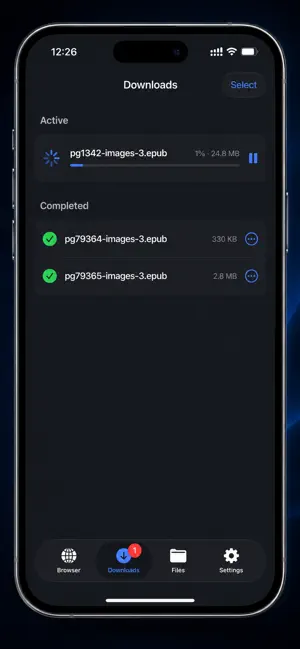
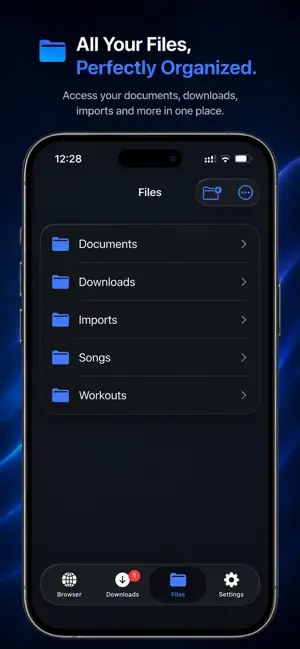
Filehaven is a web browser and a file manager in one app, built for people who actually keep the things they find. Browse the web with a fast, uncluttered browser: tabs, bookmarks, history, and a private mode that records nothing. When you tap a link to a document, an image, a song, a video, or an archive, Filehaven notices and offers to save it — no copying URLs into other apps, no detours. Saved files land in your own library on your device, where you can organize them the way you think: create folders, rename, move, sort by name, date, or size, and preview PDFs, photos, audio, and video without leaving the app. When you want a file somewhere else, hand it off to any other app through the share sheet, or reach it from the iOS Files app. And when the file belongs on your computer, switch on Wi-Fi Transfer and open the address Filehaven shows in any browser on the same network — your files are right there, no cable and no cloud account in between. **A browser that respects you** - Tabs, bookmarks, history, and a private mode that leaves no trail - Choose your search engine: DuckDuckGo, Google, Bing, or Ecosia - Clean neomorphic design in matched light and dark looks **Downloads that finish** - Automatic detection of downloadable links — PDFs, documents, music, video, images, archives - Live progress with pause, resume, retry, and cancel - Downloads keep going in the background and complete while you do something else - Files shared into Filehaven from other apps land in your library too **A real file manager** - Folders you create, rename, move, and delete - Sort by name, date, or size - Built-in preview for PDFs, images, audio, and video - Share out to any app, and full iOS Files app integration - Storage overview so you always know what's taking up space **Wi-Fi Transfer** - Move files between your device and a computer with nothing but a browser — no cable, no cloud account, no extra software - Turn it on in Settings, scan the QR code or type the address, enter the 6-digit PIN - Browse and download your files from the computer for free; sending files back to the device is Filehaven Pro - The page can only browse, download, and upload — it can never delete or rename anything on your device - Stays on your local network, and switches itself off when you leave the app **Private by design** - No account, no sign-up, no tracking - No analytics SDKs and no advertising - Your files and browsing data stay on your device - Face ID or passcode lock for your Files area (Filehaven Pro) **Filehaven Pro** — a single, one-time purchase, no subscription. Pro unlocks Face ID locking for your files, Wi-Fi Transfer uploads, unlimited simultaneous downloads, and manual light/dark theme control. The browser, downloads, the file manager, and Wi-Fi Transfer downloads are free to use. Filehaven is for downloading and managing content you have the right to access. It does not capture or record streaming media.
What’s new
Version 1.0.1 · Updated October 5, 2026
Fixes and polish across the app. Downloads • A failed download can now be removed: tap ••• on the row, or swipe left on any active download to cancel it • Retry picks up where a broken download stopped instead of starting over • Select, Move, and Delete work while music is playing • Renaming, moving, or deleting a file in Files keeps the Downloads list in step Browser • Pages that fail to load now tell you why instead of showing a blank screen • Website pop-up questions (OK / Cancel) now appear Player • Play restarts a song that has finished • Playback resumes after a phone call • The 1.25× speed is labelled correctly Privacy and security • Face ID lock now covers the Downloads tab, and turning the lock off asks for Face ID • Wi-Fi Transfer is stricter about who can send files, and stays off if you have been away for more than a few minutes
App privacy
The developer, Mohamed Shafi, reported these privacy practices to Apple.
Data Not Collected
The developer does not collect any data from this app.
Alternatives to FileHaven File & Downloader
Looking for apps like FileHaven File & Downloader? Here are 6 similar apps on the App Store. The highest rated is Foxl - AI agent runs 24/7 (5.0/5), and all 6 are free to download.
-
 All video saver - Browser
-
 Jurat Mobile
-
 NodeSketch: Draw and Mind Map
-
 Auto Tap Browser
-
 Private Messenger Hub
-
 Foxl - AI agent runs 24/7
5.0
Foxl - AI agent runs 24/7
5.0
| App | Rating | Price | Last updated | Compare |
|---|---|---|---|---|
| FileHaven File & Downloader | – | Free | October 5, 2026 | |
| All video saver - Browser | – | Free | Aug 26, 2026 | Compare |
| Jurat Mobile | – | Free | Sep 28, 2026 | Compare |
| NodeSketch: Draw and Mind Map | – | Free | Oct 2, 2026 | Compare |
| Auto Tap Browser | – | Free | Sep 15, 2026 | Compare |
| Private Messenger Hub | – | Free | Oct 16, 2026 | Compare |
| Foxl - AI agent runs 24/7 | 5.0 / 5 (1) | Free | Oct 20, 2026 | Compare |