

CoolGuard
Norbert Pentek Utilities iPhoneiPadiPod touch
CoolGuard is a free Utilities app for iPhone and iPad by Norbert Pentek. Rated 4.7/5 from 3 ratings. Requires iOS 17.0. Updated September 16, 2026.
- Rating
- 4.7
- 3 ratings
- Price
- Free
- on the App Store
- Size
- 7 MB
- Age 4+
- Updated
- Sep 16
- 2026 · v1.3.1
Screenshots


About CoolGuard
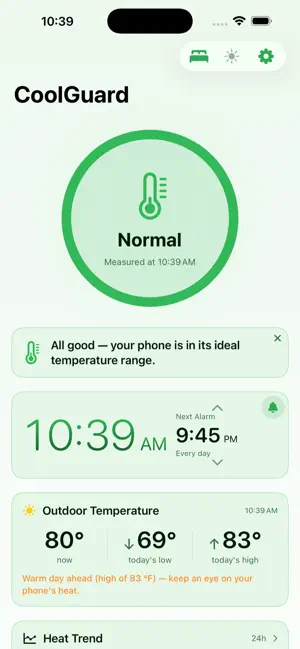
CoolGuard keeps an eye on your phone's heat — and at night, it's the clock on your nightstand. A hot iPhone runs slower, its battery ages faster, and in summer it heats up within moments in the sun or while gaming, navigating, or charging. CoolGuard shows you where your phone stands on a four-level scale (Normal, Slightly Warm, Hot, Critical), warns you in time, and tells you what to do. HEAT MONITORING • Live heat level on the main screen, with a color-coded ring and a quick tip • Heat Trend: 1-hour and 24-hour curves in a banded or clean style — drag your finger to read the details • Heat Log with calendar and map: when and where your phone got hot • Alerts from the level you choose: push notifications, sound alerts, quiet hours • Monitor Mode: background monitoring, with a Live Activity on the Lock Screen and in the Dynamic Island • Cooling tips and a carefully curated selection of active coolers NIGHT CLOCK AND ALARM • Sleep Mode: dark screen with just the clock and the outdoor temperature — three sizes, your choice of color • Alarms: up to 10, repeating daily; on iOS 26 and later they ring through the system alarm, even when your phone is silenced • Landscape view: big clock, swipeable alarm bar, brightness slider • Burn-in protection: slow pixel drift and dimming to keep your display safe • 12- or 24-hour clock, with seconds if you like WEATHER • Outdoor temperature, with today's and tomorrow's highs and lows • Weather face in the ring: the sun and moon travel around it from sunrise to sunset • A warning on dangerously hot days WIDGET • Small: thermometer, weather, battery level, clock • Medium: adds the heat trend curve and the date • Works on the Lock Screen, too BATTERY • Battery Health and cycle count, compared month by month with your phone's heat MORE • 50 languages, Celsius or Fahrenheit • Private by design: no ads, no analytics, no accounts — your Heat Log never leaves your phone • Free — you can support development with a tip Note: iOS doesn't expose exact temperatures to apps — CoolGuard shows Apple's four official thermal levels.
What’s new
Version 1.3.1 · Updated September 16, 2026
Alarm fix • Fixed: an alarm you never stopped — for example when an alarm in the Clock app set for the same minute covered it — could go off again at midnight. The alarm now gets its own full-screen view with a Stop button, the app closes an unstopped alarm on its own after 5 minutes, and the Alarms screen reminds you not to set an alarm for the same time in another app. What's new in 1.3: • Sleep Mode: dark screen with just the clock and the outdoor temperature — size and color in Settings. In landscape, the clock sits in the center, the temperature and the next alarm in the corners, with a vertical brightness slider • Alarms on the landscape clock tile: up to 10, with daily repeat, ringing through the system alarm — even when your phone is on silent • Keep Awake with a brightness slider on the nightstand; if the phone gets warm, it pauses on its own • Burn-in protection: slow pixel drift and dimming while the screen stays awake • Sun and moon around the ring: shows where the day stands, from sunrise to sunset • Landscape orientation on the main screen: the ring on the left, the tiles on the right, plus a clock tile • Weather tile: current temperature, today's low and high — tap the ring to see tomorrow's too • The advice tile can be dismissed — the heat level indicator then moves next to the ring • New widget in two layouts: thermometer, weather, battery, clock — the medium size adds the heat trend and the date • Heat Trend in two styles: Banded or Clean • 12- or 24-hour clock, with seconds if you like • Send Feedback with a single tap, by email • Proofread translations in all 50 languages Thanks for your feedback — it's shaping the app!
App privacy
The developer, Norbert Pentek, reported these privacy practices to Apple.
Data Not Collected
The developer does not collect any data from this app.
Alternatives to CoolGuard
Looking for apps like CoolGuard? Here are 6 similar apps on the App Store. The highest rated is Sabja - Device Thermal Monitor (5.0/5), and all 6 are free to download.
-
 Sabja - Device Thermal Monitor
5.0
Sabja - Device Thermal Monitor
5.0
-
 HeatCheck - Overheat Monitor
-
 Clear Up: Phone Space Cleaner
5.0
Clear Up: Phone Space Cleaner
5.0
-
 Battery Tracker: Phone Battery
-
 Phone Temperature Checker
5.0
Phone Temperature Checker
5.0
-
 Device Monitor & Diagnostics +
4.3
Device Monitor & Diagnostics +
4.3
| App | Rating | Price | Last updated | Compare |
|---|---|---|---|---|
| CoolGuard | 4.7 / 5 (3 ratings) | Free | September 16, 2026 | |
| Sabja - Device Thermal Monitor | 5.0 / 5 (1) | Free | Oct 23, 2026 | Compare |
| HeatCheck - Overheat Monitor | – | Free | Sep 3, 2026 | Compare |
| Clear Up: Phone Space Cleaner | 5.0 / 5 (4) | Free | Oct 20, 2026 | Compare |
| Battery Tracker: Phone Battery | – | Free | Sep 22, 2026 | Compare |
| Phone Temperature Checker | 5.0 / 5 (4) | Free | Oct 9, 2026 | Compare |
| Device Monitor & Diagnostics + | 4.3 / 5 (3) | Free | May 29, 2026 | Compare |
Compare CoolGuard with the top alternatives: ratings, updates, ASO score and keyword gaps →