

Plumb: Tower Stack
ARRON PAUL CHELMO Games iPhoneiPadiPod touch
Plumb: Tower Stack is a free Games app for iPhone and iPad by ARRON PAUL CHELMO. Rated 5.0/5 from 1 ratings. Requires iOS 17.0. Updated September 21, 2026.
- Rating
- 5.0
- 1 ratings
- Price
- Free
- on the App Store
- Size
- 8 MB
- Age 12+
- Updated
- Sep 21
- 2026 · v1.1
Screenshots



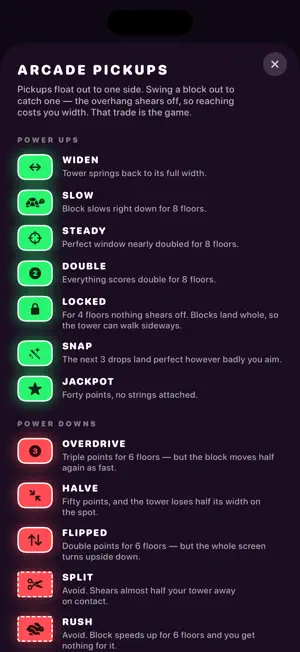
About Plumb: Tower Stack
Tap to drop. The block above slides back and forth — let go at the wrong moment and the overhang shears away, and your tower gets narrower. Land it dead centre and you get that width back. That is the whole game. It takes five seconds to understand and a long time to be good at. THREE MODES NORMAL — just the tower. Every miss costs you width, every perfect drop hands some back, and the block speeds up the higher you climb. Sooner or later it outruns you. ARCADE — pickups hang out to the sides. Swing a block wide to catch a Widen, a Slow, a double-points streak. Reaching one costs you width, so every pickup is a decision rather than a gift. Some of them bite: Overdrive triples your score and makes the block fly, Flipped turns the screen upside down. And a few you steer around entirely. GRAVITY — nothing is trimmed. Every block lands whole, in whatever width you are dealt, and the tower leans according to where the weight sits. Stack too much to one side and it goes over. A narrow block placed off-centre is a counterweight; a wide one is ballast you have to think about. WHAT IS IN IT - One tap. No buttons, no menus to learn. - Plays offline, on a plane, anywhere. - No account, no sign-up — just open it and play. - A separate high score for each mode. - Its own sound for every drop, trim, and perfect landing — or play it silent, your call. - Colorblind-friendly colors, VoiceOver, and Reduce Motion support. - Share your run as a card that draws the tower you actually built. - Optional one-off purchase removes the ads for good. Built for iPhone and iPad.
What’s new
Version 1.1 · Updated September 21, 2026
Sound! Every drop, trim, and perfect landing now has its own sound — mute it anytime from the new Settings screen. Near misses now get called out — a drop that just grazes the perfect window gets its own "SO CLOSE" instead of looking like an ordinary miss. How to Play now shows real gameplay for whichever mode you've got selected, not a wall of text. Colorblind-friendly colors in Arcade and Gravity, plus support for VoiceOver, larger text sizes, and Reduce Motion. A new Settings screen: mute sound or haptics independently, and restore a purchase without digging through the game-over screen.
App privacy
The developer, ARRON PAUL CHELMO, reported these privacy practices to Apple.
Data Used to Track You
The following data may be used to track you across apps and websites owned by other companies:
- Location: Coarse Location
- Identifiers: Device ID
- Usage Data: Product Interaction, Advertising Data
- Diagnostics: Performance Data
Data Not Linked to You
The following data, which may be collected but is not linked to your identity, may be used for the following purposes:
- Location: Coarse Location
- Identifiers: Device ID
- Usage Data: Product Interaction, Advertising Data
- Diagnostics: Performance Data, Crash Data
Used for: Third-Party Advertising, Analytics, App Functionality
Alternatives to Plumb: Tower Stack
Looking for apps like Plumb: Tower Stack? Here are 6 similar apps on the App Store.
-
 Stretch Cubes 3D
-
 Circle Traffic Car
-
 Aquapark Jam - Puzzle Game
-
 Patisserie Sort
-
 Category Flow: Card Connect
-
 Lane Stack
| App | Rating | Price | Last updated | Compare |
|---|---|---|---|---|
| Plumb: Tower Stack | 5.0 / 5 (1 rating) | Free | September 21, 2026 | |
| Stretch Cubes 3D | – | Free | Oct 1, 2026 | Compare |
| Circle Traffic Car | – | Free | Jul 28, 2026 | Compare |
| Aquapark Jam - Puzzle Game | – | Free | Aug 26, 2026 | Compare |
| Patisserie Sort | – | Free | Jul 14, 2026 | Compare |
| Category Flow: Card Connect | – | Free | Aug 20, 2026 | Compare |
| Lane Stack | – | Free | Aug 24, 2026 | Compare |
Compare Plumb: Tower Stack with the top alternatives: ratings, updates, ASO score and keyword gaps →