

Scano PDF
Luis Enrique Gil Moya Productivity iPhoneiPadiPod touch
Scano PDF is a free Productivity app for iPhone and iPad by Luis Enrique Gil Moya. Rated 5.0/5 from 1 ratings. Requires iOS 15.1. Updated October 12, 2026.
- Rating
- 5.0
- 1 ratings
- Price
- Free
- on the App Store
- Size
- 72 MB
- Age 4+
- Updated
- Oct 12
- 2026 · v1.0.2
Screenshots



About Scano PDF
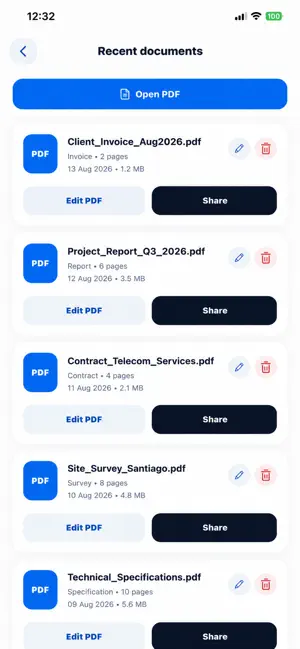
Scano is a simple and powerful document scanner designed to help you digitize, organize, edit, and share documents directly from your iPhone or iPad. Scan documents in seconds with automatic page detection and perspective correction. Review and edit your pages, organize them in the right order, and create clean PDF documents ready to save or share. KEY FEATURES • Smart document scanning • Automatic page detection • Perspective correction • Multi-page document scanning • Crop and rotate pages • Reorder or remove pages • Create PDF documents • Merge multiple PDF files • Split PDF files into separate documents • Rename and organize your files • View recent documents • Share PDFs directly from your device • English and Spanish support SIMPLE AND FAST Scano is designed to keep document scanning and PDF management straightforward. Open the scanner, capture your pages, review them, and create your PDF in just a few steps. PDF TOOLS Need to organize existing documents? Scano lets you merge multiple PDFs into one file or split a PDF into separate documents, giving you more control over your files directly from your device. YOUR DOCUMENTS, YOUR DEVICE Manage your scanned documents conveniently from Scano and access your recent files whenever you need them. Whether you’re scanning receipts, contracts, notes, forms, reports, or everyday paperwork, Scano gives you the essential tools to turn paper into organized digital documents and manage your PDFs with ease.
What’s new
Version 1.0.2 · Updated October 12, 2026
Improved document detection and scanning accuracy. General performance and stability improvements.
App privacy
The developer, Luis Enrique Gil Moya, reported these privacy practices to Apple.
Data Used to Track You
The following data may be used to track you across apps and websites owned by other companies:
- Identifiers: Device ID
- Usage Data: Product Interaction, Advertising Data
Data Linked to You
The following data, which may be collected and linked to your identity, may be used for the following purposes:
- Location: Coarse Location
- Identifiers: Device ID
- Usage Data: Product Interaction, Advertising Data
Used for: Third-Party Advertising, Analytics
Data Not Linked to You
The following data, which may be collected but is not linked to your identity, may be used for the following purposes:
- Diagnostics: Crash Data, Performance Data
Used for: Analytics, App Functionality
Alternatives to Scano PDF
Looking for apps like Scano PDF? Here are 6 similar apps on the App Store. The highest rated is SnapToPDF - PDF Scanner (5.0/5), and all 6 are free to download.
-
 SnapToPDF - PDF Scanner
5.0
-
 Vesta Home 5 US
-
 Cam Scanner, Editor & Reader ·
5.0
-
 Hughes LEO
5.0
-
 Dokia: PDF Scanner & Sign
5.0
-
 Scan to Excel
3.5
| App | Rating | Price | Last updated | Compare |
|---|---|---|---|---|
| Scano PDF | 5.0 / 5 (1 rating) | Free | October 12, 2026 | |
| SnapToPDF - PDF Scanner | 5.0 / 5 (1) | Free | Mar 11, 2026 | Compare |
| Vesta Home 5 US | – | Free | Oct 21, 2026 | Compare |
| Cam Scanner, Editor & Reader · | 5.0 / 5 (1) | Free | Oct 18, 2026 | Compare |
| Hughes LEO | 5.0 / 5 (7) | Free | Jul 16, 2026 | Compare |
| Dokia: PDF Scanner & Sign | 5.0 / 5 (2) | Free | Oct 1, 2026 | Compare |
| Scan to Excel | 3.5 / 5 (13) | Free | Jul 14, 2025 | Compare |
Compare Scano PDF with the top alternatives: ratings, updates, ASO score and keyword gaps →