

SplitFree: Expense Splitting
DEVESH AGGARWAL Finance iPhoneiPadiPod touch
SplitFree: Expense Splitting is a free Finance app for iPhone and iPad by DEVESH AGGARWAL. Rated 5.0/5 from 1 ratings. Requires iOS 18.0.
- Rating
- 5.0
- 1 ratings
- Price
- Free
- on the App Store
- Size
- 5 MB
- Age 4+
- Updated
- Sep 1
- 2026 · v1.0.6
Screenshots



About SplitFree: Expense Splitting
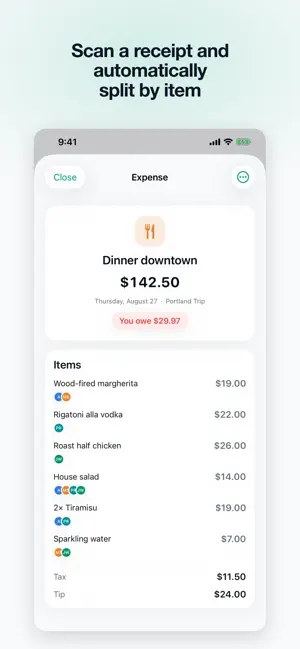
Whether it's a week away, a shared flat, or dinner with the same four people every Friday, SplitFree tracks who paid for what and helps settle up in the fewest payments. SplitFree is completely free. It has zero ads or in-app purchases, has no sign-up, and works both offline and online. Keep a group to yourself, or share it with a code and everyone adds expenses together. SplitFree works in a variety of situations: - Priya paid for the taxi, but Sam threw in $8 toward it. Fine. - The bill came in euros and you'd rather settle in pounds. Handled. - Dan skipped the wine everyone else shared. One tap. - The flat's rent splits three ways, but Alex has the bigger room. Give them a larger share. Everything it does: (+) A clean, quick interface that stays out of the way. (+) Share a group with a code, no sign-up needed. (+) Works completely offline. (+) Six ways to split: equally, exact amounts, percentages, shares, plus and minus adjustments, or line by line off the receipt. (+) Point the camera at a receipt and SplitFree reads the items off it. (+) Over 150 currencies, converted automatically, with the rate stored per expense so old expenses never change value. (+) Handles the complicated ones, like several people paying for the same bill or one person covering an uneven share. (+) Settles everyone in as few payments as possible instead of a tangle of small ones. (+) See what a group has spent in total, by month, by category and by person. (+) Recurring expenses for rent, bills and subscriptions. (+) Import a bank or card CSV, and export everything as CSV whenever you like. (+) Search that reaches into notes, line items and scanned receipts. (+) Settle up in full or in part, then hand off to Venmo, PayPal, Cash App or UPI. (+) iCloud sync across your own devices. (+) Light and dark, Dynamic Type, VoiceOver, and an optional Face ID lock. (+) Nine languages. All features are completely free, and SplitFree is open source. If you would like to support it, please consider rating the app.
What’s new
Version 1.0.6 · Updated September 1, 2026
Nothing new in the app itself this time, just clearer screenshots on the App Store.
App privacy
The developer, DEVESH AGGARWAL, reported these privacy practices to Apple.
Data Linked to You
The following data, which may be collected and linked to your identity, may be used for the following purposes:
- User Content: Other User Content
- Identifiers: User ID
Used for: App Functionality
Alternatives to SplitFree: Expense Splitting
Looking for apps like SplitFree: Expense Splitting? Here are 6 similar apps on the App Store. The highest rated is Split Equal Expense Tracker (5.0/5), and all 6 are free to download.
-
 Split Equal Expense Tracker
5.0
-
 Trip Cost - Simplify Expense
-
 SplitPay - Bill Splitter App
-
 Split Bill: Split Payments App
-
 Spendaily: Daily Budget
4.0
-
 Nepsense
3.3
| App | Rating | Price | Last updated | Compare |
|---|---|---|---|---|
| SplitFree: Expense Splitting | 5.0 / 5 (1 rating) | Free | September 1, 2026 | |
| Split Equal Expense Tracker | 5.0 / 5 (1) | Free | Oct 15, 2026 | Compare |
| Trip Cost - Simplify Expense | – | Free | Oct 15, 2024 | Compare |
| SplitPay - Bill Splitter App | – | Free | Sep 28, 2026 | Compare |
| Split Bill: Split Payments App | – | Free | Oct 4, 2026 | Compare |
| Spendaily: Daily Budget | 4.0 / 5 (2) | Free | Oct 17, 2026 | Compare |
| Nepsense | 3.3 / 5 (7) | Free | Oct 10, 2026 | Compare |