

SignalFind: Bluetooth Finder
MohammadAli Kadiwala Utilities iPhoneiPadiPod touch
SignalFind: Bluetooth Finder is a free Utilities app for iPhone and iPad by MohammadAli Kadiwala. Requires iOS 17.0. Updated August 22, 2026.
- Price
- Free
- on the App Store
- Size
- 11 MB
- Age 4+
- Updated
- Aug 22
- 2026 · v1.0.1
Screenshots


About SignalFind: Bluetooth Finder
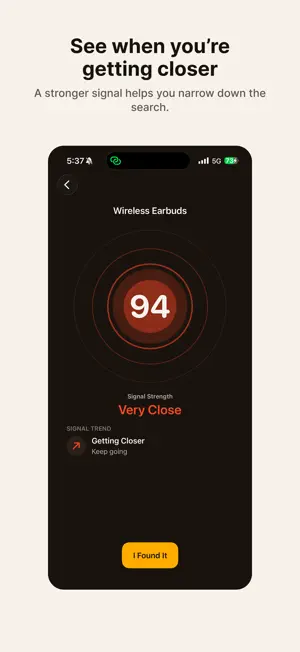
Lost your headphones or earbuds somewhere nearby? SignalFind helps you search for compatible Bluetooth devices using the signal they are already broadcasting. Scan nearby devices for free. Choose the device you recognize, then use Finder for live signal guidance as you move around. HOW IT WORKS: 1. Scan nearby Bluetooth devices. 2. Select the device you want to find. 3. Move around and watch the signal change. 4. Use getting-closer/moving-away guidance and haptics to narrow down the search. FIND WITH THE SIGNAL: SignalFind follows relative Bluetooth signal strength. A stronger signal generally means you are closer to the selected device, while trend guidance helps you see whether your search is moving in the right direction. HAPTIC GUIDANCE: You don't have to keep staring at the screen. Haptics respond as the signal changes so you can keep looking around while you search. SIMPLE BY DESIGN: - Free nearby-device scanning - Live signal-strength Finder - Getting-closer / moving-away guidance - Haptic feedback while searching - No account or sign-in - One-time lifetime unlock - No subscription SignalFind Lifetime unlocks the full Finder experience with one non-consumable in-app purchase. IMPORTANT: SignalFind is designed for nearby Bluetooth searches. It does not use GPS, Apple's Find My network, or UWB, and it does not provide an exact location, exact distance, or direction. A device must be compatible, within Bluetooth range, and actively broadcasting a discoverable signal to appear. Some accessories may stop broadcasting while powered off, asleep, out of battery, connected in certain states, or inside a charging case.
What’s new
Version 1.0.1 · Updated August 22, 2026
Minor improvements and refinements for a smoother SignalFind experience.
App privacy
The developer, MohammadAli Kadiwala, reported these privacy practices to Apple.
Data Not Linked to You
The following data, which may be collected but is not linked to your identity, may be used for the following purposes:
- Purchases: Purchase History
- Identifiers: Device ID
- Usage Data: Product Interaction, Other Usage Data
- Diagnostics: Crash Data, Other Diagnostic Data
Used for: Analytics, App Functionality
Alternatives to SignalFind: Bluetooth Finder
Looking for apps like SignalFind: Bluetooth Finder? Here are 6 similar apps on the App Store. The highest rated is Signal Watch Guard (5.0/5), and all 6 are free to download.
-
 Find Air tag & Device Tracker
-
 Beacon Scout
-
 Signal Watch Guard
5.0
-
 SigScan: Signal Radar
5.0
-
 StarFish BLE Connect
-
 Halo - Social Media Control
5.0
| App | Rating | Price | Last updated | Compare |
|---|---|---|---|---|
| SignalFind: Bluetooth Finder | – | Free | August 22, 2026 | |
| Find Air tag & Device Tracker | – | Free | Sep 23, 2026 | Compare |
| Beacon Scout | – | Free | Oct 14, 2026 | Compare |
| Signal Watch Guard | 5.0 / 5 (1) | Free | Sep 19, 2026 | Compare |
| SigScan: Signal Radar | 5.0 / 5 (1) | Free | Oct 20, 2026 | Compare |
| StarFish BLE Connect | – | Free | Apr 20, 2026 | Compare |
| Halo - Social Media Control | 5.0 / 5 (10) | Free | Oct 23, 2026 | Compare |