

Flower: Expense Tracker
Zhiwen Huang Finance iPhoneiPadiPod touch
Flower: Expense Tracker is a free Finance app for iPhone and iPad by Zhiwen Huang. Requires iOS 18.0. Updated October 20, 2026.
- Price
- Free
- on the App Store
- Size
- 140 MB
- Age 4+
- Updated
- Oct 20
- 2026 · v1.5.3
Screenshots

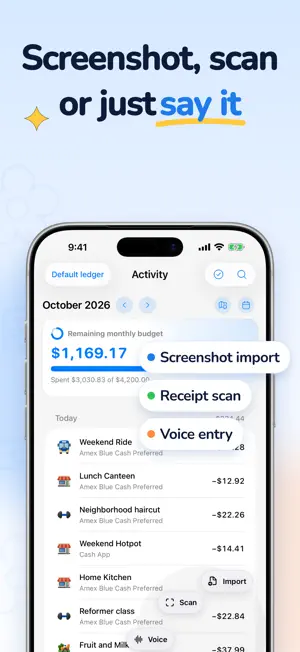


About Flower: Expense Tracker
Flower brings your expenses, budgets, and wallets together in a personal space. Keep everyday records clear, then revisit the places and moments behind the numbers. RECORD YOUR WAY Add expenses and income, organize categories and subcategories, and attach photos or places. Review CSV/XLSX records before importing them; with Flower Plus you can also scan receipts, read payment screenshots, or record by voice. Suggestions based on your own history help with familiar purchases. MULTIPLE LEDGERS, A CLEARER VIEW Flower Plus lets you create additional ledgers for different purposes, each with a name and a Flower library icon. Switch between one ledger and all ledgers; records, maps, statistics, and recaps follow your selection. Wallet and account balances belong to you across all ledgers. SEE WHERE YOU SPENT Explore saved locations on your Spending Map, from familiar streets to places visited further afield. Search for a place and look through records nearby. Photos and locations are free to add, and this week’s map is free to view. REMEMBER YOUR MONTH A completed month becomes a Monthly recap with photos, places, spending patterns, and changes. Explore your monthly imprint and revisit a Story with a few words to remember the month by. Every finished month also becomes a page in your Flower yearbook. Turn through the year like a book: each day’s photos sit on a calendar, days without photos are shaded by what you spent, and a map marks the new and familiar areas you visited. When something you buy becomes a habit, Flower notices. Your profile shows each spending habit’s rhythm, its usual places, and about how much it costs in a usual month. Records with similar names can be merged into one. Your first month’s recap and yearbook page are free, and basic weekly, monthly, and yearly statistics remain free. ORGANIZE YOUR MONEY Bring cash, bank accounts, credit accounts, and multi-currency wallets together. Track transfers, recurring items, split expenses, and repayment records. Investment accounts are for keeping your own records. PLAN AND PERSONALIZE Set an overall budget or a separate budget for each saved ledger and see what remains. Choose Card Holder styles, arrange embossings, and give categories a little personality with miniature, felt, and other icon collections. FLOWER PLUS Flower Plus lets you create additional ledgers; add reimbursement details, installment schedules, or discounts to records; record refunds; add transfer fees; and create or extend shared credit accounts. Shared credit groups cards under one limit while keeping each card’s debt separate. Other benefits include receipt and screenshot scanning, voice entry, split and multi-currency records, private iCloud sync, full-ledger PDF/CSV export, historical Spending Maps, every month’s recap and yearbook page, spending habits and places, hidden balances, account archiving, and expanded asset and Card Holder capacity. Some appearances are sold separately. See the in-app offer for current plans and included features. If a subscription expires, your saved data stays. You can keep using saved ledgers, record in active ones, rename or archive them, correct or remove saved premium details, receive reimbursements, and stop existing installment plans. Due installments from existing plans continue to create records. You can correct saved transfer fees and shared limits, remove cards from a shared group, or record repayments. Recorded refunds and archived accounts stay, and balance hiding can be turned off at any time. Creating new paid configurations requires Flower Plus. Settings → Feature display controls which tools are shown. It does not unlock paid features. A locked action opens Flower Plus; a verified purchase or restore returns you to that action. Cancelling keeps your draft. Terms of Use (EULA): https://www.apple.com/legal/internet-services/itunes/dev/stdeula/
What’s new
Version 1.5.3 · Updated October 20, 2026
• Clearer category icons: icons on Activity are larger, and many category icons in every icon style have been redrawn to read clearly at a small size. • Fewer look-alikes: categories that shared one picture, such as books, running, hearts, shoes and coffee, now have icons of their own, and the icon list shows each choice once. • Appearance → Category icons → Customize icons: see every category's icon in one place, search by ledger or name, and change its icon, category color or background.
App privacy
The developer, Zhiwen Huang, reported these privacy practices to Apple.
Data Linked to You
The following data, which may be collected and linked to your identity, may be used for the following purposes:
- Identifiers: Device ID
- Financial Info: Other Financial Info
- Search History: Search History
- Usage Data: Other Usage Data
- Diagnostics: Other Diagnostic Data
- Other Data: Other Data Types
Used for: Analytics, App Functionality
Data Not Linked to You
The following data, which may be collected but is not linked to your identity, may be used for the following purposes:
- Purchases: Purchase History
- Location: Coarse Location
- Usage Data: Product Interaction
Used for: Analytics, App Functionality
Alternatives to Flower: Expense Tracker
Looking for apps like Flower: Expense Tracker? Here are 6 similar apps on the App Store. The highest rated is Smart Ledger: One-Line Budget (5.0/5), and all 6 are free to download.
-
 Orvia: Smart Money Tracker
1.0
Orvia: Smart Money Tracker
1.0
-
 Smart Ledger: One-Line Budget
5.0
Smart Ledger: One-Line Budget
5.0
-
 WishMoney: Expense Tracker
-
 飞飞记账
5.0
飞飞记账
5.0
-
 PiggyLedger - Money Manager
5.0
PiggyLedger - Money Manager
5.0
-
 清记 - 懒人必备的AI记账神器
| App | Rating | Price | Last updated | Compare |
|---|---|---|---|---|
| Flower: Expense Tracker | – | Free | October 20, 2026 | |
| Orvia: Smart Money Tracker | 1.0 / 5 (1) | Free | Sep 19, 2026 | Compare |
| Smart Ledger: One-Line Budget | 5.0 / 5 (1) | Free | Oct 21, 2026 | Compare |
| WishMoney: Expense Tracker | – | Free | Oct 20, 2026 | Compare |
| 飞飞记账 | 5.0 / 5 (1) | Free | Sep 21, 2026 | Compare |
| PiggyLedger - Money Manager | 5.0 / 5 (5) | Free | Oct 21, 2026 | Compare |
| 清记 - 懒人必备的AI记账神器 | – | Free | Aug 18, 2026 | Compare |