

MIDI Controller - Ctrlly
明航 李 Utilities iPhoneiPadiPod touch
MIDI Controller - Ctrlly is a free Utilities app for iPhone and iPad by 明航 李. Requires iOS 17.0. Updated September 3, 2026.
- Price
- Free
- on the App Store
- Size
- 20 MB
- Age 4+
- Updated
- Sep 3
- 2026 · v1.0
Screenshots


About MIDI Controller - Ctrlly
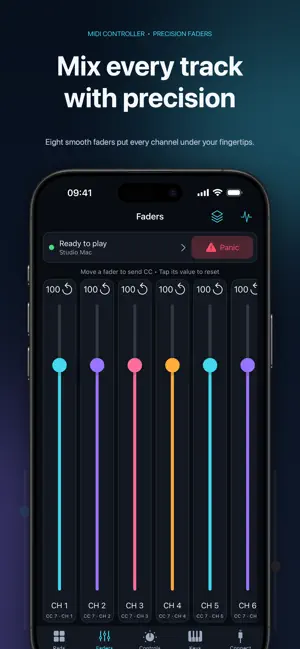
Turn your iPhone or iPad into a portable MIDI controller for Mac. MIDI Controller - Ctrlly sends standard MIDI messages to GarageBand, Logic Pro, and other MIDI-compatible music apps on your Mac. Play software instruments, trigger pads, and control assignable parameters without buying an additional MIDI controller. MAIN FEATURES • 4×4 multitouch pads Customize MIDI channel, note, velocity, and label. • 8 faders Send MIDI CC with precise 0–127 values and configurable ranges. • Knobs and buttons Use 8 knobs and 8 buttons. Buttons support momentary and toggle modes and can send CC or Program Change messages. • Touch keyboard Play with multiple fingers and use octave controls, Pitch Bend, and Modulation. • Custom presets Save, rename, duplicate, and delete your MIDI mappings. Presets stay on your device, and no account is required. • Connect to Mac Use Apple Network MIDI or Bluetooth MIDI. Choose an output destination, send a test note, and follow the built-in Mac setup guide. • MIDI Monitor See recently sent notes, CC, Program Change, and Pitch Bend messages to quickly check your connection and mappings. • Panic Immediately release active notes and send All Notes Off if a note becomes stuck. FREE FEATURES Connection management, the Bluetooth MIDI entry point, the Mac setup guide, test notes, MIDI Monitor, purchase restoration, and Panic are free to use. MIDI CONTROLLER PRO Sending performance MIDI from the pads, faders, knobs, buttons, and keyboard, as well as editing mappings and managing presets, requires a MIDI Controller Pro subscription. Weekly and annual subscriptions are available. Prices and currency are shown in the App Store. No free trial is offered. Payment is charged to your Apple ID account when you confirm your purchase. The subscription renews automatically unless canceled at least 24 hours before the end of the current period. You can manage or cancel it at any time in your Apple ID subscription settings. BEFORE YOU START This app does not produce sound. You need a Mac running GarageBand, Logic Pro, or another MIDI-compatible app to hear your software instrument. This version is designed for Mac. It does not promise support for Windows, external MIDI hardware, MPE, SysEx, sequencing, recording, or project-level two-way DAW control. This app uses Apple's standard Terms of Use (EULA): https://www.apple.com/legal/internet-services/itunes/dev/stdeula/
App privacy
The developer, 明航 李, reported these privacy practices to Apple.
Data Not Linked to You
The following data, which may be collected but is not linked to your identity, may be used for the following purposes:
- Purchases: Purchase History
- Location: Coarse Location
- Identifiers: Device ID
- Usage Data: Product Interaction, Advertising Data
- Diagnostics: Other Diagnostic Data
Used for: Analytics, App Functionality
Alternatives to MIDI Controller - Ctrlly
Looking for apps like MIDI Controller - Ctrlly? Here are 6 similar apps on the App Store.
-
 OsiMIDI Consoles Remote
-
 instant PLAYER · Soundboard
-
 Sound Meter: dB SPL Veltora
-
 OSC Deck
-
 Screen Test: Display & Touch
-
 ProdCom
| App | Rating | Price | Last updated | Compare |
|---|---|---|---|---|
| MIDI Controller - Ctrlly | – | Free | September 3, 2026 | |
| OsiMIDI Consoles Remote | – | Free | Jan 10, 2026 | Compare |
| instant PLAYER · Soundboard | – | Free | Jun 15, 2026 | Compare |
| Sound Meter: dB SPL Veltora | – | Free | Oct 27, 2026 | Compare |
| OSC Deck | – | Free | Mar 26, 2026 | Compare |
| Screen Test: Display & Touch | – | Free | Aug 18, 2026 | Compare |
| ProdCom | – | Free | Oct 3, 2026 | Compare |