

SlowPebble: AI Website Blocker
Tarek Sebaihi Productivity iPhoneiPadiPod touch
SlowPebble: AI Website Blocker is a free Productivity app for iPhone and iPad by Tarek Sebaihi. Rated 5.0/5 from 3 ratings. Requires iOS 18.0.
- Rating
- 5.0
- 3 ratings
- Price
- Free
- on the App Store
- Size
- 6 MB
- Age 4+
- Updated
- Oct 22
- 2026 · v1.2
Screenshots


About SlowPebble: AI Website Blocker
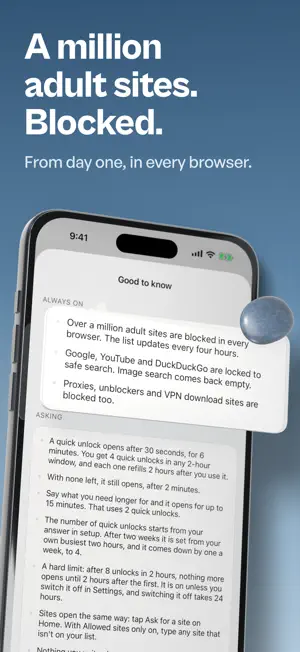
The blocker you never have to turn off. Other blockers are opt-out: Instagram is open, and you block it for a while. Slowpebble is opt-in: Instagram is blocked, and you ask when you need a few minutes. That is why you never have to turn it off. WHAT IT BLOCKS • Apps you pick with Apple's Screen Time picker • Over a million adult sites, blocked from the moment you turn Slowpebble on, with no switch to put them back • Whole lists for social media, dating, betting, streaming, gaming, shopping, news and free movie sites, one switch each • Any site you add yourself NEED SOMETHING? ASK. Say what you need it for, in a sentence. An AI reads it privately. It never sees which app or site it is, only what kind, and nothing you type is kept. What you write doesn't change the wait: a quick unlock opens after 30 seconds, for 6 minutes. You get a few of them in any 2 hours, set from your own use, and with none left it still opens, after 2 minutes. Need longer? Say what for and it opens for up to 15 minutes, for two quick unlocks. Once every 3 days an emergency unlock opens right now. A hard limit closes the window after a set number of unlocks in 2 hours, and you can switch it off. Adult content never gets a yes. YOUR OWN PATTERN The Unlocks page draws your week: how many, which days, the hours it happens in, and what it was for. It stays on your phone, and you can clear it. TURNING IT OFF TAKES 24 HOURS Adding anything is instant. Taking something off your list for good, or turning Slowpebble off, takes 24 hours, and nothing makes it sooner. The app shows the exact time it will happen, and you can cancel before then. There is no override and no support address that can rush it. We built ourselves out of the loop on purpose. PEBBLES Every milestone gets you a pebble: a day, three days, a week, two weeks, and on up to a year. Switching Slowpebble off in Settings to get around it loses every pebble and raises the wait to unlock: a minute, then 2, then 5. Seven blocked days bring it back to 30 seconds. SAFE SEARCH, ON IOS 26 AND LATER Google, YouTube and DuckDuckGo stop showing adult results in every browser and app. A switch on the Sites page empties Google's picture results too. You switch it on once in Settings. Switching it off raises the wait to unlock, the same as above, until it has been back on for 7 days. WHAT WE DON'T SEE No account and no sign-in. Slowpebble never records which sites you open or which apps you launch, so there is no history to leak or sell. Your settings stay on your phone and in your own iCloud. Slowpebble needs Screen Time permission, which you allow once during setup. The first 14 days are free, with nothing to buy. After that, asking for access and adding new apps and sites need a plan. Everything you already blocked stays blocked either way. Slowpebble offers auto-renewable subscriptions, billed monthly or yearly. Payment is charged to your Apple Account. A subscription renews automatically unless it is cancelled at least 24 hours before the current period ends. Manage or cancel it in your App Store account settings. Terms of Use: https://www.apple.com/legal/internet-services/itunes/dev/stdeula/ Privacy Policy: https://slowpebble.com/privacy
What’s new
Version 1.2 · Updated October 22, 2026
Say what you need a site for and answer one question: it opens after 5 seconds, for as long as the task needs. Google image search is now a switch on the Sites page. The Unlocks page names the site. Reddit's pictures-and-videos option now covers its video and GIF hosts.
App privacy
The developer, Tarek Sebaihi, reported these privacy practices to Apple.
Data Linked to You
The following data, which may be collected and linked to your identity, may be used for the following purposes:
- Purchases: Purchase History
- Identifiers: Device ID
- Other Data: Other Data Types
Used for: App Functionality
Data Not Linked to You
The following data, which may be collected but is not linked to your identity, may be used for the following purposes:
- Usage Data: Product Interaction
- User Content: Other User Content
Used for: Analytics, App Functionality
Alternatives to SlowPebble: AI Website Blocker
Looking for apps like SlowPebble: AI Website Blocker? Here are 6 similar apps on the App Store. The highest rated is Sisyphus: Web Blocker (5.0/5), and all 6 are free to download.
-
 Clank: Screen Time Blocker
-
 Sisyphus: Web Blocker
5.0
Sisyphus: Web Blocker
5.0
-
 Song: Journal & Tasks
-
 Camera Note Taker
-
 Website Blocker: Focus & Block
-
 Website Blocker
4.2
Website Blocker
4.2
| App | Rating | Price | Last updated | Compare |
|---|---|---|---|---|
| SlowPebble: AI Website Blocker | 5.0 / 5 (3 ratings) | Free | October 22, 2026 | |
| Clank: Screen Time Blocker | – | Free | Sep 25, 2026 | Compare |
| Sisyphus: Web Blocker | 5.0 / 5 (5) | Free | Aug 13, 2026 | Compare |
| Song: Journal & Tasks | – | Free | Sep 25, 2026 | Compare |
| Camera Note Taker | – | Free | Feb 26, 2026 | Compare |
| Website Blocker: Focus & Block | – | Free | Mar 23, 2026 | Compare |
| Website Blocker | 4.2 / 5 (24) | Free | Mar 12, 2026 | Compare |