

Overtrace: AR Drawing & Sketch
CHENG QIAO Graphics & Design iPhoneiPadiPod touch
Overtrace: AR Drawing & Sketch is a free Graphics & Design app for iPhone and iPad by CHENG QIAO. Rated 5.0/5 from 1 ratings. Requires iOS 17.0.
- Rating
- 5.0
- 1 ratings
- Price
- Free
- on the App Store
- Size
- 5 MB
- Age 4+
- Updated
- Oct 18
- 2026 · v1.3.1
Screenshots
About Overtrace: AR Drawing & Sketch
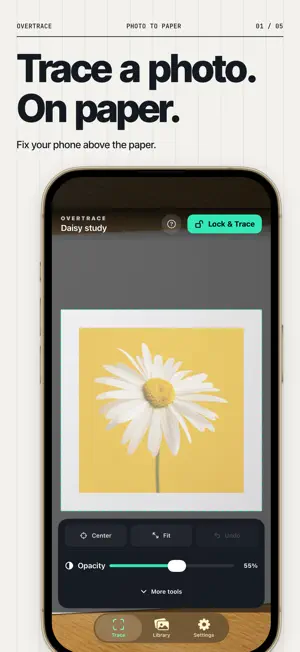
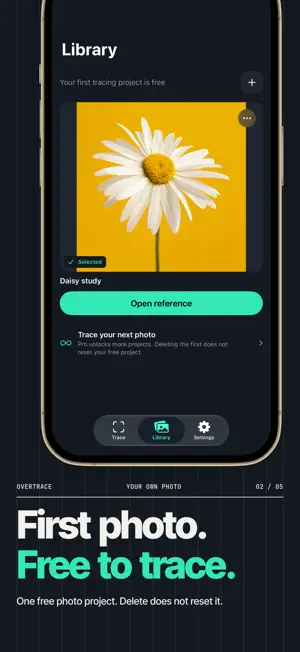
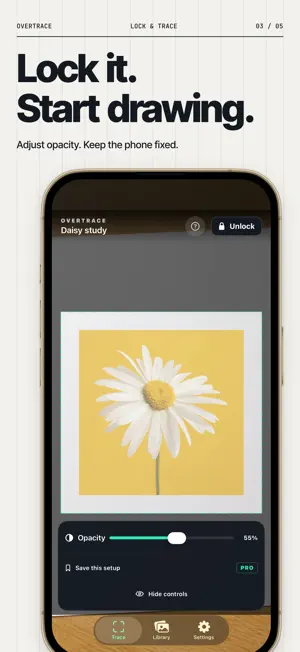
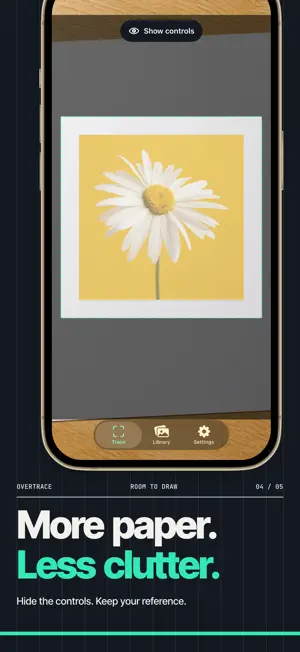
Use your own photo as a transparent guide over the live camera view, line it up with real paper, lock the overlay, and start drawing. HOW OVERTRACE WORKS • Choose a photo from your library or take a new reference photo. • Fix your iPhone in place above the paper and start the camera when you are ready. • Move, pinch and rotate the reference until it lines up with the page. • Use Center, Fit or one-step Undo to recover an alignment change. • Adjust opacity, lock the reference, and trace while the phone and paper stay still. YOUR FIRST TRACING PROJECT IS FREE • Start your first photo project with the complete camera-overlay tracing workflow for free. • Return to that same free project while its reference remains in your library. There is no timer. • Starting another photo project requires Pro. Deleting your free reference does not restore the free opportunity. • Move, scale, rotate, Center, Fit, Undo, Lock, opacity and all five paper guides remain free for your free project. • No ads and no account required. Existing users retain their previous free-access terms. OVERTRACE PRO Weekly, monthly, annual and lifetime options unlock the same Pro features: start additional photo projects; save and resume each reference's digital placement/scale/rotation, opacity, lock and enhancement state; keep unlimited reference projects; and use Contrast, Grayscale and Invert. Weekly, monthly and annual plans renew automatically until canceled in your Apple Account; Lifetime is a one-time purchase. PRIVATE BY DESIGN Overtrace has no account, no ads and no analytics SDK. Your saved reference library stays in the app's local storage. Network access may still be used by Apple services for purchases, restores, or downloading a photo that is stored in iCloud. IMPORTANT SETUP NOTE Overtrace shows the reference on your iPhone screen over the camera view. It does not project light onto the paper and it does not world-anchor the image. Keep the phone and paper fixed; if either moves, realign the reference on screen. Designed for iPhone. Terms of Use (EULA): https://www.apple.com/legal/internet-services/itunes/dev/stdeula/ Privacy Policy: https://chengai1106.github.io/overtrace-legal/privacy.html
What’s new
Version 1.3.1 · Updated October 18, 2026
Your first tracing project is free. Pro unlocks additional photo projects, and all four plans are now shown together. Existing users keep their previous free-access terms.
App privacy
The developer, CHENG QIAO, reported these privacy practices to Apple.
Data Not Collected
The developer does not collect any data from this app.
Alternatives to Overtrace: AR Drawing & Sketch
Looking for apps like Overtrace: AR Drawing & Sketch? Here are 6 similar apps on the App Store. The highest rated is TraceOverlay: AR Tracing (5.0/5), and all 6 are free to download.
-
 TraceOverlay: AR Tracing
5.0
TraceOverlay: AR Tracing
5.0
-
 TraceCam: Sketch Overlay
-
 Drawluma: AR Drawing & Sketch
4.8
Drawluma: AR Drawing & Sketch
4.8
-
 PaperVision - AR Draw & Trace
-
 Drawing Projector: AR Trace
2.0
Drawing Projector: AR Trace
2.0
-
 Tracer: Trace Drawing Camera
4.6
Tracer: Trace Drawing Camera
4.6
| App | Rating | Price | Last updated | Compare |
|---|---|---|---|---|
| Overtrace: AR Drawing & Sketch | 5.0 / 5 (1 rating) | Free | October 18, 2026 | |
| TraceOverlay: AR Tracing | 5.0 / 5 (1) | Free | Oct 10, 2026 | Compare |
| TraceCam: Sketch Overlay | – | Free | Sep 15, 2026 | Compare |
| Drawluma: AR Drawing & Sketch | 4.8 / 5 (6) | Free | Oct 15, 2026 | Compare |
| PaperVision - AR Draw & Trace | – | Free | Oct 27, 2026 | Compare |
| Drawing Projector: AR Trace | 2.0 / 5 (1) | Free | Oct 29, 2026 | Compare |
| Tracer: Trace Drawing Camera | 4.6 / 5 (111) | Free | Oct 26, 2026 | Compare |