

WayFinder: Visual Assistant
Elizabeth Tahirova Utilities iPhoneiPadiPod touch
WayFinder: Visual Assistant is a free Utilities app for iPhone and iPad by Elizabeth Tahirova. Requires iOS 16.0. Updated August 28, 2026.
- Price
- Free
- on the App Store
- Size
- 26 MB
- Age 12+
- Updated
- Aug 28
- 2026 · v3.1.0
Screenshots

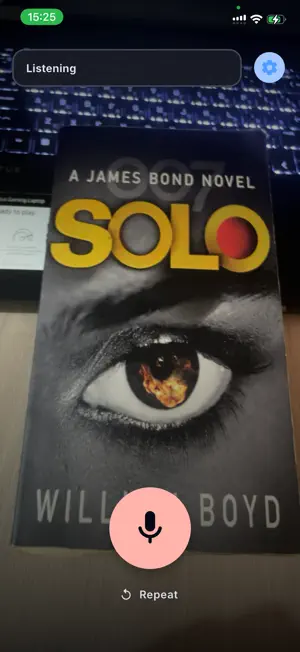


About WayFinder: Visual Assistant
WayFinder is a voice-first visual assistant for blind and low-vision people. Press the microphone, ask a question aloud, and WayFinder takes one photo and speaks an AI-generated description. Ask about objects, text, colors, or the general scene in front of the camera. HOW IT WORKS • Sign in with Apple, with Google, or with an email address and password. Nothing else is asked of you. • Press the microphone to speak. That is the only way WayFinder listens — there is no wake word and no background listening. • You choose whether to send camera images for third-party AI processing. Until you agree, no image is sent. You can change the decision in Settings. • Each request uses one still photo. WayFinder does not record video. • Speech recognition runs on the iPhone. Raw microphone audio is not sent to WayFinder. • Answers and important status messages are spoken aloud. Controls have VoiceOver labels, large touch targets, and scalable text. SAFETY LIMITS AI can miss, misidentify, or misread things. If WayFinder cannot produce a sufficiently grounded answer, or if the camera, network, account, server, or AI provider fails, it tells you to stop instead of presenting the failure as a clear path. WayFinder is assistive information only. It is not a mobility aid or a medical device. It does not replace a white cane, guide dog, your own judgment, or orientation-and-mobility training. Never rely on it to decide whether to step or cross. USAGE LIMIT Each authenticated account receives exactly 25 lifetime successful vision analyses. Request 26 and later is refused before any AI request is made. There is no subscription, payment, purchase, upgrade, or quota reset. PRIVACY AND CONTROL The requested photo is sent over an encrypted connection to the WayFinder server and processed by a Google Gemini model on Google Cloud Vertex AI. WayFinder does not store the raw image. Questions, answers, and any answer report you submit are retained for up to 30 days for history and service operation. You can erase history or delete your account in the app. LANGUAGES The interface and spoken flow support English and Russian.
App privacy
The developer, Elizabeth Tahirova, reported these privacy practices to Apple.
Data Linked to You
The following data, which may be collected and linked to your identity, may be used for the following purposes:
- Contact Info: Email Address, Name
- User Content: Photos or Videos, Other User Content
- Identifiers: User ID
- Usage Data: Product Interaction
Used for: App Functionality
Data Not Linked to You
The following data, which may be collected but is not linked to your identity, may be used for the following purposes:
- Identifiers: Device ID
Used for: App Functionality
Alternatives to WayFinder: Visual Assistant
Looking for apps like WayFinder: Visual Assistant? Here are 6 similar apps on the App Store. The highest rated is See For Me AI (5.0/5), and all 6 are free to download.
-
 See For Me AI
5.0
-
 HearNear
-
 Nusoft Ticket
-
 JustSee Vision
-
 Phoice - Text to Speech
4.0
-
 TermAI: SSH Client & Terminal
| App | Rating | Price | Last updated | Compare |
|---|---|---|---|---|
| WayFinder: Visual Assistant | – | Free | August 28, 2026 | |
| See For Me AI | 5.0 / 5 (1) | Free | Apr 23, 2026 | Compare |
| HearNear | – | Free | May 7, 2025 | Compare |
| Nusoft Ticket | – | Free | Nov 21, 2025 | Compare |
| JustSee Vision | – | Free | Sep 19, 2026 | Compare |
| Phoice - Text to Speech | 4.0 / 5 (2) | Free | Jul 8, 2026 | Compare |
| TermAI: SSH Client & Terminal | – | Free | Oct 9, 2026 | Compare |