

PhotoBorder: White EXIF Frame
伟 孙 Photo & Video iPhoneiPadiPod touchMac
PhotoBorder: White EXIF Frame is a free Photo & Video app for iPhone and iPad by 伟 孙. Requires iOS 16.0. Updated October 30, 2026.
- Price
- Free
- on the App Store
- Size
- 6 MB
- Age 4+
- Updated
- Oct 30
- 2026 · v1.0.8
Screenshots



About PhotoBorder: White EXIF Frame
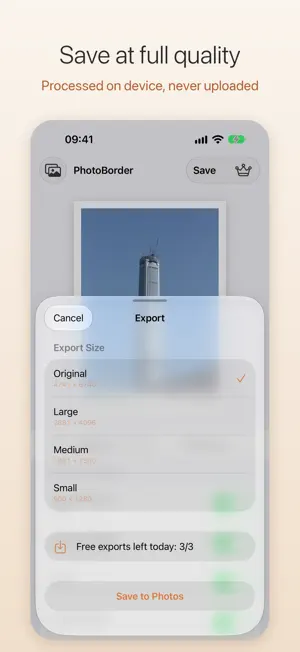
Give your photos a clean white border and print the shooting details underneath, so every shot looks like a finished print. IPHONE, IPAD & MAC • One app for iPhone, iPad and Mac: download it once and use it on all three • Frame shots on your iPhone as you take them; check the details and batch export on the bigger screen of your iPad or Mac • On Mac: a wide window, a side settings panel and keyboard shortcuts (⌘= / ⌘- to zoom, ⌘0 for 100%, ⌘, for Settings) • Buy Pro once and it works on iPhone, iPad and Mac with the same Apple Account, no need to buy again • Templates sync via iCloud: save one on your iPhone and use it right away on your iPad and Mac; deletions sync too • Only template settings are synced, your photos are never uploaded • Available in 12 languages, and you can switch the app language in Settings CAMERA • See the border and live shooting info in the viewfinder, then shoot with the border already on • Switch between 0.5×, 1×, 2× and telephoto zoom • Pick a filter in the viewfinder and see it live FILTERS • 11 film-style filters: Sunlit, Crisp, Soft, Portrait Film, Vivid Slide, Faded, Teal & Orange, Airy, Golden Hour, Documentary and Moody • Adjust the strength, and add film grain and a vignette • Filters are saved in templates and sync via iCloud, so a whole batch gets the same look INSTANT STYLE & TEMPLATES • Instant style: cream paper, a recessed photo edge and handwritten text, with adjustable paper color and grain • 20+ fonts: handwritten, sans serif, serif and monospaced, each previewed in its own style • Save your favorite settings as templates and apply them in one tap WHITE BORDERS • Canvas ratios: Original, 1:1, 4:5, 3:4, 2:3, 9:16, 4:3, 3:2, 16:9 • Adjust border width and the height of the bottom area • Border color: handy presets or the color picker (HEX supported) • Double border: add a thin inner border for extra depth SHOOTING INFO • Reads EXIF automatically: camera brand, model, lens, focal length, aperture, shutter speed, ISO, date and location • Turn on only what you want; aperture, shutter speed and ISO are shown by default • Left & right or centered layout, with adjustable text color • Location is off by default to protect your privacy • Presets: Default (aperture, shutter speed, ISO), Show All or Hide All • Custom text: add a place, signature or caption on its own line, aligned left, center or right • Three text sizes: smaller, standard and larger • Photos without EXIF (like screenshots) hide the info line automatically LIGHT ADJUSTMENTS (PRO) • Live histogram: drag left or right on it to adjust that tonal range • Exposure, contrast, highlights, shadows, whites and blacks • Auto Clarity in three strengths, with the values shown on the sliders for fine-tuning PREVIEW & SAVE • Live preview as you adjust • Export at Original, Large, Medium or Small size • Exported photos keep their EXIF; GPS is kept only when Location is turned on • Zoom in and out of the preview to check details • Save as JPEG or HEIC • Add photos from a folder or drag them in, and save to Photos or a folder • Keeps the original color space, such as Display P3 PRIVACY • Everything happens on your device; photos are never uploaded • The app only sees the photo you pick and only asks to add photos when saving FREE & PRO • Free: 3 exports per day • Pro (monthly, yearly or a one-time lifetime purchase): unlimited exports • Pro also batch exports with a template, up to 50 photos at once • Pro also saves photos with light adjustments • Monthly and yearly plans start with a 7-day free trial for new subscribers; you are charged only when the trial ends, and cancelling during the trial costs nothing • Subscriptions renew automatically unless cancelled at least 24 hours before the end of the current period. Manage or cancel them in your App Store account settings. Terms of Use: https://www.apple.com/legal/internet-services/itunes/dev/stdeula/ Privacy Policy: https://nicerhythm.net/PhotoBorder/privacy/
What’s new
Version 1.0.8 · Updated October 30, 2026
PhotoBorder now speaks Arabic, bringing it to 12 languages. The Arabic interface is laid out right to left. The app follows your system language, or you can pick a different one in Settings.
App privacy
The developer, 伟 孙, reported these privacy practices to Apple.
Data Not Collected
The developer does not collect any data from this app.
Alternatives to PhotoBorder: White EXIF Frame
Looking for apps like PhotoBorder: White EXIF Frame? Here are 6 similar apps on the App Store.


| App | Rating | Price | Last updated | Compare |
|---|---|---|---|---|
| PhotoBorder: White EXIF Frame | – | Free | October 30, 2026 | |
| Borderz | – | Free | Oct 10, 2026 | Compare |
| FrameR | – | Free | Jul 28, 2026 | Compare |
| LucidFrame | – | Free | May 11, 2026 | Compare |
| EXIF Frame Editor: Shotcard | – | Free | Oct 18, 2026 | Compare |
| Color Splash X | – | Free | Nov 23, 2023 | Compare |
| Spatial Collage - Photo Maker | – | Free | Jan 7, 2025 | Compare |